sickn33/agentic-awesome-skills / plugins/aasb-aas-mobile-app-builder/skills/hig-components-system
hig-components-system
VerifiedApple HIG guidance for system experience components: widgets, live activities, notifications, complications, home screen quick actions, top shelf, watch faces, app clips, and app shortcuts.
| File | Kind | Size |
|---|---|---|
| SKILL.md | skill md | 6.8 KB |
| references/app-clips.md | markdown | 41.4 KB |
| references/app-shortcuts.md | markdown | 14.2 KB |
| references/complications.md | markdown | 38.9 KB |
| references/home-screen-quick-actions.md | markdown | 5.2 KB |
| references/live-activities.md | markdown | 43.5 KB |
| references/notifications.md | markdown | 18.8 KB |
| references/top-shelf.md | markdown | 13.0 KB |
| references/watch-faces.md | markdown | 5.4 KB |
| references/widgets.md | markdown | 55.7 KB |
references/watch-faces.md
View on GitHub---
title: "Watch faces | Apple Developer Documentation"
source: https://developer.apple.com/design/human-interface-guidelines/watch-faces
---
# Watch faces
> Imported Apple HIG reference snapshot, with local review corrections. Source attribution is retained; this is not an official Apple skill or a guarantee of current API availability. Confirm target OS/SDK, device capabilities and current linked developer documentation before implementation. Dimension tables are design references, not fixed layout contracts. No Apple app, device or entitlement validation was performed.
A watch face is a view that people choose as their primary view in watchOS.
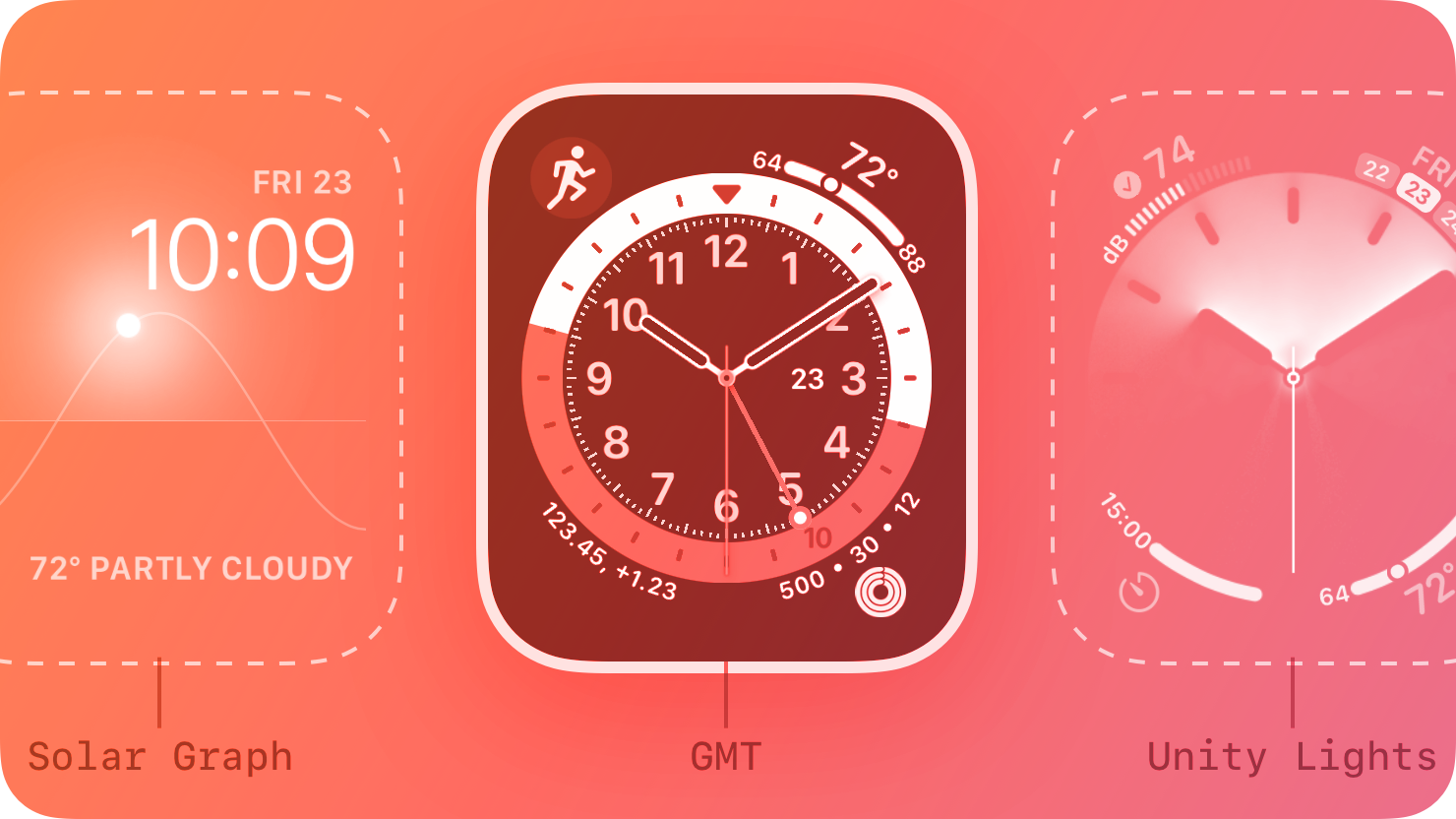
The watch face is at the heart of the watchOS experience. People choose a watch face they want to see every time they raise their wrist, and they customize it with their favorite complications. People can even customize different watch faces for different activities, so they can switch to the watch face that fits their current context.
In watchOS 7 and later, people can share the watch faces they configure. For example, a fitness instructor might configure a watch face to share with their students by choosing the Gradient watch face, customizing the color, and adding their favorite health and fitness complications. When the students add the shared watch face to their Apple Watch or the Watch app on their iPhone, they get a custom experience without having to configure it themselves.
You can also configure a watch face to share from within your app, on your website, or through Messages, Mail, or social media. Offering shareable watch faces can help you introduce more people to your complications and your app.
## [Best practices](https://developer.apple.com/design/human-interface-guidelines/watch-faces#Best-practices)
**Help people discover your app by sharing watch faces that feature your complications.** Ideally, you support multiple complications so that you can showcase them in a shareable watch face and provide a curated experience. For some watch faces, you can also specify a system accent color, images, or styles. If people add your watch face but haven’t installed your app, the system prompts them to install it.
**Display a preview of each watch face you share.** Displaying a preview that highlights the advantages of your watch face can help people visualize its benefits. You can get a preview by using the iOS Watch app to email the watch face to yourself. The preview includes an illustrated device bezel that frames the face and is suitable for display on websites and in watchOS and iOS apps. Alternatively, you can replace the illustrated bezel with a high-fidelity hardware bezel that you can download from [Apple Design Resources](https://developer.apple.com/design/resources/#product-bezels) and composite onto the preview. For developer guidance, see [Sharing an Apple Watch face](https://developer.apple.com/documentation/ClockKit/sharing-an-apple-watch-face).
**Aim to offer shareable watch faces for all Apple Watch devices.** Some watch faces are available on Series 4 and later — such as California, Chronograph Pro, Gradient, Infograph, Infograph Modular, Meridian, Modular Compact, and Solar Dial — and Explorer is available on Series 3 (with cellular) and later. If you use one of these faces in your configuration, consider offering a similar configuration using a face that’s available on Series 3 and earlier. To help people make a choice, you can clearly label each shareable watch face with the devices it supports.
**Respond gracefully if people choose an incompatible watch face.** The system sends your app an error when people try to use an incompatible watch face on Series 3 or earlier. In this scenario, consider immediately offering an alternative configuration that uses a compatible face instead of displaying an error. Along with the previews you provide, help people understand that they might receive an alternative watch face if they choose a face that isn’t compatible with their Apple Watch.
## [Platform considerations](https://developer.apple.com/design/human-interface-guidelines/watch-faces#Platform-considerations)
_Not supported in iOS, iPadOS, macOS, tvOS, or visionOS._
## [Resources](https://developer.apple.com/design/human-interface-guidelines/watch-faces#Resources)
#### [Related](https://developer.apple.com/design/human-interface-guidelines/watch-faces#Related)
[Apple Design Resources — Product Bezels](https://developer.apple.com/design/resources/#product-bezels)
#### [Developer documentation](https://developer.apple.com/design/human-interface-guidelines/watch-faces#Developer-documentation)
[Sharing an Apple Watch face](https://developer.apple.com/documentation/ClockKit/sharing-an-apple-watch-face) — ClockKit
## Scope of face sharing
Sharing a configuration for an existing Apple watch face is different from shipping an arbitrary third-party face renderer. Historical Series 3/4 examples above are not a current hardware support matrix. Check the actual watchOS version, face availability, complication families and sharing API errors on supported target devices; avoid promising automatic app installation or lossless configuration across models.
Related skills
| Skill | Stars | Updated | Works with | Status | Install |
|---|---|---|---|---|---|
| brainstormingobra/superpowersYou MUST use this before any creative work - creating features, building components, adding functionality, modifying behavior, or planning anything new, in software or out of it (a talk, a business, a renovation). | Stars: 322k | Updated | Claude CodeCodex | Verified | Install |
| brand-guidelinesanthropics/skillsApplies Anthropic's official brand colors and typography to any sort of artifact that may benefit from having Anthropic's look-and-feel. Use it when brand colors or style guidelines, visual formatting, or company design standards apply. | Stars: 198k | Updated | Claude CodeCodex | Verified | Install |
| frontend-designanthropics/skillsGuidance for distinctive, intentional visual design when building new UI or reshaping an existing one. Helps with aesthetic direction, typography, and making choices that don't read as templated defaults. | Stars: 198k | Updated | Claude CodeCodex | Verified | Install |
| mcp-builderanthropics/skillsGuide for creating high-quality MCP (Model Context Protocol) servers that enable LLMs to interact with external services through well-designed tools. Use when building MCP servers to integrate external APIs or services, whether in Python (FastMCP) or Node/TypeScript (MCP SDK). | Stars: 198k | Updated | Claude CodeCodex | Verified | Install |