LazyCats-dev/ao3-podfic-posting-helper / .agent/skills/frontend-a11y
frontend-a11y
VerifiedWrite minimal, accessible web UI without over-engineering, adapting to whatever stack the project uses — React, Vue, Svelte, Angular, web components, or plain HTML. Use this skill on every project and every task that writes or reviews markup or components, builds forms, adds interactive elements like buttons, dialogs, accordions, or tabs, or audits code for accessibility — even when the user never mentions accessibility, and even inside a framework, CMS, or design system. It's non-negotiable regardless of project type, stack, or deadline. About to reach for ARIA attributes, a dialog library, a focus-trap package, or a headless UI component? Use this skill first.
| File | Kind | Size |
|---|---|---|
| SKILL.md | skill md | 27.7 KB |
| evals/evals.json | config | 12.9 KB |
| references/angular.md | markdown | 2.5 KB |
| references/aria.md | markdown | 503.4 KB |
| references/css.md | markdown | 7.4 KB |
| references/patterns.md | markdown | 8.3 KB |
| references/react.md | markdown | 3.7 KB |
| references/standards.md | markdown | 1.2 KB |
| references/svelte.md | markdown | 2.4 KB |
| references/vue.md | markdown | 2.9 KB |
| references/wcag.json | config | 141.1 KB |
| references/web-components.md | markdown | 2.8 KB |
references/aria.md
View on GitHubMore details about this document
This version:
[https://www.w3.org/TR/2023/REC-wai-aria-1.2-20230606/](https://www.w3.org/TR/2023/REC-wai-aria-1.2-20230606/)
Latest published version:
[https://www.w3.org/TR/wai-aria-1.2/](https://www.w3.org/TR/wai-aria-1.2/)
Latest editor's draft:
[https://w3c.github.io/aria/](https://w3c.github.io/aria/)
History:
[https://www.w3.org/standards/history/wai-aria-1.2](https://www.w3.org/standards/history/wai-aria-1.2)
[Commit history](https://github.com/w3c/aria/commits/2022-12_PR)
Implementation report:
[https://w3c.github.io/test-results/core-aam-1.2/](https://w3c.github.io/test-results/core-aam-1.2/)
Previous Recommendation:
[https://www.w3.org/TR/wai-aria-1.1/](https://www.w3.org/TR/wai-aria-1.1/)
Editors:
Joanmarie Diggs ([Igalia, S.L.](https://www.igalia.com/))
James Nurthen ([Adobe](https://www.adobe.com/))
Michael Cooper ([W3C](https://www.w3.org/))
Carolyn MacLeod ([IBM](http://www.ibm.com/))
Former editors:
Shane McCarron (Spec-Ops) (Editor until 2018)
Richard Schwerdtfeger ([Knowbility](https://www.knowbility.org/)) (Editor until October 2017)
James Craig ([Apple Inc.](https://www.apple.com/accessibility)) (Editor until May 2016)
Feedback:
[GitHub w3c/aria](https://github.com/w3c/aria/) ([pull requests](https://github.com/w3c/aria/pulls/), [new issue](https://github.com/w3c/aria/issues/new/choose), [open issues](https://github.com/w3c/aria/issues/))
Errata:
[Errata exists](https://www.w3.org/WAI/ARIA/1.2/errata/aria.html).
See also [**translations**](https://www.w3.org/Translations/?technology=wai-aria-1.2).
---
## Abstract
Accessibility of web content requires semantic information about widgets, structures, and behaviors, in order to allow assistive technologies to convey appropriate information to persons with disabilities. This specification provides an ontology of roles, states, and properties that define accessible user interface elements and can be used to improve the accessibility and interoperability of web content and applications. These semantics are designed to allow an author to properly convey user interface behaviors and structural information to assistive technologies in document-level markup. This version adds features new since WAI-ARIA 1.1 \[\] to improve interoperability with assistive technologies to form a more consistent accessibility model for \[\] and \[\]. This specification complements both \[\] and \[\].
This document is part of the WAI-ARIA suite described in the [WAI-ARIA Overview](https://www.w3.org/WAI/intro/aria.php).
## Status of This Document
_This section describes the status of this document at the time of its publication. A list of current W3C publications and the latest revision of this technical report can be found in the [W3C technical reports index](https://www.w3.org/TR/) at https://www.w3.org/TR/._
WAI-ARIA 1.2 is a W3C Recommendation. The Advisory Committee (AC) as well as the W3C Director have endorsed this specification to become a W3C Recommendation. For details about implementation experience, see the [WAI-ARIA 1.2 Implementation Report](https://w3c.github.io/test-results/core-aam-1.2/). A [history of changes to WAI-ARIA 1.2](#changelog) is available in the appendix.
This document was published by the [Accessible Rich Internet Applications Working Group](https://www.w3.org/groups/wg/aria) as a Recommendation using the [Recommendation track](https://www.w3.org/2021/Process-20211102/#recs-and-notes).
W3C recommends the wide deployment of this specification as a standard for the Web.
A W3C Recommendation is a specification that, after extensive consensus-building, is endorsed by W3C and its Members, and has commitments from Working Group members to [royalty-free licensing](https://www.w3.org/Consortium/Patent-Policy/#sec-Requirements) for implementations.
This document was produced by a group operating under the [W3C Patent Policy](https://www.w3.org/Consortium/Patent-Policy/). W3C maintains a [public list of any patent disclosures](https://www.w3.org/groups/wg/aria/ipr) made in connection with the deliverables of the group; that page also includes instructions for disclosing a patent. An individual who has actual knowledge of a patent which the individual believes contains [Essential Claim(s)](https://www.w3.org/Consortium/Patent-Policy/#def-essential) must disclose the information in accordance with [section 6 of the W3C Patent Policy](https://www.w3.org/Consortium/Patent-Policy/#sec-Disclosure).
This document is governed by the [2 November 2021 W3C Process Document](https://www.w3.org/2021/Process-20211102/).
## Dedication
This version of the ARIA specification is dedicated to the memory of Carolyn MacLeod whose contributions are found throughout this document. She graced our work with equanimity and sagacity, and her untimely passing will long be missed by our community.
## 1\. Introduction
_This section is non-normative._
The goals of this specification include:
- expanding the accessibility information that may be supplied by the author;
- requiring that supporting host languages provide full keyboard support that may be implemented in a device-independent way, for example, by telephones, handheld devices, e-book readers, and televisions;
- improving the accessibility of dynamic content generated by scripts; and
- providing for interoperability with [assistive technologies](#dfn-assistive-technology).
WAI-ARIA is a technical specification that provides a framework to improve the accessibility and interoperability of web content and applications. This document is primarily for developers creating custom widgets and other web application components. Please see the [WAI-ARIA Overview](https://www.w3.org/WAI/intro/aria) for links to related documents for other audiences, such as [WAI-ARIA Authoring Practices](https://www.w3.org/WAI/ARIA/apg/) \[\] that introduces developers to the accessibility problems that WAI-ARIA is intended to solve, the fundamental concepts, and the technical approach of WAI-ARIA.
This document currently handles two aspects of [roles](#dfn-role): user interface functionality and structural [relationships](#dfn-relationship). For more information and use cases, see [WAI-ARIA Authoring Practices](https://www.w3.org/WAI/ARIA/apg/) \[\] for the use of roles in making interactive content accessible.
Roles defined by this specification are designed to support the roles used by platform [accessibility APIs](#dfn-accessibility-api). Declaration of these roles on elements within dynamic web content is intended to support interoperability between the web content and assistive technologies that utilize [accessibility APIs](#dfn-accessibility-api).
The schema to support this standard has been designed to be extensible so that custom roles can be created by extending base roles. This allows [user agents](#dfn-user-agent) to support at least the base role, and user agents that support the custom role can provide enhanced access. Note that much of this could be formalized in \[\]. However, being able to define similarities between roles, such as [baseConcepts](#baseConcept) and more descriptive definitions, would not be available in XSD.
WAI-ARIA 1.2 is a member of the [WAI-ARIA 1.2 suite](https://www.w3.org/WAI/intro/aria) that defines how to expose semantics of WAI-ARIA and other web content languages to [accessibility APIs](#dfn-accessibility-api).
### 1.1 Rich Internet Application Accessibility
The domain of web accessibility defines how to make web content usable by persons with disabilities. Persons with certain types of disabilities use [assistive technologies](#dfn-assistive-technology) (AT) to interact with content. Assistive technologies can transform the presentation of content into a format more suitable to the user, and can allow the user to interact in different ways. For example, the user may need to, or choose to, interact with a slider widget via arrow keys, instead of dragging and dropping with a mouse. In order to accomplish this effectively, the software needs to understand the [semantics](#dfn-semantics) of the content. Semantics is the science of meaning; in this case, used to assign roles, states, and properties that apply to user interface and content elements as a human would understand. For instance, if a paragraph is semantically identified as such, assistive technologies can interact with it as a unit separable from the rest of the content, knowing the exact boundaries of that paragraph. An adjustable range slider or collapsible list (a.k.a. a tree [widget](#dfn-widget)) are more complex examples, in which various parts of the widget have semantics that need to be properly identified for assistive technologies to support effective interaction.
New technologies often overlook semantics required for accessibility, and new authoring practices often misuse the intended semantics of those technologies. [Elements](#dfn-element) that have one defined meaning in the language are used with a different meaning intended to be understood by the user.
For example, web application developers create collapsible tree widgets in HTML using CSS and JavaScript even though HTML has no semantic `tree` element. To a non-disabled user, it may look and act like a collapsible tree widget, but without appropriate semantics, the tree widget may not be [perceivable](#dfn-perceivable) to, or [operable](#dfn-operable) by, a person with a disability because assistive technologies may not recognize the role. Similarly, web application developers create interactive button widgets in SVG using JavaScript even though SVG has no semantic `button` element. To a non-disabled user, it may look and act like a button widget, but without appropriate semantics, the button widget may not be [perceivable](#dfn-perceivable) to, or [operable](#dfn-operable) by, a person with a disability because assistive technologies may not recognize the role.
The incorporation of WAI-ARIA is a way for an author to provide proper semantics for custom widgets to make these widgets accessible, usable, and interoperable with assistive technologies. This specification identifies the types of widgets and structures that are commonly recognized by accessibility products, by providing an [ontology](#dfn-ontology) of corresponding [roles](#dfn-role) that can be attached to content. This allows elements with a given role to be understood as a particular widget or structural type regardless of any semantics inherited from the implementing host language. Roles are a common property of platform [accessibility APIs](#dfn-accessibility-api) which assistive technologies use to provide the user with effective presentation and interaction.
The Roles Model includes interaction [widgets](#dfn-widget) and elements denoting document structure. The Roles Model describes inheritance and details the [attributes](#dfn-attribute) each role supports. Information about mapping of roles to accessibility APIs is provided by the [Core Accessibility API Mappings](https://www.w3.org/TR/core-aam-1.2/) \[\].
Roles are element types and will not change with time or user actions. Role information is used by assistive technologies, through interaction with the user agent, to provide normal processing of the specified element type.
States and properties are used to declare important attributes of an element that affect and describe interaction. They enable the [user agent](#dfn-user-agent) and operating system to properly handle the element even when the attributes are dynamically changed by client-side scripts. For example, alternative input and output technology, such as screen readers and speech dictation software, need to be able to recognize and effectively manipulate and communicate various interaction states (e.g., disabled, checked) to the user.
While it is possible for assistive technologies to access these properties directly through the [Document Object Model](https://dom.spec.whatwg.org/) \[\], the preferred mechanism is for the user agent to map the states and properties to the accessibility API of the operating system. See the [Core Accessibility API Mappings](https://www.w3.org/TR/core-aam-1.2/) \[\] and the [Accessible Name and Description Computation](https://www.w3.org/TR/accname-1.2/) \[\] for details.
Figure 1.0 illustrates the relationship between user agents (e.g., browsers), accessibility APIs, and assistive technologies. It describes the "contract" provided by the user agent to assistive technologies, which includes typical accessibility information found in the accessibility API for many of our accessible platforms for GUIs (role, state, selection, [event](#dfn-event) notification, [relationship](#dfn-relationship) information, and descriptions). The DOM, usually HTML, acts as the data model and view in a typical model-view-controller relationship, and JavaScript acts as the controller by manipulating the style and content of the displayed data. The user agent conveys relevant information to the operating system's accessibility API, which can be used by any assistive technologies, such as screen readers.
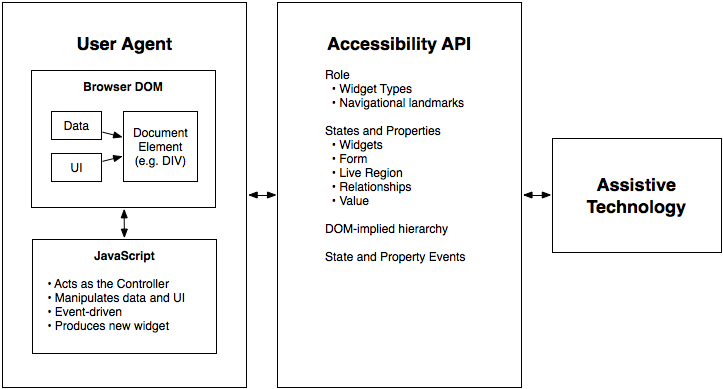
Figure 1: The contract model with accessibility APIs
For more information see [WAI-ARIA Authoring Practices](https://www.w3.org/WAI/ARIA/apg/) for the use of roles in making interactive content accessible.
Users of alternate input devices need [keyboard accessible](#dfn-keyboard-accessible) content. The new semantics, when combined with the recommended keyboard interactions provided in [WAI-ARIA Authoring Practices](https://www.w3.org/WAI/ARIA/apg/), will allow alternate input solutions to facilitate command and control via an alternate input solution.
WAI-ARIA introduces navigational [landmarks](#dfn-landmark) through its Roles Model and the XHTML role landmarks, which can help persons with dexterity and vision impairments by providing for improved keyboard navigation. WAI-ARIA may also be used to assist persons with cognitive learning disabilities. The additional semantics allow authors to restructure and substitute alternative content as needed.
[Assistive technologies](#dfn-assistive-technology) need the ability to support alternative inputs by getting and setting the current value of [widget](#dfn-widget) states and properties. Assistive technologies also need to determine what [objects](#dfn-object) are selected and manage widgets that allow multiple selections, such as list boxes and grids.
Speech-based command and control systems can benefit from WAI-ARIA semantics like the `role` attribute to assist in conveying audio information to the user. For example, upon encountering an element with a role of with child elements of role each containing text content representing a different flavor, a speech system might state to the user, "Select one of three choices: chocolate, strawberry, or vanilla."
WAI-ARIA is intended to be used as a supplement for native language semantics, not a replacement. When the host language provides a feature that provides equivalent accessibility to the WAI-ARIA feature, use the host language feature. WAI-ARIA should only be used in cases where the host language lacks the needed [role](#dfn-role), [state](#dfn-state), and [property](#dfn-property) indicators. Use a host language feature that is as similar as possible to the WAI-ARIA feature, then refine the meaning by adding WAI-ARIA. For instance, a multi-selectable grid could be implemented as a table, and then WAI-ARIA used to clarify that it is an interactive grid, not just a static data table. This allows for the best possible fallback for user agents that do not support WAI-ARIA and preserves the integrity of the host language semantics.
### 1.2 Target Audience
This specification defines the basic model for WAI-ARIA, including roles, states, properties, and values. It impacts several audiences:
- [User agents](#dfn-user-agent) that process content containing WAI-ARIA features;
- [Assistive technologies](#dfn-assistive-technology) that present content in special ways to user with disabilities;
- Authors who create content;
- Authoring tools that help authors create conforming content; and
- Conformance checkers that verify appropriate use of WAI-ARIA.
Each conformance requirement indicates the audience to which it applies.
Although this specification is applicable to the above audiences, it is not specifically targeted to, nor is it intended to be the sole source of information for, any of these audiences. The following documents provide important supporting information:
- \[\] addresses authoring recommendations for HTML, and is also of interest to developers of authoring tools and conformance checkers.
- \[\] addresses developers of and.
- \[\] also addresses developers of and.
### 1.3 User Agent Support
WAI-ARIA relies on user agent support for its features in two ways:
- Mainstream [user agents](#dfn-user-agent) use WAI-ARIA to alter how host language features are exposed to [accessibility APIs](#dfn-accessibility-api) in order to improve accessibility. The mechanism for this is defined in the [Core Accessibility API Mappings](https://www.w3.org/TR/core-aam-1.2/).
- [Assistive technologies](#dfn-assistive-technology) use the enhanced information available in an accessibility API, or uses the WAI-ARIA markup directly via the DOM, to convey semantic and interaction information to the user.
Aside from using WAI-ARIA markup to improve what is exposed to accessibility APIs, user agents behave as they would natively. Assistive technologies react to the extra information in the accessibility API as they already do for the same information on non-web content. User agents that are not assistive technologies, however, need do nothing beyond providing appropriate updates to the accessibility API.
The WAI-ARIA specification neither requires nor forbids user agents from enhancing native presentation and interaction behaviors on the basis of WAI-ARIA markup. Mainstream user agents might expose WAI-ARIA navigational landmarks (for example, as a dialog box or through a keyboard command) with the intention to facilitate navigation for all users. User agents are encouraged to maximize their usefulness to users, including users without disabilities.
WAI-ARIA is intended to provide missing semantics so that the intent of the author may be conveyed to assistive technologies. Generally, authors using WAI-ARIA will provide the appropriate presentation and interaction features. Over time, host languages may add WAI-ARIA equivalents, such as new form controls, that are implemented as standard accessible user interface controls by the user agent. This allows authors to use them instead of custom WAI-ARIA enabled user interface components. In this case the user agent would support the native host language feature. Developers of host languages that implement WAI-ARIA are advised to continue supporting WAI-ARIA semantics when they do not adversely conflict with implicit host language semantics, as WAI-ARIA semantics more clearly reflect the intent of the author if the host language features are inadequate to meet the author's needs.
### 1.4 Co-Evolution of WAI-ARIA and Host Languages
WAI-ARIA is intended to augment semantics in supporting languages like \[\] and \[\], or to be used as an accessibility enhancement technology in other markup-based languages that do not explicitly include support for ARIA. It clarifies semantics to assistive technologies when authors create new types of objects, via style and script, that are not yet directly supported by the language of the page, because the invention of new types of objects is faster than standardized support for them appears in web languages.
It is not appropriate to create objects with style and script when the host language provides a semantic element for that type of object. While WAI-ARIA can improve the accessibility of these objects, accessibility is best provided by allowing the user agent to handle the object natively. For example, it's better to use an `h1` element in HTML than to use the role on a `div` element.
It is expected that, over time, host languages will evolve to provide semantics for objects that currently can only be declared with WAI-ARIA. This is natural and desirable, as one goal of WAI-ARIA is to help stimulate the emergence of more semantic and accessible markup. When native semantics for a given feature become available, it is appropriate for authors to use the native feature and stop using WAI-ARIA for that feature. Legacy content may continue to use WAI-ARIA, however, so the need for user agents to support WAI-ARIA remains.
While specific features of WAI-ARIA may lose importance over time, the general possibility of WAI-ARIA to add semantics to web pages is expected to be a persistent need. Host languages may not implement all the semantics WAI-ARIA provides, and various host languages may implement different subsets of the features. New types of objects are continually being developed, and one goal of WAI-ARIA is to provide a way to make such objects accessible, because web authoring practices often advance faster than host language standards. In this way, WAI-ARIA and host languages both evolve together but at different rates.
Some host languages exist to create semantics for features other than the user interface. For example, SVG expresses the semantics behind production of graphical objects, not of user interface components that those objects may represent. Host languages might, by design, not provide native semantics that map to WAI-ARIA features. In these cases, WAI-ARIA could be adopted as a long-term approach to add semantic information to user interface components.
### 1.5 Authoring Practices
#### 1.5.1 Authoring Tools
Many of the requirements in the definitions of WAI-ARIA [roles](#dfn-role), [states](#dfn-state), and [properties](#dfn-property) can be checked automatically during the development process, similar to other quality control processes used for validating code. To assist authors who are creating custom widgets, authoring tools may compare widget roles, states, and properties to those supported in WAI-ARIA as well as those supported in related and cross-referenced roles, states, and properties. Authoring tools may notify authors of errors in widget design patterns, and may also prompt developers for information that cannot be determined from context alone. For example, a scripting library can determine the labels for the tree items in a tree view, but would need to prompt the author to label the entire tree. To help authors visualize a logical accessibility structure, an authoring environment might provide an outline view of a web resource based on the WAI-ARIA markup.
In both HTML and SVG, `tabindex` is an important way browsers support keyboard [focus navigation](#host_general_focus) for implementations of WAI-ARIA; authoring and debugging tools may check to make sure `tabindex` values are properly set. For example, error conditions may include cases where more than one treeitem in a tree has a `tabindex` value greater than or equal to 0, where `tabindex` is not set on any treeitem, or where is not defined when the element with the role tree has a `tabindex` value of greater than or equal to 0.
#### 1.5.2 Testing Practices and Tools
The accessibility of interactive content cannot be confirmed by static checks alone. Developers of interactive content should test for device-independent access to [widgets](#dfn-widget) and applications, and should verify accessibility API access to all content and changes during user interaction.
### 1.6 Assistive Technologies
Programmatic access to accessibility semantics is essential for assistive technologies. Most assistive technologies interact with user agents, like other applications, through a recognized accessibility API. Perceivable objects in the user interface are exposed to assistive technologies as accessible objects, defined by the accessibility API interfaces. To do this properly, accessibility information – role, states, properties as well as contextual information – needs to be accurately conveyed to the assistive technologies through the accessibility API. When a state change occurs, the user agent provides the appropriate event notification to the accessibility API. Contextual information, in many host languages like HTML, can be determined from the DOM itself as it provides a contextual tree hierarchy.
While some assistive technologies interact with these accessibility APIs, others may access the content directly from the DOM. These technologies can restructure, simplify, style, or reflow the content to help a different set of users. Common use cases for these types of adaptations may be the aging population, persons with cognitive impairments, or persons in environments that interfere with use of their tools. For example, the availability of regional navigational landmarks may allow for a mobile device adaptation that shows only portions of the content at any one time based on its semantics. This could reduce the amount of information the user needs to process at any one time. In other situations it may be appropriate to replace a custom user interface control with something that is easier to navigate with a keyboard, or touch screen device.
_This section is non-normative._
While some terms are defined in place, the following definitions are used throughout this document.
Accessibility API
Operating systems and other platforms provide a set of interfaces that expose information about and to [assistive technologies](#dfn-assistive-technology). Assistive technologies use these interfaces to get information about and interact with those. Examples of accessibility APIs are [Microsoft Active Accessibility](https://docs.microsoft.com/en-us/windows/win32/winauto/microsoft-active-accessibility) \[\], [Microsoft User Interface Automation](https://docs.microsoft.com/en-us/windows/win32/winauto/entry-uiauto-win32) \[\], MSAA with [UIA Express](https://docs.microsoft.com/en-us/windows/win32/winauto/iaccessibleex) \[\], the [Mac OS X Accessibility Protocol](https://developer.apple.com/documentation/appkit/nsaccessibility) \[\], the [Linux/Unix Accessibility Toolkit](https://gnome.pages.gitlab.gnome.org/atk/) \[\] and [Assistive Technology Service Provider Interface](https://developer-old.gnome.org/libatspi/stable/) \[\], and [IAccessible2](https://wiki.linuxfoundation.org/accessibility/iaccessible2/start) \[\].
Accessibility Subtree
An [accessible object](#dfn-accessible-object) in the [accessibility tree](#dfn-accessibility-tree) and its descendants in that tree. It does not include objects which have relationships other than parent-child in that tree. For example, it does not include objects linked via unless those objects are also descendants in the [accessibility tree](#dfn-accessibility-tree).
Accessibility Tree
Tree of that represents the structure of the user interface (UI). Each node in the accessibility tree represents an element in the UI as exposed through the [accessibility API](#dfn-accessibility-api); for example, a push button, a check box, or container.
Accessible Description
An accessible description provides additional information, related to an interface element, that complements the [accessible name](#dfn-accessible-name). The accessible description might or might not be visually perceivable.
Accessible Name
The accessible name is the name of a user interface element. Each platform [accessibility API](#dfn-accessibility-api) provides the accessible name property. The value of the accessible name may be derived from a visible (e.g., the visible text on a button) or invisible (e.g., the text alternative that describes an icon) property of the user interface element. See related [accessible description](#dfn-accessible-description).
A simple use for the accessible name property may be illustrated by an "OK" button. The text "OK" is the accessible name. When the button receives focus, assistive technologies may concatenate the platform's role description with the accessible name. For example, a screen reader may speak "push-button OK" or "OK button". The order of concatenation and specifics of the role description (e.g., "button", "push-button", "clickable button") are determined by platform s or [assistive technologies](#dfn-assistive-technology).
Accessible object
A [node](#dfn-node) in the [accessibility tree](#dfn-accessibility-tree) of a platform [accessibility API](#dfn-accessibility-api). Accessible objects expose various,, and for use by [assistive technologies](#dfn-assistive-technology). In the context of markup languages (e.g., HTML and SVG) in general, and of WAI-ARIA in particular, markup and their are represented as accessible objects.
Activation behavior
The action taken when an [event](#dfn-event), typically initiated by users through an input device, causes an element to fulfill a defined role. The role may be defined for that element by the host language, or by author-defined variables, or both. The role for any given element may be a generic action, or may be unique to that element. For example, the activation behavior of an HTML or SVG `<a>` element shall be to cause the user agent to traverse the link specified in the `href` attribute, with the further optional parameter of specifying the browsing context for the traversal (such as the current window or tab, a named window, or a new window); the activation behavior of an HTML `<input>` element with the `type` attribute value `submit` shall be to send the values of the form elements to an author-defined IRI by the author-defined HTTP method.
Assistive Technologies
Hardware and/or software that:
- relies on services provided by a [user agent](#dfn-user-agent) to retrieve and render Web content
- works with a user agent or web content itself through the use of APIs, and
- provides services beyond those offered by the user agent to facilitate user interaction with web content by people with disabilities
This definition may differ from that used in other documents.
Examples of assistive technologies that are important in the context of this document include the following:
- screen magnifiers, which are used to enlarge and improve the visual readability of rendered text and images;
- screen readers, which are most-often used to convey information through synthesized speech or a refreshable Braille display;
- text-to-speech software, which is used to convert text into synthetic speech;
- speech recognition software, which is used to allow spoken control and dictation;
- alternate input technologies (including head pointers, on-screen keyboards, single switches, and sip/puff devices), which are used to simulate the keyboard;
- alternate pointing devices, which are used to simulate mouse pointing and clicking.
Attribute
In this specification, attribute is used as it is in markup languages. Attributes are structural features added to to provide information about the and of the represented by the element.
Class
A set of instance that share similar characteristics.
Deprecated
A deprecated,, or is one which has been outdated by newer constructs or changed circumstances, and which may be removed in future versions of the WAI-ARIA specification. are encouraged to continue to support items identified as deprecated for backward compatibility. For more information, see in the Conformance section.
Desktop focus event
Event from/to the host operating system via the accessibility API, notifying of a change of input focus.
DOMString
Sequence of 16-bit unsigned integers, typically interpreted as UTF-16 code units. This corresponds to the JavaScript primitive String type.
Element
In this specification, element is used as it is in markup languages. Elements are the structural elements in markup language that contains the data profile for.
Event
A programmatic message used to communicate discrete changes in the [state](#dfn-state) of an [object](#dfn-object) to other objects in a computational system. User input to a web page is commonly mediated through abstract events that describe the interaction and can provide notice of changes to the state of a document object. In some programming languages, events are more commonly known as notifications.
Expose
Translated to platform-specific as defined in the Core Accessibility API Mappings.
Graphical Document
A document containing graphic representations with user-navigable parts. Charts, maps, diagrams, blueprints, and dashboards are examples of graphical documents. A graphical document is composed using any combination of symbols, images, text, and graphic primitives (shapes such as circles, points, lines, paths, rectangles, etc).
Hidden
Indicates that the [element](#dfn-element) is not visible, [perceivable](#dfn-perceivable), or interactive to _any_ user. An element is considered _hidden_ if it or any one of its ancestor elements is not rendered or is explicitly hidden.
Informative
Content provided for information purposes and not required for conformance. Content required for conformance is referred to as [normative](#dfn-normative).
Keyboard Accessible
Accessible to the user using a keyboard or [assistive technologies](#dfn-assistive-technology) that mimic keyboard input, such as a sip and puff tube. References in this document relate to [WCAG 2.1 Guideline 2.1: Make all functionality available from a keyboard](https://www.w3.org/TR/WCAG21/#keyboard-accessible) \[\].
Landmark
A type of region on a page to which the user may want quick access. Content in such a region is different from that of other regions on the page and relevant to a specific user purpose, such as navigating, searching, perusing the primary content, etc.
Live Region
Live regions are perceivable regions of a web page that are typically updated as a result of an external event when user focus may be elsewhere. These regions are not always updated as a result of a user interaction. Examples of live regions include a chat log, stock ticker, or a sport scoring section that updates periodically to reflect game statistics. Since these asynchronous areas are expected to update outside the user's area of focus, assistive technologies such as screen readers have either been unaware of their existence or unable to process them for the user. WAI-ARIA has provided a collection of properties that allow the author to identify these live regions and process them: aria-live, aria-relevant, aria-atomic, and aria-busy.
Primary Content Element
An implementing host language's primary content element, such as the `body` element in HTML.
Managed State
[Accessibility API](#dfn-accessibility-api) [state](#dfn-state) that is controlled by the user agent, such as focus and selection. These are contrasted with "unmanaged states" that are typically controlled by the author. Nevertheless, authors can override some managed states, such as aria-posinset and aria-setsize. Many managed states have corresponding CSS pseudo-classes, such as:focus, and pseudo-elements, such as::selection, that are also updated by the user agent.
Nemeth Braille
The Nemeth Braille Code for Mathematics is a braille code for encoding mathematical and scientific notation. See [Nemeth Braille on Wikipedia](https://en.wikipedia.org/wiki/Nemeth_Braille).
Node
Basic type of in the DOM tree or. DOM nodes are further specified as or, among other types. The nodes of an are.
Normative
Required for conformance. By contrast, content identified as [informative](#dfn-informative) or "non-normative" is not required for conformance.
Object
In the context of user interfaces, an item in the perceptual user experience, represented in markup languages by one or more, and rendered by.
In the context of programming, the instantiation of one or more and interfaces which define the general characteristics of similar objects. An object in an [accessibility API](#dfn-accessibility-api) may represent one or more DOM objects. have defined interfaces that are distinct from DOM interfaces.
Ontology
A description of the characteristics of and how they relate to each other.
Operable
Usable by users in ways they can control. References in this document relate to [WCAG 2.1 Principle 2: Content must be operable](https://www.w3.org/TR/WCAG21/#operable) \[\]. See [Keyboard Accessible](#dfn-keyboard-accessible).
Owned Element
An 'owned element' is any DOM descendant of the [element](#dfn-element), any element specified as a child via, or any DOM descendant of the owned child.
Owning Element
An 'owning element' is any DOM ancestor of the [element](#dfn-element), or any element with an attribute which references the ID of the element.
Perceivable
Presentable to users in ways they can sense. References in this document relate to [WCAG 2.1 Principle 1: Content must be perceivable](https://www.w3.org/TR/WCAG21/#perceivable) \[\].
Property
that are essential to the nature of a given [object](#dfn-object), or that represent a data value associated with the object. A change of a property may significantly impact the meaning or presentation of an object. Certain properties (for example, ) are less likely to change than, but note that the frequency of change difference is not a rule. A few properties, such as,, and are expected to change often. See.
Relationship
A connection between two distinct things. Relationships may be of various types to indicate which [object](#dfn-object) labels another, controls another, etc.
Role
Main indicator of type. This association allows tools to present and support interaction with the object in a manner that is consistent with user expectations about other objects of that type.
Root WAI-ARIA node
The primary element containing non-metadata content. In many languages, this is the document element but in HTML, it is the `<body>`.
Semantics
The meaning of something as understood by a human, defined in a way that computers can process a representation of an [object](#dfn-object), such as and, and reliably represent the object in a way that various humans will achieve a mutually consistent understanding of the object.
State
A state is a dynamic expressing characteristics of an [object](#dfn-object) that may change in response to user action or automated processes. States do not affect the essential nature of the object, but represent data associated with the object or user interaction possibilities. See.
Sub-document
Any document created from a `<frame>`, `<iframe>` or similar mechanism. A sub-document may contain a document, an application or any widget such as a calendar pulled in from another server. In the [accessibility tree](#dfn-accessibility-tree) there are two for this situation—one represents the `<frame>` / `<iframe>` element in the parent document, which parents a single [accessible object](#dfn-accessible-object) child representing the spawned document contents.
Target Element
An element specified in a WAI-ARIA relation. For example, in ` <div aria-controls=”elem1”>`, where `“elem1”` is the ID for the target element.
A hierarchical definition of how the characteristics of various relate to each other, in which classes inherit the properties of superclasses in the hierarchy. A taxonomy can comprise part of the formal definition of an [ontology](#dfn-ontology).
Text node
Type of DOM that represents the textual content of an or an. A Text node has no child nodes.
Tooltip attribute
Any host language attribute that would result in a user agent generating a tooltip such as in response to a mouse hover in desktop user agents.
Understandable
Presentable to users in ways they can construct an appropriate meaning. References in this document relate to [WCAG 2.1 Principle 3: Information and the operation of user interface must be understandable](https://www.w3.org/TR/WCAG21/#understandable) \[\].
Unicode Braille Patterns
In Unicode, braille is represented in a block called Braille Patterns (U+2800..U+28FF). The block contains all 256 possible patterns of an 8-dot braille cell; this includes the complete 6-dot cell range which is represented by U+2800..U+283F. In all braille systems, the braille pattern dots-0 (U+2800) is used to represent a space or the lack of content; it is also called a blank Braille pattern. See [Braille Patterns on Wikipedia](https://en.wikipedia.org/wiki/Braille_Patterns).
User Agent
Any software that retrieves, renders and facilitates end user interaction with Web content. This definition may differ from that used in other documents.
Valid IDREF
A reference to a target element in the same document that has a matching ID
Widget
Discrete user interface with which the user can interact. Widgets range from simple objects that have one value or operation (e.g., check boxes and menu items), to complex objects that contain many managed sub-objects (e.g., trees and grids).
## 3\. Conformance
The main content of Accessible Rich Internet Applications is [normative](#dfn-normative) and defines requirements that impact conformance claims. Introductory material, appendices, sections marked as "non-normative" and their subsections, diagrams, examples, and notes are [informative](#dfn-informative) (non-normative). Non-normative material provides advisory information to help interpret the guidelines but does not create requirements that impact a conformance claim.
Normative sections provide requirements that must follow for an implementation to conform to this specification. The keywords **MUST**, **MUST NOT**, **REQUIRED**, **SHALL**, **SHALL NOT**, **SHOULD**, **RECOMMENDED**, **MAY**, and **OPTIONAL** in this document are to be interpreted as described in [Keywords for use in RFCs to indicate requirement levels](http://www.rfc-editor.org/rfc/rfc2119.txt) \[\]. RFC-2119 keywords are formatted in uppercase and contained in an element with `class="rfc2119"`. When the keywords shown above are used, but do not share this format, they do not convey formal information in the RFC 2119 sense, and are merely explanatory, i.e., informative. As much as possible, such usages are avoided in this specification.
Normative sections provide requirements that authors, user agents and assistive technologies _MUST_ follow for an implementation to conform to this specification.
Non-normative (informative) sections provide information useful to understanding the specification. Such sections may contain examples of recommended practice, but it is not required to follow such recommendations in order to conform to this specification.
### 3.1 Non-interference with the Host Language
WAI-ARIA processing by the [user agent](#dfn-user-agent) _MUST NOT_ interfere with the normal operation of the built-in features of the host language.
If a CSS selector includes a WAI-ARIA attribute (e.g.,
```
input[aria-invalid="true"]
```
), user agents _MUST_ update the visual display of any elements matching (or no longer matching) the selector any time the attribute is added/changed/removed in the DOM. The user agent _MAY_ alter the mapping of the host language features into an [accessibility API](#dfn-accessibility-api), but the user agent _MUST NOT_ alter the DOM in order to remap WAI-ARIA markup into host language features.
### 3.2 All WAI-ARIA in DOM
A conforming [user agent](#dfn-user-agent) which implements a document object model that does not conform to the W3C DOM specification _MUST_ include the content attribute for role and its [WAI-ARIA role values](#roles_categorization), as well as the [WAI-ARIA States and Properties](#states_and_properties) in the DOM as specified by the author, even though processing may affect how the elements are exposed to accessibility APIs. Doing so ensures that each role attribute and all WAI-ARIA states and properties, including their values, are in the document in an unmodified form so other tools, such as assistive technologies, can access them. A conforming W3C DOM meets this criterion.
### 3.3 Assistive Technology Notifications Communicated to Web Applications
[Assistive technologies](#dfn-assistive-technology), such as speech recognition systems and alternate input devices for users with mobility impairments, require the ability to control a web application in a device-independent way. WAI-ARIA [states](#dfn-state) and [properties](#dfn-property) reflect the current state of rich internet application components. The ability for assistive technologies to notify web applications of necessary changes is essential because it allows these alternative input solutions to control an application without being dependent on the standard input device which the user is unable to effectively control directly.
User agents _MUST_ provide a method to notify the web application when a change occurs to states or properties in the system accessibility API. Likewise, web application authors _SHOULD_ update the web application accordingly when notified of a change request from the user agent or assistive technology.
Note
Many state and properties can be changed by assistive technologies through existing accessibility APIs by responding to a default action event. For example, the state of a in a can be changed by triggering the default action on the element.
### 3.4 Conformance Checkers
Any application or script verifying document conformance or validity _SHOULD_ include a test for all of the [normative](#dfn-normative) author requirements in this specification. If testing for a given requirement, conformance checkers _MUST_ issue an error if an author " _MUST_ " requirement isn't met, and _MUST_ issue a warning if an author " _SHOULD_ " requirement isn't met.
### 3.5 Deprecated Requirements
As the technology evolves, sometimes new ways to meet a use case become available, that work better than a feature that was previously defined. But because of existing implementation of the older feature, that feature cannot be removed from the conformance model without rendering formerly conforming content non-conforming. In this case, the older feature is marked as "deprecated". This indicates that the feature is allowed in the conformance model and expected to be supported by user agents, but it is recommended that authors do not use it for new content. In future versions of the specification, if the feature is no longer widely used, the feature could be removed and no longer expected to be supported by user agents.
## 4\. Using WAI-ARIA
Complex web applications become inaccessible when [assistive technologies](#dfn-assistive-technology) cannot determine the [semantics](#dfn-semantics) behind portions of a document or when the user is unable to effectively navigate to all parts of it in a usable way (see [WAI-ARIA Authoring Practices](https://www.w3.org/WAI/ARIA/apg/)). WAI-ARIA divides the semantics into [roles](#dfn-role) (the type defining a user interface element) and [states](#dfn-state) and [properties](#dfn-property) supported by the roles.
Authors need to associate [elements](#dfn-element) in the document to a WAI-ARIA role and the appropriate states and properties (aria-\* [attributes](#dfn-attribute)) during its life-cycle, unless the elements already have the appropriate [implicit WAI-ARIA semantics](#implicit_semantics) for states and properties. In these instances the equivalent host language states and properties take precedence to avoid a conflict while the role attribute will take precedence over the implicit role of the host language element.
### 4.1 WAI-ARIA Roles
A WAI-ARIA [role](#dfn-role) is set on an [element](#dfn-element) using a `role` [attribute](#dfn-attribute), similar to the `role` attribute defined in [Role Attribute](https://www.w3.org/TR/role-attribute/) \[\].
```xml
<li role="menuitem">Open file…</li>
```
The definition of each role in the model provides the following information:
- an informative description of the role;
- hierarchical information about related roles (e.g., a is a type of );
- context of the role (e.g., a is contained inside a );
- references to related concepts in other specifications;
- supported [states](#dfn-state) and [properties](#dfn-property) for each role (e.g., a supports being checked via ).
Attaching a role gives [assistive technologies](#dfn-assistive-technology) information about how to handle each element. When WAI-ARIA roles override host language semantics, there are no changes in the DOM, only in the.
User agents _MUST_ use the first token in the sequence of tokens in the `role` [attribute](#dfn-attribute) value that matches the name of any non-abstract WAI-ARIA [role](#dfn-role). The following steps will correctly identify the applicable WAI-ARIA role:
1. Use the rules of the host language to detect that an element has a role attribute and to identify the attribute value string for it.
2. Separate the attribute value string for that attribute into a sequence of whitespace-free substrings by separating on whitespace.
3. Compare the substrings to all the names of the non-abstract WAI-ARIA roles. Case-sensitivity of the comparison inherits from the case-sensitivity of the host language.
4. Use the first such substring in textual order that matches the name of a non-abstract WAI-ARIA role.
### 4.2 WAI-ARIA States and Properties
WAI-ARIA provides a collection of accessibility [states](#dfn-state) and [properties](#dfn-property) which are used to support platform [accessibility APIs](#dfn-accessibility-api) on various operating system platforms. [Assistive technologies](#dfn-assistive-technology) may access this information through an exposed [user agent](#dfn-user-agent) DOM or through a mapping to the platform accessibility API. When combined with [roles](#dfn-role), the user agent can supply the assistive technologies with user interface information to convey to the user at any time. Changes in states or properties will result in a notification to assistive technologies, which could alert the user that a change has occurred.
In the following example, a list item (`html:li`) has been used to create a checkable menu item, and JavaScript [events](#dfn-event) will capture mouse and keyboard events to toggle the value of. A role is used to make the behavior of this simple [widget](#dfn-widget) known to the user agent. [Attributes](#dfn-attribute) that change with user actions (such as ) are defined in the [states and properties](#states_and_properties) section.
```xml
<li role="menuitemcheckbox" aria-checked="true">Sort by Last Modified</li>
```
Some accessibility states, called _[managed states](#dfn-managed-state)_, are controlled by the user agent. Examples of managed state include keyboard focus and selection. Managed states often have corresponding CSS pseudo-classes (such as `:focus` and `::selection`) to define style changes. In contrast, the states in this specification are typically controlled by the author and are called _unmanaged states._ Some states are managed by the user agent, such as and, but the author can override them if the DOM is incomplete and would cause the user agent calculation to be incorrect. User agents map both managed and unmanaged states to the platform accessibility APIs.
Most modern user agents support [CSS attribute selectors](https://www.w3.org/TR/css3-selectors/#attribute-selectors) (\[\]), and can allow the author to create UI changes based on WAI-ARIA attribute information, reducing the amount of scripts necessary to achieve equivalent functionality. In the following example, a CSS selector is used to determine whether or not the text is bold and an image of a check mark is shown, based on the value of the attribute.
```
[aria-checked="true"] { font-weight: bold; }
[aria-checked="true"]::before { background-image: url(checked.gif); }
```
If CSS is not used to toggle the visual representation of the check mark, the author could include additional markup and scripts to manage an image that represents whether or not the is checked.
```xml
<li role="menuitemcheckbox" aria-checked="true">
<img src="checked.gif" role="presentation" alt="">
<!-- note: additional scripts required to toggle image source -->
Sort by Last Modified
</li>
```
When using standard HTML interactive elements and simple WAI-ARIA [widgets](#dfn-widget), application developers can manipulate the tab order or associate keyboard shortcuts with elements in the document.
WAI-ARIA includes a number of "managing container" widgets, also known as "composite" widgets. When appropriate, the container is responsible for tracking the last descendant that was active (the default is usually the first item in the container). It is essential that a container maintain a usable and consistent strategy when focus leaves a container and is then later refocused. While there may be exceptions, it is recommended that when a previously focused container is refocused, the active descendant be the same element as the active descendant when the container was last focused. Exceptions include cases where the contents of a container widget have changed, and widgets like a menubar where the user expects to always return to the first item when focus leaves the menu bar. For example, if the second item of a tree group was the active descendant when the user tabbed out of the tree group, then the second item of the tree group remains the active descendant when the tree group gets focus again. The user may also activate the container by clicking on one of the descendants within it. When the container or its active descendant has focus, the user may navigate through the container by pressing additional keys, such as the arrow keys, to change the currently active descendant. Any additional press of the main navigation key (generally the TAB key) will move out of the container to the next widget.
Usable keyboard navigation in a rich internet application is different from the tabbing paradigm among interactive elements, such as links and form controls, in a static document. In rich internet applications, the user tabs to significantly complex, such as a menu or spreadsheet, and uses the arrow keys to navigate within the widget. The changes that WAI-ARIA introduces to keyboard navigation make this enhanced accessibility possible. In WAI-ARIA, any element can be keyboard focusable. In addition to host language mechanisms such as `tabindex`, provides another mechanism for keyboard operation. Most other aspects of WAI-ARIA widget development depend on keyboard navigation functioning properly.
When implementing as described below, the user agent keeps the DOM focus on the container element or on an input element that controls the container element. However, the user agent communicates [desktop focus events](#dfn-desktop-focus) and states to the assistive technology as if the element referenced by has focus. User agents are not expected to validate that the active descendant is a descendant of the container element. It is the responsibility of the user agent to ensure that keyboard events are processed at the [element](#dfn-element) that has DOM focus. Any keyboard events directed at the active descendant bubble up to the DOM element with focus for processing.
#### 4.3.1 Information for Authors
If the author removes the element with focus, the author _SHOULD_ move focus to a logical element. Similarly, authors _SHOULD_ not scroll the element with focus off screen unless the user performed a scrolling action.
Authors _SHOULD_ ensure that all interactive [elements](#dfn-element) are focusable and that all parts of composite widgets are either focusable or have a documented alternative method to achieve their function.
Authors _MUST_ manage focus on the following container roles:
User agents that support WAI-ARIA expand the usage of host language mechanisms such as `tabindex`, `focus`, and `blur` to allow them on all [elements](#dfn-element). Where the host language supports it, authors _MAY_ add any element such as a `div`, `span`, or `img` to the default tab order by setting `tabindex="0"`. In addition, any item with `tabindex` equal to a negative integer is focusable via script or a mouse click, but is not part of the default tab order. This is supported in both \[\] and \[\].
Authors _MAY_ use to inform [assistive technologies](#dfn-assistive-technology) which descendant of a element is treated as having keyboard focus in the user interface if the role of the widget element supports `aria-activedescendant`. This is often a more convenient way of providing keyboard navigation within widgets, such as a, where the widget occupies only one stop in the page Tab sequence and other keys, typically arrow keys, are used to focus elements inside the widget.
Typically, the author will use host language [semantics](#dfn-semantics) to put the widget in the Tab sequence (e.g., `tabindex="0"` in HTML) and `aria-activedescendant` to point to the ID of the currently active descendant. The author, not the user agent, is responsible for styling the currently active descendant to show it has keyboard focus. The author cannot use `:focus` to style the currently active descendant since the actual focus is on the container.
More information on managing focus can be found in the [Developing a Keyboard Interface](https://www.w3.org/WAI/ARIA/apg/practices/keyboard-interface/) section of the WAI-ARIA Authoring Practices.
#### 4.3.2 Information for User Agents
The user agent _MUST_ do the following to implement:
1. Implement the host language method for keyboard navigation so that widgets that support `aria-activedescendant` may be included in the tab order.
2. For platforms that expose [desktop focus](#dfn-desktop-focus) or [accessibility API](#dfn-accessibility-api) focus separately from DOM focus, do not expose the focused state in the accessibility API for any element when it has DOM focus and also has which points to a valid [ID reference](#valuetype_idref).
3. When the attribute changes on an element that currently has DOM focus, remove the focused state from the previously focused object and fire an accessibility API [desktop focus event](#dfn-desktop-focus) on the new element referenced by `aria-activedescendant`. If is cleared or does not point to an element in the current document, fire a desktop focus event for the [object](#dfn-object) that had the attribute change.
4. Apply the following accessibility API states to any element with an ID attribute that can be referenced by an element with both an attribute and has DOM focus. There are two ways an element can be referenced by. One way is when it is [owned](#dfn-owned-element) by an element with and the other is when it is [owned](#dfn-owned-element) by an element that is controlled by an element with role of, or with an attribute:
1. Focusable, if the element also has a WAI-ARIA. The element needs to be focusable because it could be referenced by the attribute. Native elements that have no attribute do not need to be checked; their native semantics determine the focusable state. 2. Focused, whenever the element is the target of the attribute and the element with the attribute has DOM focus.
When an assistive technology uses its platform's accessibility API to request a change of focus, user agents _MUST_ do the following:
1. Remove the platform's focused state from the previously focused object.
2. Set the DOM focus:
1. If the can take DOM focus, the _MUST_ set the DOM focus to it. 2. Otherwise, if the current element has an ID and the ID is referenced by the attribute of an element that is focusable, the user agent _MUST_ set DOM focus to the element that has the attribute.
Note
An element with an ID can be referenced when it is [owned](#dfn-owned-element) by a container element that has the attribute or by a container element that is controlled by an element that has the attribute (e.g. see ). Otherwise the attribute reference indicates an author error.
Note
The inability to set DOM focus to the containing element indicates an author error. 3. Otherwise, the user agent _MAY_ attempt to set DOM focus to the child element itself.
3. If the current element has an ID and is [owned](#dfn-owned-element) by either a container element with both an `aria-activedescendant` attribute and has DOM focus, or by a container element that is controlled by an element with both an attribute and has DOM focus, the user agent _MUST_ set the accessibility API focused state and fire an accessibility API focus [event](#dfn-event) on the element identified by the value of `aria-activedescendant`.
## 5\. The Roles Model
This section defines WAI-ARIA [roles](#dfn-role) and describes their characteristics and properties.
The roles, their characteristics, the states and properties they support, and specification of how they may be used in markup, shall be considered normative.
In order to reflect the content in the DOM, user agents _SHOULD_ map the role attribute to the appropriate value in the implemented accessibility API, and user agents _SHOULD_ update the mapping when the role attribute changes.
### 5.1 Relationships Between Concepts
The Roles Model uses the following relationships to relate WAI-ARIA roles to each other and to concepts from other specifications, such as HTML.
#### 5.1.1 Superclass Role
The [role](#dfn-role) that the current subclassed role extends in the Roles Model. This extension causes all the properties and constraints of the superclass role to propagate to the subclass role. Other than well known stable specifications, inheritance may be restricted to items defined inside this specification, so that external items cannot be changed and affect inherited [classes](#dfn-class).
#### 5.1.2 Subclass Roles
Informative list of [roles](#dfn-role) for which this role is the superclass. This is provided to facilitate reading of the specification but adds no new information.
#### 5.1.4 Base Concept
Informative data about [objects](#dfn-object) that are considered prototypes for the [role](#dfn-role). Base concept is similar to type, but without inheritance of limitations and properties. Base concepts are designed as a substitute for inheritance for external concepts. A base concept is like a [related concept](#relatedConcept) except that the base concept is almost identical to the role definition.
For example, the defined in this document has similar functionality and anticipated behavior to a `<input[type="checkbox"]>` defined in \[\]. Therefore, a has an \[\] `checkbox` as a `baseConcept`. However, if the original \[\] checkbox baseConcept definition is modified, the definition of a in this document will not be affected, because there is no actual inheritance of the respective type.
### 5.2 Characteristics of Roles
Roles are defined and described by their characteristics. Characteristics define the structural function of a role, such as what a role is, concepts behind it, and what instances the role can or must contain. In the case of [widgets](#dfn-widget) this also includes how it interacts with the [user agent](#dfn-user-agent) based on mapping to HTML forms. States and properties from WAI-ARIA that are supported by the role are also indicated.
Roles define the following characteristics.
#### 5.2.1 Abstract Roles
Values
Boolean
Abstract [roles](#dfn-role) are the foundation upon which all other WAI-ARIA roles are built. Content authors _MUST NOT_ use abstract roles because they are not implemented in the API binding. User agents _MUST NOT_ map abstract roles to the standard role mechanism of the accessibility API. Abstract roles are provided to help with the following:
1. Organize the Roles Model and provide roles with a meaning in the context of known concepts.
2. Streamline the addition of roles that include necessary features.
#### 5.2.2 Required States and Properties
[States](#dfn-state) and [properties](#dfn-property) specifically required for the [role](#dfn-role) and subclass roles. Content authors _MUST_ provide a non-empty value for required states and properties. Content authors _MUST NOT_ use the value `undefined` for required states and properties, unless `undefined` is an explicitly-supported value of that state or property.
When an [object](#dfn-object) inherits from multiple ancestors and one ancestor indicates that property is supported while another ancestor indicates that it is required, the property is required in the inheriting object.
Note
A host language attribute with the appropriate [implicit WAI-ARIA semantic](#implicit_semantics) fulfills this requirement.
#### 5.2.3 Supported States and Properties
[States](#dfn-state) and [properties](#dfn-property) specifically applicable to the [role](#dfn-role) and child roles. Content authors _MAY_ provide values for supported states and properties, but need not in cases where default values are sufficient. [User agents](#dfn-user-agent) _MUST_ map all supported states and properties for the role to an accessibility API. If the state or property is undefined and it has a default value for the role, [user agents](#dfn-user-agent) _SHOULD_ expose the default value.
Note
A host language attribute with the appropriate [implicit WAI-ARIA semantic](#implicit_semantics) fulfills this requirement.
#### 5.2.4 Inherited States and Properties
Informative list of properties that are inherited by a [role](#dfn-role) from superclass roles. [States](#dfn-state) and [properties](#dfn-property) are inherited from superclass roles in the Roles Model, not from ancestor [elements](#dfn-element) in the DOM tree. These properties are not explicitly defined on the role, as the inheritance of properties is automatic. This information is provided to facilitate reading of the specification. The set of supported states and properties combined with inherited states and properties forms the full set of states and properties supported by the role.
#### 5.2.5 Prohibited States and Properties
List of states and properties that are prohibited on a [role](#dfn-role). Authors _MUST NOT_ specify a prohibited state or property.
Note
A host language attribute with the appropriate [implicit WAI-ARIA semantic](#implicit_semantics) would also prohibit a state or property in this section.
#### 5.2.6 Required Owned Elements
Any [element](#dfn-element) that will be [owned](#dfn-owned-element) by the element with this [role](#dfn-role). For example, an element with the role will own at least one element with the role.
When multiple roles are specified as _required owned elements_ for a role, at least one instance of one required [owned](#dfn-owned-element) element is expected. This specification does _not_ require an instance of each of the listed owned roles. For example, a `menu` should have at least one instance of a `menuitem`, `menuitemcheckbox`, _or_ `menuitemradio`. The `menu` role does not require one instance of each.
There may be times that required [owned](#dfn-owned-element) elements are missing, for example, while editing or while loading a data set. When a widget is missing _required owned elements_ due to script execution or loading, authors _MUST_ mark a containing element with equal to `true`. For example, until a page is fully initialized and complete, an author could mark the document element as busy.
Note
A role that has 'required owned elements' does not imply the reverse relationship. While processing of a role may be incomplete without elements of given roles present as descendants, elements with roles in this list do not always have to be found within elements of the given role. See [required context role](#scope) for requirements about the context where elements of a given role will be contained.
Note
An element with a [subclass role](#subclassroles) of the 'required owned element' does not fulfill this requirement. For example, the role requires ownership of an element using the or role. Although the role is the superclass of, adding an [owned](#dfn-owned-element) element with a role of will not fulfill the requirement that owns an or a.
Note
An element with the appropriate [implicit WAI-ARIA semantic](#implicit_semantics) fulfills this requirement.
#### 5.2.7 Required Context Role
The required context role defines the owning container where this [role](#dfn-role) is allowed. If a role has a required context, authors _MUST_ ensure that an element with the role is contained inside (or [owned](#dfn-owned-element) by) an element with the required context role. For example, an element with role `listitem` is only meaningful when contained inside (or [owned](#dfn-owned-element) by) an element with role `list`.
Note
A role that has 'required context role' does not imply the reverse relationship. While an element with the given role needs to appear within an element of the listed role(s) in order to be meaningful, elements of the listed roles do not always need descendant elements of the given role in order to be meaningful. See [required owned elements](#mustContain) for requirements about elements that require presence of a given descendant to be processed properly.
Note
An element with the appropriate [implicit WAI-ARIA semantic](#implicit_semantics) fulfills this requirement.
#### 5.2.8 Accessible Name Calculation
Values
One of the following values:
1. author: name comes from values provided by the author in explicit markup features such as the attribute, the attribute, or the host language labeling mechanism, such as the `alt` or `title` attributes in HTML, with HTML `title` attribute having the lowest precedence for specifying a text alternative.
2. contents: name comes from the text value of the [element](#dfn-element) [node](#dfn-node). Although this may be allowed in addition to "author" in some [roles](#dfn-role), this is used in content only if higher priority "author" features are not provided. Priority is defined by the [accessible name and description computation](https://www.w3.org/TR/accname-1.2/#mapping_additional_nd_te) algorithm \[\].
3. prohibited: the element does not support name from author. Authors _MUST NOT_ use the or attributes to name the element.
##### 5.2.8.1 Name Computation
[Name Computation](https://www.w3.org/TR/accname-1.2/#mapping_additional_nd_name) is defined in the Accessible Name and Description specification.
##### 5.2.8.2 Description Computation
[Description Computation](https://www.w3.org/TR/accname-1.2/#mapping_additional_nd_description) is defined in the Accessible Name and Description specification.
##### 5.2.8.3 Accessible Name and Description Computation
[Accessible Name and Description Computation](https://www.w3.org/TR/accname-1.2/#mapping_additional_nd_te) is defined in the Accessible Name and Description specification.
##### 5.2.8.4 Roles Supporting Name from Author
- (name required)
- (name required)
- (name required)
- (name required)
- (name required)
- (name required)
- (name required)
- (name required)
- (name required)
- (name required)
- (name required)
- (name required)
- (name required)
- (name required)
- (name required)
- (name required)
- (name required)
- (name required)
- (name required)
- (name required)
- (name required)
- (name required)
- (name required)
- (name required)
- (name required)
- (name required)
- (name required)
- (name required)
- (name required)
- (name required)
- (name required)
- (name required)
- (name required)
- (name required)
##### 5.2.8.5 Roles Supporting Name from Content
- (name required)
- (name required)
- (name required)
- (name required)
- (name required)
- (name required)
- (name required)
- (name required)
- (name required)
- (name required)
- (name required)
- (name required)
- (name required)
- (name required)
##### 5.2.8.6 Roles which cannot be named (Name prohibited)
#### 5.2.9 Presentational Children
Values
Boolean (`true` | `false`)
The DOM descendants are presentational. [User agents](#dfn-user-agent) _SHOULD NOT_ expose descendants of this [element](#dfn-element) through the platform [accessibility API](#dfn-accessibility-api). If [user agents](#dfn-user-agent) do not hide the descendant nodes, some information may be read twice.
#### 5.2.10 Implicit Value for Role
Many states and properties have default values. Occasionally, the default value when used on a given role should be different from the usual default. Roles that require a state or property to have a non-standard default value indicate this in the "Implicit Value for Role". This is expressed in the form "Default for `state or property name` is `new default value` ". Roles that define this have the new default value for the state or property if the author does not provide an explicit value.
### 5.3 Categorization of Roles
To support the current user scenario, this specification categorizes [roles](#dfn-role) that define user interface [widgets](#dfn-widget) (sliders, tree controls, etc.) and those that define page structure (sections, navigation, etc.). Note that some assistive technologies provide special modes of interaction for regions marked with role `application` or `document`.
A visual description of the relationships among roles is available in the [ARIA 1.2 Class Diagram](https://www.w3.org/WAI/ARIA/1.2/class-diagram/).
Roles are categorized as follows:
#### 5.3.1 Abstract Roles
The following [roles](#dfn-role) are used to support the WAI-ARIA Roles Model for the purpose of defining general role concepts.
Abstract roles are used for the ontology. Authors _MUST NOT_ use abstract roles in content.
#### 5.3.2 Widget Roles
The following roles act as standalone user interface widgets or as part of larger, composite widgets.
- (when focusable)
The following roles act as composite user interface widgets. These roles typically act as containers that manage other, contained widgets.
#### 5.3.3 Document Structure Roles
The following [roles](#dfn-role) describe structures that organize content in a page. Document structures are not usually interactive.
- (when not focusable)
#### 5.3.4 Landmark Roles
The following [roles](#dfn-role) are regions of the page intended as navigational [landmarks](#dfn-landmark). All of these roles inherit from the `landmark` base type and all are imported from the [Role Attribute](https://www.w3.org/TR/role-attribute/#s_role_module_attributes) \[\]. The roles are included here in order to make them clearly part of the WAI-ARIA Roles Model.
#### 5.3.6 Window Roles
The following [roles](#dfn-role) act as windows within the browser or application.
### 5.4 Definition of Roles
Below is an alphabetical list of WAI-ARIA [roles](#dfn-role) to be used by authors.
Abstract roles are used for the ontology. Authors _MUST NOT_ use abstract roles in content.
A type of [live region](#dfn-live-region) with important, and usually time-sensitive, information. See related and.
A type of dialog that contains an alert message, where initial focus goes to an [element](#dfn-element) within the dialog. See related and.
A containing one or more focusable elements requiring user input, such as keyboard or gesture events, that do not follow a standard interaction pattern supported by a role.
A section of a page that consists of a composition that forms an independent part of a document, page, or site.
A that contains mostly site-oriented content, rather than page-specific content.
A section of content that is quoted from another source.
An input that allows for user-triggered actions when clicked or pressed. See related.
Visible content that names, and may also describe, a,,, or.
A cell in a tabular container. See related.
A checkable input that has three possible values: `true`, `false`, or `mixed`.
A section whose content represents a fragment of computer code.
A cell containing header information for a column.
An that controls another element, such as a or, that can dynamically pop up to help the user set the value of the.
A form of widget that performs an action but does not receive input data.
A that is designed to be complementary to the main content at a similar level in the DOM hierarchy, but remaining meaningful when separated from the main content.
A [widget](#dfn-widget) that may contain navigable descendants or [owned](#dfn-owned-element) children.
A that contains information about the parent document.
A definition of a term or concept. See related.
A deletion contains content that is marked as removed or content that is being suggested for removal. See related.
A dialog is a descendant window of the primary window of a web application. For HTML pages, the primary application window is the entire web document, i.e., the `body` element.
\[Deprecated in ARIA 1.2\] A list of references to members of a group, such as a static table of contents.
An [element](#dfn-element) containing content that [assistive technology](#dfn-assistive-technology) users may want to browse in a reading mode.
One or more emphasized characters. See related.
A scrollable of where scrolling may cause to be added to or removed from either end of the list.
A perceivable of content that typically contains a [graphical document](#dfn-graphical-document), images, code snippets, or example text. The parts of a `figure` _MAY_ be user-navigable.
A region that contains a collection of items and objects that, as a whole, combine to create a form. See related.
A nameless container [element](#dfn-element) that has no semantic meaning on its own.
A composite containing a collection of one or more rows with one or more cells where some or all cells in the grid are focusable by using methods of two-dimensional navigation, such as directional arrow keys.
A in a or.
A set of user interface [objects](#dfn-object) that is not intended to be included in a page summary or table of contents by [assistive technologies](#dfn-assistive-technology).
A heading for a section of the page.
A container for a collection of [elements](#dfn-element) that form an image.
A generic type of [widget](#dfn-widget) that allows user input.
An insertion contains content that is marked as added or content that is being suggested for addition. See related.
A perceivable containing content that is relevant to a specific, author-specified purpose and sufficiently important that users will likely want to be able to navigate to the section easily and to have it listed in a summary of the page. Such a page summary could be generated dynamically by a user agent or assistive technology.
An interactive reference to an internal or external resource that, when activated, causes the user agent to navigate to that resource. See related.
A containing elements. See related.
A [widget](#dfn-widget) that allows the user to select one or more items from a list of choices. See related and.
A single item in a list or directory.
A type of [live region](#dfn-live-region) where new information is added in meaningful order and old information may disappear. See related.
A containing the main content of a document.
A type of [live region](#dfn-live-region) where non-essential information changes frequently. See related.
Content that represents a mathematical expression.
An [element](#dfn-element) that represents a scalar measurement within a known range, or a fractional value. See related.
A type of [widget](#dfn-widget) that offers a list of choices to the user.
A presentation of that usually remains visible and is usually presented horizontally.
An option in a set of choices contained by a or.
A with a checkable state whose possible values are `true`, `false`, or `mixed`.
A checkable in a set of elements with the same role, only one of which can be checked at a time.
A containing a collection of navigational [elements](#dfn-element) (usually links) for navigating the document or related documents.
An [element](#dfn-element) whose implicit native role semantics will not be mapped to the [accessibility API](#dfn-accessibility-api). See synonym.
A section whose content is parenthetic or ancillary to the main content of the resource.
A selectable item in a.
A paragraph of content.
An [element](#dfn-element) whose implicit native role semantics will not be mapped to the [accessibility API](#dfn-accessibility-api). See synonym.
An [element](#dfn-element) that displays the progress status for tasks that take a long time.
A checkable input in a group of elements with the same role, only one of which can be checked at a time.
A group of buttons.
An element representing a range of values.
A containing content that is relevant to a specific, author-specified purpose and sufficiently important that users will likely want to be able to navigate to the section easily and to have it listed in a summary of the page. Such a page summary could be generated dynamically by a user agent or assistive technology.
The base [role](#dfn-role) from which all other roles inherit.
A row of cells in a tabular container.
A structure containing one or more row elements in a tabular container.
A cell containing header information for a row.
A graphical object that controls the scrolling of content within a viewing area, regardless of whether the content is fully displayed within the viewing area.
A region that contains a collection of items and objects that, as a whole, combine to create a search facility. See related and.
A type of textbox intended for specifying search criteria. See related and.
A renderable structural containment unit in a document or application.
A structure that labels or summarizes the topic of its related section.
A form widget that allows the user to make selections from a set of choices.
A divider that separates and distinguishes sections of content or groups of menuitems.
An input where the user selects a value from within a given range.
A form of that expects the user to select from among discrete choices.
A type of [live region](#dfn-live-region) whose content is advisory information for the user but is not important enough to justify an, often but not necessarily presented as a status bar.
Content that is important, serious, or urgent. See related.
A document structural [element](#dfn-element).
One or more subscripted characters. See related.
One or more superscripted characters. See related.
A type of checkbox that represents on/off values, as opposed to checked/unchecked values. See related.
A grouping label providing a mechanism for selecting the tab content that is to be rendered to the user.
A containing data arranged in rows and columns. See related.
A list of [elements](#dfn-element), which are references to elements.
A container for the resources associated with a, where each is contained in a.
A word or phrase with a corresponding definition. See related.
A type of input that allows free-form text as its value.
An element that represents a specific point in time.
A type of [live region](#dfn-live-region) containing a numerical counter which indicates an amount of elapsed time from a start point, or the time remaining until an end point.
A collection of commonly used function buttons or controls represented in compact visual form.
A contextual popup that displays a description for an element.
A that allows the user to select one or more items from a hierarchically organized collection.
A whose rows can be expanded and collapsed in the same manner as for a.
An option item of a. This is an [element](#dfn-element) within a tree that may be expanded or collapsed if it contains a sub-level group of tree item elements.
An interactive component of a graphical user interface (GUI).
A browser or application window.
#### alert role
A type of [live region](#dfn-live-region) with important, and usually time-sensitive, information. See related and.
Alerts are used to convey messages that may be immediately important to users. In the case of audio warnings, alerts provide an accessible alternative for hearing-impaired users. The `alert` [role](#dfn-role) is applied to the element containing the alert message. An `alert` is a specialized form of the role, which is processed as an atomic [live region](#dfn-live-region).
Alerts are assertive live regions, which means they cause immediate notification for assistive technology users. If the operating system allows, the [user agent](#dfn-user-agent) _SHOULD_ fire a system alert [event](#dfn-event) through the accessibility API when the WAI-ARIA alert is created.
Neither authors nor user agents are required to set or manage focus to an alert in order for it to be processed. Since alerts are not required to receive focus, authors _SHOULD NOT_ require users to close an alert. If an author desires focus to move to a message when it is conveyed, the author _SHOULD_ use instead of `alert`.
Elements with the role `alert` have an implicit value of `assertive`, and an implicit value of `true`.
| Characteristic | Value |
| -------------------------------- | --------------------------------------------------------------------------------------------------------------------------------------------------------------------------------------------------------------------------------------- |
| Superclass Role: | |
| Subclass Roles: | |
| Inherited States and Properties: | - (state) - (state) - (state) **(deprecated on this role in ARIA 1.2)** - **(deprecated on this role in ARIA 1.2)** - (state) - **(deprecated on this role in ARIA 1.2)** - (state) - (state) **(deprecated on this role in ARIA 1.2)** |
| Name From: | author |
| Implicit Value for Role: | Default for is `assertive`. Default for is `true`. |
#### alertdialog role
A type of dialog that contains an alert message, where initial focus goes to an [element](#dfn-element) within the dialog. See related and.
Alert dialogs are used to convey messages to alert the user. The `alertdialog` [role](#dfn-role) goes on the node containing both the alert message and the rest of the dialog. Content authors _SHOULD_ make alert dialogs modal by ensuring that, while the `alertdialog` is shown, keyboard and mouse interactions only operate within the dialog. See.
Unlike, `alertdialog` can receive a response from the user. For example, to confirm that the user understands the alert being generated. When the alert dialog is displayed, authors _SHOULD_ set focus to an active element within the alert dialog, such as a form control or confirmation button. The [user agent](#dfn-user-agent) _SHOULD_ fire a system alert [event](#dfn-event) through the accessibility API when the alert is created, provided one is specified by the intended [accessibility API](#dfn-accessibility-api).
Authors _SHOULD_ use on an `alertdialog` to reference the alert message element in the dialog. If they do not, an [assistive technology](#dfn-assistive-technology) can resort to its internal recovery mechanism to determine the contents of the alert message.
| Characteristic | Value |
| -------------------------------- | --------------------------------------------------------------------------------------------------------------------------------------------------------------------------------------------------------------------------------------- |
| Superclass Role: |
| Inherited States and Properties: | - (state) - (state) - (state) **(deprecated on this role in ARIA 1.2)** - **(deprecated on this role in ARIA 1.2)** - (state) - **(deprecated on this role in ARIA 1.2)** - (state) - (state) **(deprecated on this role in ARIA 1.2)** |
| Name From: | author |
| Accessible Name Required: | True |
#### application role
A containing one or more focusable elements requiring user input, such as keyboard or gesture events, that do not follow a standard interaction pattern supported by a role.
Some [user agents](#dfn-user-agent) and [assistive technologies](#dfn-assistive-technology) have a browse mode where standard input events, such as up and down arrow key events, are intercepted and used to control a reading cursor. This browse mode behavior prevents elements that do not have a role from receiving and using such keyboard and gesture events to provide interactive functionality.
When there is a need to create an element with an interaction model that is not supported by any of the WAI-ARIA roles, authors _MAY_ give that element role `application`. And, when a user navigates into an element with role `application`, [assistive technologies](#dfn-assistive-technology) that intercept standard input events _SHOULD_ switch to a mode that passes most or all standard input events through to the web application.
For example, a presentation slide editor uses arrow keys to change the positions of textbox and image elements on the slide. There are not any WAI-ARIA roles that correspond to such an interaction model so an author could give the slide container role `application`, an of "Slide Editor", and use to provide instructions.
Because only the focusable elements contained in an `application` element are accessible to users of some assistive technologies, authors _MUST_ use one of the following techniques to ensure all non-decorative static text or image content inside an application is accessible:
1. Associate the content with a focusable element using or.
2. Place the content in a focusable element that has role or.
3. Manage focus of [owned](#dfn-owned-element) elements as described in [Managing Focus](#managingfocus), updating the value of to reference the [element](#dfn-element) containing the focused content.
| Characteristic | Value |
| -------------------------------- | --------------------------------------- |
| Superclass Role: | |
| Supported States and Properties: |
| Inherited States and Properties: | - (state) - (state) - (state) - (state) |
| Name From: | author |
| Accessible Name Required: | True |
#### article role
A section of a page that consists of a composition that forms an independent part of a document, page, or site.
An article is not a navigational [landmark](#dfn-landmark), but may be nested to form a discussion where assistive technologies could pay attention to article nesting to assist the user in following the discussion. An article could be a forum post, a magazine or newspaper article, a web log entry, a user-submitted comment, or any other independent item of content. It is _independent_ in that its contents could stand alone, for example in syndication. However, the [element](#dfn-element) is still associated with its ancestors; for instance, contact information that applies to a parent body element still covers the article as well. When nesting articles, the child articles represent content that is related to the content of the parent article. For instance, a web log entry on a site that accepts user-submitted comments could represent the comments as articles nested within the article for the web log entry. Author, heading, date, or other information associated with an article does not apply to nested articles.
When the user navigates to an element assigned the role of `article`, [assistive technologies](#dfn-assistive-technology) that typically intercept standard keyboard events _SHOULD_ switch to document browsing mode, as opposed to passing keyboard events through to the web application. Assistive technologies _MAY_ provide a feature allowing the user to navigate the hierarchy of any nested `article` elements.
When an `article` is in the context of a, the author _MAY_ specify values for and.
| Characteristic | Value |
| -------------------------------- | --------------------------------------------------------------------------------------------------------------------------------------------------------------------------------------------------------------------------------------- |
| Superclass Role: | |
| Supported States and Properties: |
| Inherited States and Properties: | - (state) - (state) - (state) **(deprecated on this role in ARIA 1.2)** - **(deprecated on this role in ARIA 1.2)** - (state) - **(deprecated on this role in ARIA 1.2)** - (state) - (state) **(deprecated on this role in ARIA 1.2)** |
| Name From: | author |
#### blockquote role
A section of content that is quoted from another source.
| Characteristic | Value |
| -------------------------------- | --------------------------------------------------------------------------------------------------------------------------------------------------------------------------------------------------------------------------------------- |
| Superclass Role: | |
| Inherited States and Properties: | - (state) - (state) - (state) **(deprecated on this role in ARIA 1.2)** - **(deprecated on this role in ARIA 1.2)** - (state) - **(deprecated on this role in ARIA 1.2)** - (state) - (state) **(deprecated on this role in ARIA 1.2)** |
| Name From: | author |
#### button role
An input that allows for user-triggered actions when clicked or pressed. See related.
Buttons are mostly used for discrete actions. Standardizing the appearance of buttons enhances the user's recognition of the [widgets](#dfn-widget) as buttons and allows for a more compact display in toolbars.
Buttons support the optional [attribute](#dfn-attribute). Buttons with a non-empty attribute are toggle buttons. When is `true` the button is in a "pressed" [state](#dfn-state), when is `false` it is not pressed. If the attribute is not present, the button is a simple command button.
| Characteristic | Value |
| -------------------------------- | --------------------------------------------------------------------------------------------------------------------------------------- |
| Superclass Role: | |
| Base Concept: | `<button>` in \[\] |
| Supported States and Properties: |
| Inherited States and Properties: | - (state) - (state) - **(deprecated on this role in ARIA 1.2)** - (state) - (state) - (state) **(deprecated on this role in ARIA 1.2)** |
| Name From: | - contents - author |
| Accessible Name Required: | True |
| Children Presentational: | True |
#### caption role
Visible content that names, and may also describe, a,,, or.
When using `caption` authors _SHOULD_ ensure:
- The `caption` is a direct child of a,,, or.
- The `caption` is the first child of a,, or.
- The `caption` is the first or last child of a.
Authors _SHOULD_ set on the parent `figure`, `table`, `grid`, or to reference the element with role `caption`. However, if a `caption` contains content that serves as both a name and description for its parent, authors _MAY_ instead set to reference an element within the `caption` that contains a concise name, and set to reference an element within the `caption` that contains the descriptive content.
```xml
<div role="table" aria-labelledby="name" aria-describedby="desc">
<div role="caption">
<div id="name">Contest Entrants</div>
<div id="desc">
This table shows the total number of entrants (500) the
contest accepted over the past four weeks.
</div>
</div>
<!-- ... -->
```
| Characteristic | Value |
| --------------------------------- | --------------------------------------------------------------------------------------------------------------------------------------------------------------------------------------------------------------------------------------- |
| Superclass Role: | |
| Required Context Role: |
| Inherited States and Properties: | - (state) - (state) - (state) **(deprecated on this role in ARIA 1.2)** - **(deprecated on this role in ARIA 1.2)** - (state) - **(deprecated on this role in ARIA 1.2)** - (state) - (state) **(deprecated on this role in ARIA 1.2)** |
| Prohibited States and Properties: |
| Name From: | prohibited |
#### cell role
| Characteristic | Value |
| -------------------------------- | --------------------------------------------------------------------------------------------------------------------------------------------------------------------------------------------------------------------------------------- |
| Superclass Role: | |
| Subclass Roles: |
| Base Concept: | `<td>` in \[\] |
| Required Context Role: | |
| Supported States and Properties: |
| Inherited States and Properties: | - (state) - (state) - (state) **(deprecated on this role in ARIA 1.2)** - **(deprecated on this role in ARIA 1.2)** - (state) - **(deprecated on this role in ARIA 1.2)** - (state) - (state) **(deprecated on this role in ARIA 1.2)** |
| Name From: | - contents - author |
#### checkbox role
A checkable input that has three possible values: `true`, `false`, or `mixed`.
The [attribute](#dfn-attribute) of a `checkbox` indicates whether the input is checked (`true`), unchecked (`false`), or represents a group of [elements](#dfn-element) that have a mixture of checked and unchecked values (`mixed`). Many checkboxes do not use the `mixed` value, and thus are effectively boolean checkboxes.
| Characteristic | Value |
| -------------------------------- | --------------------------------------------------------------------------------------------- |
| Superclass Role: | |
| Subclass Roles: | |
| Required States and Properties: | |
| Supported States and Properties: |
| Inherited States and Properties: | - (state) - (state) - (state) - (state) - **(deprecated on this role in ARIA 1.2)** - (state) |
| Name From: | - contents - author |
| Accessible Name Required: | True |
| Children Presentational: | True |
#### code role
A section whose content represents a fragment of computer code.
The primary purpose of the code role is to inform assistive technologies that the content is computer code and thus may require special presentation, in particular with respect to synthesized speech. More specifically, screen readers and other tools which provide text-to-speech presentation of content _SHOULD_ prefer full punctuation verbosity to ensure common symbols (e.g. "-") are spoken.
| Characteristic | Value |
| --------------------------------- | --------------------------------------------------------------------------------------------------------------------------------------------------------------------------------------------------------------------------------------- |
| Superclass Role: | |
| Inherited States and Properties: | - (state) - (state) - (state) **(deprecated on this role in ARIA 1.2)** - **(deprecated on this role in ARIA 1.2)** - (state) - **(deprecated on this role in ARIA 1.2)** - (state) - (state) **(deprecated on this role in ARIA 1.2)** |
| Prohibited States and Properties: |
| Name From: | prohibited |
#### columnheader role
A cell containing header information for a column.
`columnheader` can be used as a column header in a table or grid. It could also be used in a pie chart to show a similar [relationship](#dfn-relationship) in the data.
The `columnheader` establishes a relationship between it and all cells in the corresponding column. It is the structural equivalent to an HTML `th` [element](#dfn-element) with a column scope.
Authors _MUST_ ensure [elements](#dfn-element) with [role](#dfn-role) `columnheader` are contained in, or [owned](#dfn-owned-element) by, an element with the role.
Applying the state on a columnheader _MUST_ not cause the user agent to automatically propagate the state to all the cells in the corresponding column. An author _MAY_ choose to propagate selection in this manner depending on the specific application.
While the `columnheader` role can be used in both interactive grids and non-interactive tables, the use of and is only applicable to interactive elements. Therefore, authors _SHOULD NOT_ use or in a `columnheader` that descends from a, and user agents _SHOULD NOT_ expose either property to [assistive technologies](#dfn-assistive-technology) unless the `columnheader` descends from a.
Note
Because cells are organized into rows, there is not a single container element for the column. The column is the set of elements in a particular position within their respective containers.
Note: Usage of aria-disabled
While is currently supported on, in a future version the working group plans to prohibit its use on elements with role except when the element is in the context of a or.
| Characteristic | Value |
| -------------------------------- | ------------------------------------------------------------------------------- |
| Superclass Role: |
| Base Concept: | `<th[scope="col"]>` in \[\] |
| Required Context Role: | |
| Supported States and Properties: | |
| Inherited States and Properties: | - (state) - (state) - (state) - (state) - (state) - (state) - (state) - (state) |
| Name From: | - contents - author |
| Accessible Name Required: | True |
#### combobox role
An that controls another element, such as a or, that can dynamically pop up to help the user set the value of the.
Editor's note: Major Changes to combobox role in ARIA 1.2
The Guidance for has changed significantly in ARIA 1.2 due to problems with implementation of the previous patterns. Authors and developers of User Agents, Assistive Technologies, and Conformance Checkers are advised to review this section carefully to understand the changes. Explanation of the changes is available in the [ARIA repository wiki](https://github.com/w3c/aria/wiki/Resolving-ARIA-1.1-Combobox-Issues).
A `combobox` functionally combines a named input field with the ability to assist value selection via a supplementary popup element. A `combobox` input _MAY_ be either a single-line text field that supports editing and typing or an element that only displays the current value of the `combobox`. If the `combobox` supports text input and provides autocompletion behavior as described in, authors _MUST_ set on the `combobox` element to the value that corresponds to the provided behavior.
Typically, the initial state of a `combobox` is collapsed. In the collapsed state, only the `combobox` element and a separate, optional popup control are visible. A `combobox` is said to be expanded when both the `combobox` element showing its current value and its associated popup element are visible. Authors _MUST_ set to `true` on an element with role `combobox` when it is expanded and `false` when it is collapsed.
Authors _MUST_ ensure the popup element associated with a `combobox` has a role of,,, or. Authors _MUST_ set on a `combobox` element to a value that refers to the `combobox` popup element.
Elements with the role `combobox` have an implicit value of `listbox`. If the `combobox` popup element has a role other than, authors _MUST_ specify a value for that corresponds to the role of its popup.
If the user interface includes an additional icon that allows the visibility of the popup to be controlled via pointer and touch events, authors _SHOULD_ ensure that element has role, that it is focusable but not included in the page Tab sequence, and that it is not a descendant of the element with role `combobox`. In addition, to be keyboard accessible, authors _SHOULD_ provide keyboard mechanisms for moving focus between the `combobox` element and elements contained in the popup. For example, one common convention is that Down Arrow moves focus from the input to the first focusable descendant of the popup element. If the popup element supports, in lieu of moving focus, such keyboard mechanisms can control the value of on the `combobox` element. When a descendant of the popup element is active, authors _MAY_ set on the `combobox` to a value that refers to the active element within the popup while focus remains on the `combobox` element.
User agents _MUST_ expose the value of elements with role `combobox` to [assistive technologies](#dfn-assistive-technology). The value of a `combobox` is represented by one of the following:
- If the `combobox` element is a host language element that provides a value, such as an HTML `input` element, the value of the combobox is the value of that element.
- Otherwise, the value of the `combobox` is represented by its descendant elements and can be determined using the same method used to compute the name of a from its descendant content.
```xml
<label for="tag_combo">Tag</label>
<input type="text" id="tag_combo"
role="combobox" aria-autocomplete="list"
aria-haspopup="listbox" aria-expanded="true"
aria-controls="popup_listbox" aria-activedescendant="selected_option">
<ul role="listbox" id="popup_listbox">
<li role="option">Zebra</li>
<li role="option" id="selected_option">Zoom</li>
</ul>
```
Editor's note: Validity changes combobox for ARIA 1.2
Please review the following carefully. As a result of these changes a combobox following the ARIA 1.1 combobox specification will no longer conform with the ARIA specification.
Note
The structural requirements for `combobox` defined by this version of the specification are different from the requirements defined by ARIA 1.0 and ARIA 1.1:
- The ARIA 1.0 specification required the input element with the `combobox` role to be a single-line text field and reference the popup element with instead of.
- The ARIA 1.1 specification, which was not broadly supported by assistive technologies, required the `combobox` to be a non-focusable element with two required owned elements -- a focusable and a popup element controlled by the.
- The changes introduced in ARIA 1.2 improve interoperability with assistive technologies and enable authors to create presentations of combobox that more closely imitate a native HTML `select` element.
The features and behaviors of combobox implementations vary widely. Consequently, there are many important authoring considerations. See the [WAI-ARIA Authoring Practices](https://www.w3.org/WAI/ARIA/apg/) for additional details on implementing combobox design patterns.
| Characteristic | Value |
| -------------------------------- | ------------------------------------------------- |
| Superclass Role: | |
| Required States and Properties: |
| Supported States and Properties: |
| Inherited States and Properties: | - (state) - (state) - (state) - (state) - (state) |
| Name From: | author |
| Accessible Name Required: | True |
| Implicit Value for Role: | Default for is `listbox`. |
#### command role
A form of widget that performs an action but does not receive input data.
Note
`command` is an abstract role used for the ontology. Authors should not use this role in content.
| Characteristic | Value |
| -------------------------------- | --------------------------------------------------------------------------------------------------------------------------------------------------------------------------------------------------------------------------------------- |
| Is Abstract: | True |
| Superclass Role: | |
| Subclass Roles: |
| Inherited States and Properties: | - (state) - (state) - (state) **(deprecated on this role in ARIA 1.2)** - **(deprecated on this role in ARIA 1.2)** - (state) - **(deprecated on this role in ARIA 1.2)** - (state) - (state) **(deprecated on this role in ARIA 1.2)** |
| Name From: | author |
#### composite role
A [widget](#dfn-widget) that may contain navigable descendants or [owned](#dfn-owned-element) children.
Authors _SHOULD_ ensure that a composite widget exists as a single navigation stop within the larger navigation system of the web page. Once the composite widget has focus, authors _SHOULD_ provide a separate navigation mechanism for users to navigate to [elements](#dfn-element) that are descendants or owned children of the composite element.
Note
`composite` is an abstract role used for the ontology. Authors should not use this role in content.
| Characteristic | Value |
| -------------------------------- | ----------------------------------------------------------------------------------------------------------------------------------------------------------------------------------- |
| Is Abstract: | True |
| Superclass Role: | |
| Subclass Roles: |
| Supported States and Properties: |
| Inherited States and Properties: | - (state) - (state) - **(deprecated on this role in ARIA 1.2)** - (state) - **(deprecated on this role in ARIA 1.2)** - (state) - (state) **(deprecated on this role in ARIA 1.2)** |
| Name From: | author |
#### contentinfo role
A that contains information about the parent document.
Examples of information included in this region of the page are copyrights and links to privacy statements.
User agents _SHOULD_ treat elements with the role of `contentinfo` as navigational [landmarks](#dfn-landmark).
Within any or, the author _SHOULD_ mark no more than one [element](#dfn-element) with the `contentinfo` role.
Note
Because `document` and `application` elements can be nested in the DOM, they may have multiple `contentinfo` elements as DOM descendants, assuming each of those is associated with different document nodes, either by a DOM nesting (e.g., within ) or by use of the attribute.
| Characteristic | Value |
| -------------------------------- | --------------------------------------------------------------------------------------------------------------------------------------------------------------------------------------------------------------------------------------- |
| Superclass Role: | |
| Inherited States and Properties: | - (state) - (state) - (state) **(deprecated on this role in ARIA 1.2)** - **(deprecated on this role in ARIA 1.2)** - (state) - **(deprecated on this role in ARIA 1.2)** - (state) - (state) **(deprecated on this role in ARIA 1.2)** |
| Name From: | author |
#### definition role
A definition of a term or concept. See related.
Authors _SHOULD_ identify the [element](#dfn-element) being defined by giving that element a role of and referencing it with the [attribute](#dfn-attribute) or by making the element with role a descendant of the element with role `definition`.
| Characteristic | Value |
| -------------------------------- | --------------------------------------------------------------------------------------------------------------------------------------------------------------------------------------------------------------------------------------- |
| Superclass Role: | |
| Inherited States and Properties: | - (state) - (state) - (state) **(deprecated on this role in ARIA 1.2)** - **(deprecated on this role in ARIA 1.2)** - (state) - **(deprecated on this role in ARIA 1.2)** - (state) - (state) **(deprecated on this role in ARIA 1.2)** |
| Name From: | author |
#### deletion role
A deletion contains content that is marked as removed or content that is being suggested for removal. See related.
Deletions are typically used to either mark differences between two versions of content or to designate content suggested for removal in scenarios where multiple people are revising content.
| Characteristic | Value |
| --------------------------------- | --------------------------------------------------------------------------------------------------------------------------------------------------------------------------------------------------------------------------------------- |
| Superclass Role: | |
| Inherited States and Properties: | - (state) - (state) - (state) **(deprecated on this role in ARIA 1.2)** - **(deprecated on this role in ARIA 1.2)** - (state) - **(deprecated on this role in ARIA 1.2)** - (state) - (state) **(deprecated on this role in ARIA 1.2)** |
| Prohibited States and Properties: |
| Name From: | prohibited |
#### dialog role
A dialog is a descendant window of the primary window of a web application. For HTML pages, the primary application window is the entire web document, i.e., the `body` element.
Dialogs are most often used to prompt the user to enter or respond to information. A dialog that is designed to interrupt workflow is usually modal. See related.
Authors _MUST_ provide an accessible name for a dialog, which can be done with the or attribute.
Authors _SHOULD_ ensure that all dialogs (both modal and non-modal) have at least one focusable descendant element. Authors _SHOULD_ focus an element in the modal dialog when it is displayed, and authors _SHOULD_ manage focus of modal dialogs.
Note
In the description of this role, the term "web application" does not refer to the role, which specifies specific assistive technology behaviors.
| Characteristic | Value |
| -------------------------------- | --------------------------------------------------------------------------------------------------------------------------------------------------------------------------------------------------------------------------------------- |
| Superclass Role: | |
| Subclass Roles: | |
| Inherited States and Properties: | - (state) - (state) - (state) **(deprecated on this role in ARIA 1.2)** - **(deprecated on this role in ARIA 1.2)** - (state) - **(deprecated on this role in ARIA 1.2)** - (state) - (state) **(deprecated on this role in ARIA 1.2)** |
| Name From: | author |
| Accessible Name Required: | True |
#### directory role
\[Deprecated in ARIA 1.2\] A list of references to members of a group, such as a static table of contents.
Note
As exposed by accessibility APIs, the `directory` [role](#dfn-role) is essentially equivalent to the `list` [role](#dfn-role). So, using `directory` does not provide any additional benefits to assistive technology users. Authors are advised to treat `directory` as deprecated and to use `list`, or a host language's equivalent semantics instead.
A `directory` is a static table of contents, whether linked or unlinked. This includes tables of contents built with lists, including nested lists. Dynamic tables of contents, however, might use a role instead.
| Characteristic | Value |
| -------------------------------- | --------------------------------------------------------------------------------------------------------------------------------------------------------------------------------------------------------------------------------------- |
| Superclass Role: | |
| Inherited States and Properties: | - (state) - (state) - (state) **(deprecated on this role in ARIA 1.2)** - **(deprecated on this role in ARIA 1.2)** - (state) - **(deprecated on this role in ARIA 1.2)** - (state) - (state) **(deprecated on this role in ARIA 1.2)** |
| Name From: | author |
#### document role
An [element](#dfn-element) containing content that [assistive technology](#dfn-assistive-technology) users may want to browse in a reading mode.
When [user agent](#dfn-user-agent) focus moves to an element assigned the role of `document`, [assistive technologies](#dfn-assistive-technology) having a reading mode for browsing static content _MAY_ switch to that reading mode and intercept standard input events, such as Up or Down arrow keyboard events, to control the reading cursor.
Because [assistive technologies](#dfn-assistive-technology) that have a reading mode default to that mode for all elements except for those with either a or role, the only circumstance where the `document` role is useful for changing assistive technology behavior is when the element with role `document` is a focusable child element of a or. For example, given an element which contains some static rich text, the author can apply role `document` to the element containing the text and give it a `tabindex` of `0`. When a screen reader user presses the Tab key and places focus on the `document` element, the user will be able to read the text with the screen reader's reading cursor.
| Characteristic | Value |
| -------------------------------- | --------------------------------------------------------------------------------------------------------------------------------------------------------------------------------------------------------------------------------------- |
| Superclass Role: | |
| Subclass Roles: | |
| Inherited States and Properties: | - (state) - (state) - (state) **(deprecated on this role in ARIA 1.2)** - **(deprecated on this role in ARIA 1.2)** - (state) - **(deprecated on this role in ARIA 1.2)** - (state) - (state) **(deprecated on this role in ARIA 1.2)** |
| Name From: | author |
| Accessible Name Required: | False |
#### emphasis role
One or more emphasized characters. See related.
The purpose of the `emphasis` role is to stress or emphasize content. It is not for communicating changes in typographical presentation that do not impact the meaning of the content. Authors _SHOULD_ use the `emphasis` role only if its absence would change the meaning of the content.
The `emphasis` role is not intended to convey importance; for that purpose, the role is more appropriate.
| Characteristic | Value |
| --------------------------------- | --------------------------------------------------------------------------------------------------------------------------------------------------------------------------------------------------------------------------------------- |
| Superclass Role: | |
| Inherited States and Properties: | - (state) - (state) - (state) **(deprecated on this role in ARIA 1.2)** - **(deprecated on this role in ARIA 1.2)** - (state) - **(deprecated on this role in ARIA 1.2)** - (state) - (state) **(deprecated on this role in ARIA 1.2)** |
| Prohibited States and Properties: |
| Name From: | prohibited |
#### figure role
A perceivable of content that typically contains a [graphical document](#dfn-graphical-document), images, code snippets, or example text. The parts of a `figure` _MAY_ be user-navigable.
Authors _SHOULD_ provide a reference to the `figure` from the main text, but the `figure` need not be displayed at the same location as the referencing element. Authors _MAY_ reference text serving as a caption using. Authors _MAY_ provide a label using or _MAY_ reference text serving as a label using.
[Assistive technologies](#dfn-assistive-technology) _SHOULD_ enable users to quickly navigate to figures. Mainstream [user agents](#dfn-user-agent) _MAY_ enable users to quickly navigate to figures.
| Characteristic | Value |
| -------------------------------- | --------------------------------------------------------------------------------------------------------------------------------------------------------------------------------------------------------------------------------------- |
| Superclass Role: | |
| Inherited States and Properties: | - (state) - (state) - (state) **(deprecated on this role in ARIA 1.2)** - **(deprecated on this role in ARIA 1.2)** - (state) - **(deprecated on this role in ARIA 1.2)** - (state) - (state) **(deprecated on this role in ARIA 1.2)** |
| Name From: | author |
| Accessible Name Required: | False |
#### form role
A region that contains a collection of items and objects that, as a whole, combine to create a form. See related.
A form may contain a mix of host language form controls, scripted controls, and hyperlinks. Authors are reminded to use native host language semantics to create form controls whenever possible. If the purpose of a form is to submit search criteria, authors _SHOULD_ use the role instead of the generic `form` role.
Authors _MUST_ give each element with role `form` a brief label that describes the purpose of the form. Authors _SHOULD_ reference a visible label with if a visible label is present. Authors _SHOULD_ include the label inside of a heading whenever possible. The heading _MAY_ be an instance of the standard host language heading element or an instance of an element with role.
If an author uses a script to submit a form based on a user action that would otherwise not trigger an `onsubmit` event (for example, a form submission triggered by the user changing a form element's value), the author _SHOULD_ provide the user with advance notification of the behavior.
User agents _SHOULD_ treat elements with the role of `form` as navigational [landmarks](#dfn-landmark).
| Characteristic | Value |
| -------------------------------- | --------------------------------------------------------------------------------------------------------------------------------------------------------------------------------------------------------------------------------------- |
| Superclass Role: | |
| Base Concept: | `<form>` in \[\] |
| Inherited States and Properties: | - (state) - (state) - (state) **(deprecated on this role in ARIA 1.2)** - **(deprecated on this role in ARIA 1.2)** - (state) - **(deprecated on this role in ARIA 1.2)** - (state) - (state) **(deprecated on this role in ARIA 1.2)** |
| Name From: | author |
| Accessible Name Required: | true |
#### generic role
A nameless container [element](#dfn-element) that has no semantic meaning on its own.
The `generic` role is intended for use as the implicit role of generic elements in host languages (such as HTML `div` or `span`), so is primarily for implementors of user agents. Authors _SHOULD NOT_ use this role in content. Authors _MAY_ use or to remove implicit accessibility semantics, or a semantic container role such as to semantically group descendants in a named container.
Like an element with role, an element with role `generic` can provide a limited number of accessible states and properties for its descendants, such as attributes. However, unlike elements with role, `generic` elements are exposed in [accessibility APIs](#dfn-accessibility-api) so that assistive technologies can gather certain properties such as layout and bounds.
| Characteristic | Value |
| --------------------------------- | --------------------------------------------------------------------------------------------------------------------------------------------------------------------------------------------------------------------------------------- |
| Superclass Role: | |
| Inherited States and Properties: | - (state) - (state) - (state) **(deprecated on this role in ARIA 1.2)** - **(deprecated on this role in ARIA 1.2)** - (state) - **(deprecated on this role in ARIA 1.2)** - (state) - (state) **(deprecated on this role in ARIA 1.2)** |
| Prohibited States and Properties: |
| Name From: | prohibited |
#### grid role
A composite containing a collection of one or more rows with one or more cells where some or all cells in the grid are focusable by using methods of two-dimensional navigation, such as directional arrow keys.
The `grid` role does not imply a specific visual, e.g., tabular, presentation. It describes [relationships](#dfn-relationship) among [elements](#dfn-element). It may be used for purposes as simple as grouping a collection of checkboxes or navigation links or as complex as creating a full-featured spreadsheet application.
The cell elements of a `grid` have role. Authors _MAY_ designate a cell as a row or column header by using either the or [role](#dfn-role) in lieu of the role. Authors _MUST_ ensure elements with role,, or are [owned](#dfn-owned-element) by elements with role, which are in turn owned by an element with role, or `grid`.
To be [keyboard accessible](#dfn-keyboard-accessible), authors _SHOULD_ manage focus of descendants of a `grid` as described in [Managing Focus](#managingfocus). When a user is navigating the `grid` content with a keyboard, authors _SHOULD_ set focus as follows:
- If a contains a single interactive that will not consume arrow key presses when it receives focus, such as a,, or, authors _MAY_ set focus on the interactive element contained in that cell. This allows the contained widget to be directly operable.
- Otherwise, authors _SHOULD_ ensure the element that receives focus is a,, or element.
Authors _SHOULD_ provide a mechanism for changing to an interaction or edit mode that allows users to navigate and interact with content contained inside a focusable cell if that focusable cell contains any of the following:
- a widget that requires arrow keys to operate, e.g., a or
- multiple interactive elements
- editable content
For example, if a cell in a spreadsheet contains a or editable text, the Enter key might be used to activate a cell interaction or editing mode when that cell has focus so the directional arrow keys can be used to operate the contained or. Depending on the implementation, pressing Enter again, Tab, Escape, or another key may switch the application back to the grid navigation mode.
Authors _MAY_ use a to display the result of a formula, which could be editable by the user. In a spreadsheet application, for example, a may show a value calculated from a formula until the user activates the for editing when a appears in the containing the formula in an editable state.
If is set on an element with role `grid`, [user agents](#dfn-user-agent) _MUST_ propagate the value to all elements [owned](#dfn-owned-element) by the `grid` and expose the value in the accessibility API. An author _MAY_ override the propagated value of for an individual element.
In a `grid` that provides cell content editing functions, if the content of a focusable element is not editable, authors _MAY_ set to `true` on the `gridcell` element. However, the value of, whether specified for a `grid` or individual cells, only indicates whether the content contained in cells is editable. It does not represent availability of functions for navigating or manipulating the `grid` itself.
An unspecified value for does not imply that a `grid` or a contains editable content. For example, if a `grid` presents a collection of elements that are not editable, such as a collection of elements representing dates in a datepicker, it is not necessary for the author to specify a value for.
Authors _MAY_ indicate that a focusable is selectable as the object of an action with the attribute. If the `grid` allows multiple s to be selected, the author _SHOULD_ set to `true` on the element with role `grid`.
Since WAI-ARIA can augment an element of the host language, a `grid` can reuse the elements and attributes of a native table, such as an HTML `table` element. For example, if an author applies the `grid` role to an HTML `table` element, the author does not need to apply the and roles to the descendant HTML `tr` and `td` elements because the [user agent](#dfn-user-agent) will automatically make the appropriate translations. When the author is reusing a native host language table element and needs a element to span multiple rows or columns, the author _SHOULD_ apply the appropriate host language attributes instead of WAI-ARIA or properties.
See the [WAI-ARIA Authoring Practices](https://www.w3.org/WAI/ARIA/apg/) for additional details on implementing grid design patterns.
| Characteristic | Value |
| -------------------------------- | --------------------------------------------------------------------------------------------------------------------------------------------------------------------------------------------- |
| Superclass Role: |
| Subclass Roles: | |
| Base Concept: | `<table>` in \[\] |
| Required Owned Elements: | - → |
| Supported States and Properties: |
| Inherited States and Properties: | - (state) - (state) - (state) - **(deprecated on this role in ARIA 1.2)** - (state) - **(deprecated on this role in ARIA 1.2)** - (state) - (state) **(deprecated on this role in ARIA 1.2)** |
| Name From: | author |
| Accessible Name Required: | True |
#### gridcell role
A in a or.
A `gridcell` may be focusable, editable, and selectable. A `gridcell` may have [relationships](#dfn-relationship) such as to address the application of functional relationships.
If an author intends a `gridcell` to have a row header, column header, or both, and if the relevant headers cannot be determined from the DOM structure, authors _SHOULD_ explicitly indicate which header cells are relevant to the `gridcell` by applying on the `gridcell` and referencing [elements](#dfn-element) with [role](#dfn-role) or.
In a, authors _MAY_ define a `gridcell` as expandable by using the attribute. If the attribute is provided, it applies only to the individual cell. It is not a proxy for the container, which also can be expanded. The main use case for providing this attribute on a `gridcell` is pivot table behavior.
Authors _MUST_ ensure [elements](#dfn-element) with [role](#dfn-role) gridcell are contained in, or [owned](#dfn-owned-element) by, an element with the [role](#dfn-role).
| Characteristic | Value |
| -------------------------------- | --------------------------------------- |
| Superclass Role: |
| Subclass Roles: |
| Base Concept: | `<td>` in \[\] |
| Required Context Role: | |
| Supported States and Properties: |
| Inherited States and Properties: | - (state) - (state) - (state) - (state) |
| Name From: | - contents - author |
#### group role
A set of user interface [objects](#dfn-object) that is not intended to be included in a page summary or table of contents by [assistive technologies](#dfn-assistive-technology).
Contrast with, which is a grouping of user interface objects that will be included in a page summary or table of contents.
Authors _SHOULD_ use a `group` to form a logical collection of items in a [widget](#dfn-widget), such as children in a tree widget forming a collection of siblings in a hierarchy. However, when a `group` is used in the context of a, authors _MUST_ limit its children to elements. Therefore, proper handling of `group` by authors and assistive technologies is determined by the context in which it is provided.
Authors _MAY_ nest `group` elements. If a section is significant enough to warrant inclusion in the web page's table of contents, the author _SHOULD_ assign it a [role](#dfn-role) of or a [standard landmark role](#landmark_roles).
| Characteristic | Value |
| -------------------------------- | ----------------------------------------------------------------------------------------------------------------------------------------------------------------------------------- |
| Superclass Role: | |
| Subclass Roles: |
| Supported States and Properties: |
| Inherited States and Properties: | - (state) - (state) - **(deprecated on this role in ARIA 1.2)** - (state) - **(deprecated on this role in ARIA 1.2)** - (state) - (state) **(deprecated on this role in ARIA 1.2)** |
| Name From: | author |
#### heading role
A heading for a section of the page.
To ensure elements with a role of `heading` are organized into a logical outline, authors _MUST_ use the attribute to indicate the proper nesting level.
| Characteristic | Value |
| -------------------------------- | --------------------------------------------------------------------------------------------------------------------------------------------------------------------------------------------------------------------------------------- |
| Superclass Role: | |
| Required States and Properties: | |
| Inherited States and Properties: | - (state) - (state) - (state) **(deprecated on this role in ARIA 1.2)** - **(deprecated on this role in ARIA 1.2)** - (state) - **(deprecated on this role in ARIA 1.2)** - (state) - (state) **(deprecated on this role in ARIA 1.2)** |
| Name From: | - contents - author |
| Accessible Name Required: | True |
#### img role
A container for a collection of [elements](#dfn-element) that form an image.
An `img` can contain captions and descriptive text, as well as multiple image files that when viewed together give the impression of a single image. An `img` represents a single graphic within a document, whether or not it is formed by a collection of drawing [objects](#dfn-object). In order for elements with a [role](#dfn-role) of `img` to be [perceivable](#dfn-perceivable), authors _MUST_ provide a label using the or attribute.
| Characteristic | Value |
| -------------------------------- | --------------------------------------------------------------------------------------------------------------------------------------------------------------------------------------------------------------------------------------- |
| Superclass Role: | |
| Inherited States and Properties: | - (state) - (state) - (state) **(deprecated on this role in ARIA 1.2)** - **(deprecated on this role in ARIA 1.2)** - (state) - **(deprecated on this role in ARIA 1.2)** - (state) - (state) **(deprecated on this role in ARIA 1.2)** |
| Name From: | author |
| Accessible Name Required: | True |
| Children Presentational: | True |
#### input role
A generic type of [widget](#dfn-widget) that allows user input.
| Characteristic | Value |
| -------------------------------- | ----------------------------------------------------------------------------------------------------------------------------------------------------------------------------------- |
| Is Abstract: | True |
| Superclass Role: | |
| Subclass Roles: |
| Supported States and Properties: | |
| Inherited States and Properties: | - (state) - (state) - **(deprecated on this role in ARIA 1.2)** - (state) - **(deprecated on this role in ARIA 1.2)** - (state) - (state) **(deprecated on this role in ARIA 1.2)** |
| Name From: | author |
#### insertion role
An insertion contains content that is marked as added or content that is being suggested for addition. See related.
Insertions are typically used to either mark differences between two versions of content or to designate content suggested for addition in scenarios where multiple people are revising content.
| Characteristic | Value |
| --------------------------------- | --------------------------------------------------------------------------------------------------------------------------------------------------------------------------------------------------------------------------------------- |
| Superclass Role: | |
| Inherited States and Properties: | - (state) - (state) - (state) **(deprecated on this role in ARIA 1.2)** - **(deprecated on this role in ARIA 1.2)** - (state) - **(deprecated on this role in ARIA 1.2)** - (state) - (state) **(deprecated on this role in ARIA 1.2)** |
| Prohibited States and Properties: |
| Name From: | prohibited |
#### landmark role
A perceivable containing content that is relevant to a specific, author-specified purpose and sufficiently important that users will likely want to be able to navigate to the section easily and to have it listed in a summary of the page. Such a page summary could be generated dynamically by a user agent or assistive technology.
Authors designate the purpose of the content by assigning a role that is a subclass of the landmark role and, when needed, by providing a brief, descriptive label.
Elements with a role that is a subclass of the landmark role are known as landmark regions or navigational landmark regions. [Assistive technologies](#dfn-assistive-technology) _SHOULD_ enable users to quickly navigate to landmark regions. Mainstream [user agents](#dfn-user-agent) _MAY_ enable users to quickly navigate to landmark regions.
Note
`landmark` is an abstract role used for the ontology. Authors should not use this role in content.
| Characteristic | Value |
| -------------------------------- | --------------------------------------------------------------------------------------------------------------------------------------------------------------------------------------------------------------------------------------- |
| Is Abstract: | True |
| Superclass Role: | |
| Subclass Roles: |
| Inherited States and Properties: | - (state) - (state) - (state) **(deprecated on this role in ARIA 1.2)** - **(deprecated on this role in ARIA 1.2)** - (state) - **(deprecated on this role in ARIA 1.2)** - (state) - (state) **(deprecated on this role in ARIA 1.2)** |
| Name From: | author |
| Accessible Name Required: | False |
#### link role
An interactive reference to an internal or external resource that, when activated, causes the user agent to navigate to that resource. See related.
If this is a native link in the host language (such as an HTML anchor with an `href` value), activating the link causes the [user agent](#dfn-user-agent) to navigate to that resource. If this is a simulated link, the web application author is responsible for managing navigation.
Note
If pressing the link triggers an action but does not change browser focus or page location, authors are advised to consider using the role instead of the `link` role.
| Characteristic | Value |
| -------------------------------- | --------------------------------------------------------------------------------------------------------------------------------------- |
| Superclass Role: | |
| Supported States and Properties: |
| Inherited States and Properties: | - (state) - (state) - **(deprecated on this role in ARIA 1.2)** - (state) - (state) - (state) **(deprecated on this role in ARIA 1.2)** |
| Name From: | - contents - author |
| Accessible Name Required: | True |
#### list role
A containing elements. See related.
Lists contain children whose [role](#dfn-role) is.
| Characteristic | Value |
| -------------------------------- | --------------------------------------------------------------------------------------------------------------------------------------------------------------------------------------------------------------------------------------- |
| Superclass Role: | |
| Subclass Roles: |
| Base Concept: | - `<ol>` in \[\] - `<ul>` in \[\] |
| Required Owned Elements: | |
| Inherited States and Properties: | - (state) - (state) - (state) **(deprecated on this role in ARIA 1.2)** - **(deprecated on this role in ARIA 1.2)** - (state) - **(deprecated on this role in ARIA 1.2)** - (state) - (state) **(deprecated on this role in ARIA 1.2)** |
| Name From: | author |
#### listbox role
A [widget](#dfn-widget) that allows the user to select one or more items from a list of choices. See related and.
Items within the list are static and, unlike standard HTML `select` [elements](#dfn-element), may contain images. List boxes contain children whose [role](#dfn-role) is or elements whose [role](#dfn-role) is which in turn contains children whose [role](#dfn-role) is.
To be [keyboard accessible](#dfn-keyboard-accessible), authors _SHOULD_ manage focus of descendants for all instances of this [role](#dfn-role), as described in [Managing Focus](#managingfocus).
Elements with the role `listbox` have an implicit value of `vertical`.
| Characteristic | Value |
| -------------------------------- | --------------------------------------------------------------------------------------------- |
| Superclass Role: | |
| Required Owned Elements: | - → |
| Supported States and Properties: |
| Inherited States and Properties: | - (state) - (state) - (state) - (state) - **(deprecated on this role in ARIA 1.2)** - (state) |
| Name From: | author |
| Accessible Name Required: | True |
| Implicit Value for Role: | Default for is `vertical`. |
#### listitem role
A single item in a list or directory.
Authors _MUST_ ensure [elements](#dfn-element) whose [role](#dfn-role) is `listitem` are contained in, or [owned](#dfn-owned-element) by, an [element](#dfn-element) whose [role](#dfn-role) is.
| Characteristic | Value |
| -------------------------------- | --------------------------------------------------------------------------------------------------------------------------------------------------------------------------------------------------------------------------------------- |
| Superclass Role: | |
| Subclass Roles: | |
| Base Concept: | `<li>` in \[\] |
| Required Context Role: |
| Supported States and Properties: |
| Inherited States and Properties: | - (state) - (state) - (state) **(deprecated on this role in ARIA 1.2)** - **(deprecated on this role in ARIA 1.2)** - (state) - **(deprecated on this role in ARIA 1.2)** - (state) - (state) **(deprecated on this role in ARIA 1.2)** |
| Name From: | author |
#### log role
A type of [live region](#dfn-live-region) where new information is added in meaningful order and old information may disappear. See related.
Examples include chat logs, messaging history, game log, or an error log. In contrast to other live regions, in this [role](#dfn-role) there is a [relationship](#dfn-relationship) between the arrival of new items in the log and the reading order. The log contains a meaningful sequence and new information is added only to the end of the log, not at arbitrary points.
Elements with the role `log` have an implicit value of `polite`.
| Characteristic | Value |
| -------------------------------- | --------------------------------------------------------------------------------------------------------------------------------------------------------------------------------------------------------------------------------------- |
| Superclass Role: | |
| Inherited States and Properties: | - (state) - (state) - (state) **(deprecated on this role in ARIA 1.2)** - **(deprecated on this role in ARIA 1.2)** - (state) - **(deprecated on this role in ARIA 1.2)** - (state) - (state) **(deprecated on this role in ARIA 1.2)** |
| Name From: | author |
| Implicit Value for Role: | Default for is `polite`. |
#### main role
A containing the main content of a document.
This marks the content that is directly related to or expands upon the central topic of the document. The `main` [role](#dfn-role) is a non-obtrusive alternative for "skip to main content" links, where the navigation option to go to the main content (or other [landmarks](#dfn-landmark)) is provided by the [user agent](#dfn-user-agent) through a dialog or by [assistive technologies](#dfn-assistive-technology).
User agents _SHOULD_ treat elements with the role of `main` as navigational landmarks.
Within any or, the author _SHOULD_ mark no more than one [element](#dfn-element) with the `main` role.
Note
Because `document` and `application` elements can be nested in the DOM, they may have multiple `main` elements as DOM descendants, assuming each of those is associated with different document nodes, either by a DOM nesting (e.g., within ) or by use of the attribute.
| Characteristic | Value |
| -------------------------------- | --------------------------------------------------------------------------------------------------------------------------------------------------------------------------------------------------------------------------------------- |
| Superclass Role: | |
| Inherited States and Properties: | - (state) - (state) - (state) **(deprecated on this role in ARIA 1.2)** - **(deprecated on this role in ARIA 1.2)** - (state) - **(deprecated on this role in ARIA 1.2)** - (state) - (state) **(deprecated on this role in ARIA 1.2)** |
| Name From: | author |
#### marquee role
A type of [live region](#dfn-live-region) where non-essential information changes frequently. See related.
Common usages of `marquee` include stock tickers and ad banners. The primary difference between a `marquee` and a is that logs usually have a meaningful order or sequence of important content changes.
Elements with the role `marquee` have an implicit value of `off`.
| Characteristic | Value |
| -------------------------------- | --------------------------------------------------------------------------------------------------------------------------------------------------------------------------------------------------------------------------------------- |
| Superclass Role: | |
| Inherited States and Properties: | - (state) - (state) - (state) **(deprecated on this role in ARIA 1.2)** - **(deprecated on this role in ARIA 1.2)** - (state) - **(deprecated on this role in ARIA 1.2)** - (state) - (state) **(deprecated on this role in ARIA 1.2)** |
| Name From: | author |
| Accessible Name Required: | True |
#### math role
Content that represents a mathematical expression.
Content with the role `math` is intended to be marked up in an accessible format such as [MathML](https://www.w3.org/TR/MathML3/) \[\], or with another type of textual representation such as TeX or LaTeX, which can be converted to an accessible format by native browser implementations or a polyfill library.
While it is not ideal to use an image of a mathematical expression, there exists a significant amount of legacy content where images are used to represent mathematical expressions. Authors _SHOULD_ ensure that images of math are labeled by text that describes the mathematical expression as it might be spoken.
Note
Browsers that support native implementations of MathML are able to provide a more robust, accessible math experience than can be accomplished with plain text approximations of math. Some rendering engines have close integration with screen readers that allow spacial touch exploration of the formula and refreshable braille display output in the [Nemeth Braille](#dfn-nemeth-braille) format. This level of integration is not supported with images of mathematical formulas, even if the author provides a plain text approximation.
At the time of this writing, some mainstream browsers do not support MathML natively, and must be retrofit using a JavaScript polyfill library. When authoring math content, use native MathML wherever possible, and test thoroughly. Use a polyfill library or provide a fallback image with a text alternative approximation if necessary.
#### MathML Example with Embedded TeX Annotation
```xml
<!-- Note: Use a JavaScript polyfill library to ensure
this renders in user agents that do not support MathML. -->
<!-- The math element has an implicit role="math". -->
<math xmlns="http://www.w3.org/1998/Math/MathML">
<mrow>
<mi>x</mi>
<mo>=</mo>
<mfrac>
<mrow>
<mo form="prefix">−</mo>
<mi>b</mi>
<mo>±</mo>
<msqrt>
<msup>
<mi>b</mi>
<mn>2</mn>
</msup>
<mo>−</mo>
<mn>4</mn>
<mo>⁢<!-- ⁢ --></mo>
<mi>a</mi>
<mo>⁢<!-- ⁢ --></mo>
<mi>c</mi>
</msqrt>
</mrow>
<mrow>
<mn>2</mn>
<mo>⁢<!-- ⁢ --></mo>
<mi>a</mi>
</mrow>
</mfrac>
</mrow>
<annotation encoding="TeX">
x=\frac{-b\pm\sqrt{b^2-4ac}}{2a}
</annotation>
</math>
```
#### Plain HTML or Polyfill DOM Result of the MathML Quadratic Formula
If a rendering engine does not support a native math format such as MathML, authors _MAY_ use JavaScript to downgrade the content to a format the browser can display, such as this HTML image using a data URI and plain text alternative.
```xml
<img role="math" src="..." alt="x=⟮−b±√⟮b²−4ac⟯⟯÷2a">
```
| Characteristic | Value |
| -------------------------------- | --------------------------------------------------------------------------------------------------------------------------------------------------------------------------------------------------------------------------------------- |
| Superclass Role: | |
| Inherited States and Properties: | - (state) - (state) - (state) **(deprecated on this role in ARIA 1.2)** - **(deprecated on this role in ARIA 1.2)** - (state) - **(deprecated on this role in ARIA 1.2)** - (state) - (state) **(deprecated on this role in ARIA 1.2)** |
| Name From: | author |
| Children Presentational: | False |
#### meter role
An [element](#dfn-element) that represents a scalar measurement within a known range, or a fractional value. See related.
Authors _MAY_ set and to indicate the minimum and maximum values for the `meter`. Otherwise, their implicit values follow the same rules as `<input[type="range"]>` in \[\]:
- If `aria-valuemin` is missing or not a [number](#valuetype_number), it defaults to 0 (zero).
- If `aria-valuemax` is missing or not a [number](#valuetype_number), it defaults to 100.
The value of _MUST NOT_ fall below or exceed the computed values of `aria-valuemin` and `aria-valuemax`, respectively.
Authors _SHOULD NOT_ use the `meter` role to indicate progress; the role exists to address that need.
Note
Presently, there are no WAI-ARIA properties corresponding to the `low`, `optimum`, and `high` attributes supported on the `<meter>` element in \[\]. The addition of these properties will be considered for ARIA version 1.3.
| Characteristic | Value |
| -------------------------------- | --------------------------------------------------------------------------------------------------------------------------------------------------------------------------------------------------------------------------------------- |
| Superclass Role: | |
| Required States and Properties: | |
| Inherited States and Properties: | - (state) - (state) - (state) **(deprecated on this role in ARIA 1.2)** - **(deprecated on this role in ARIA 1.2)** - (state) - **(deprecated on this role in ARIA 1.2)** - (state) - (state) **(deprecated on this role in ARIA 1.2)** |
| Name From: | author |
| Accessible Name Required: | True |
| Children Presentational: | True |
| Implicit Value for Role: | Default for is `0`. Default for is `100`. |
#### menu role
| Characteristic | Value |
| -------------------------------- | --------------------------------------------------------------------------------------------------------------------------------------------------------------------------------------------- |
| Superclass Role: | |
| Subclass Roles: | |
| Required Owned Elements: | - → - → - → |
| Inherited States and Properties: | - (state) - (state) - (state) - **(deprecated on this role in ARIA 1.2)** - (state) - **(deprecated on this role in ARIA 1.2)** - (state) - (state) **(deprecated on this role in ARIA 1.2)** |
| Name From: | author |
| Implicit Value for Role: | Default for is `vertical`. |
#### menubar role
| Characteristic | Value |
| -------------------------------- | --------------------------------------------------------------------------------------------------------------------------------------------------------------------------------------------- |
| Superclass Role: | |
| Required Owned Elements: | - → - → - → |
| Inherited States and Properties: | - (state) - (state) - (state) - **(deprecated on this role in ARIA 1.2)** - (state) - **(deprecated on this role in ARIA 1.2)** - (state) - (state) **(deprecated on this role in ARIA 1.2)** |
| Name From: | author |
| Implicit Value for Role: | Default for is `horizontal`. |
#### menuitem role
| Characteristic | Value |
| -------------------------------- | --------------------------------------------------------------------------------------------------------------------------------------- |
| Superclass Role: | |
| Subclass Roles: | |
| Required Context Role: |
| Supported States and Properties: |
| Inherited States and Properties: | - (state) - (state) - **(deprecated on this role in ARIA 1.2)** - (state) - (state) - (state) **(deprecated on this role in ARIA 1.2)** |
| Name From: | - contents - author |
| Accessible Name Required: | True |
#### menuitemcheckbox role
| Characteristic | Value |
| -------------------------------- | ----------------------------------------------------------------------------------------------------------------------------------------------------------- |
| Superclass Role: | |
| Subclass Roles: | |
| Required Context Role: |
| Required States and Properties: | |
| Inherited States and Properties: | - (state) - (state) - (state) - **(deprecated on this role in ARIA 1.2)** - (state) - (state) - (state) - (state) **(deprecated on this role in ARIA 1.2)** |
| Name From: | - contents - author |
| Accessible Name Required: | True |
| Children Presentational: | True |
#### menuitemradio role
| Characteristic | Value |
| -------------------------------- | ------------------------------------------------------------------------------------------------------------------------------------------------------------------------------------ |
| Superclass Role: | |
| Required Context Role: |
| Inherited States and Properties: | - (state) - (state) **(required)** - (state) - (state) - **(deprecated on this role in ARIA 1.2)** - (state) - (state) - (state) - (state) **(deprecated on this role in ARIA 1.2)** |
| Name From: | - contents - author |
| Accessible Name Required: | True |
| Children Presentational: | True |
#### none role
An [element](#dfn-element) whose implicit native role semantics will not be mapped to the [accessibility API](#dfn-accessibility-api). See synonym.
Note
### Note regarding the ARIA 1.1 none role.
In ARIA 1.1, the working group introduced `none` as a synonym to the role, due to author confusion surrounding the intended meaning of the word "presentation" or "presentational." Many individuals erroneously consider `role="presentation"` to be synonymous with `aria-hidden="true"`, and we believe `role="none"` conveys the actual meaning more unambiguously.
#### note role
A section whose content is parenthetic or ancillary to the main content of the resource.
| Characteristic | Value |
| -------------------------------- | --------------------------------------------------------------------------------------------------------------------------------------------------------------------------------------------------------------------------------------- |
| Superclass Role: | |
| Inherited States and Properties: | - (state) - (state) - (state) **(deprecated on this role in ARIA 1.2)** - **(deprecated on this role in ARIA 1.2)** - (state) - **(deprecated on this role in ARIA 1.2)** - (state) - (state) **(deprecated on this role in ARIA 1.2)** |
| Name From: | author |
#### option role
A selectable item in a.
Authors _MUST_ ensure [elements](#dfn-element) with [role](#dfn-role) `option` are contained in, or [owned](#dfn-owned-element) by, an element with the [role](#dfn-role) or within a `listbox`. Options not associated with a might not be correctly mapped to an [accessibility API](#dfn-accessibility-api).
Elements with the role `option` have an implicit value of `false`.
| Characteristic | Value |
| -------------------------------- | --------------------------------------------------------------------------------------------------------------------------------------------------------------------------------------------- |
| Superclass Role: | |
| Subclass Roles: | |
| Base Concept: | `<option>` in \[\] |
| Required Context Role: |
| Required States and Properties: | |
| Supported States and Properties: |
| Inherited States and Properties: | - (state) - (state) - (state) - **(deprecated on this role in ARIA 1.2)** - (state) - **(deprecated on this role in ARIA 1.2)** - (state) - (state) **(deprecated on this role in ARIA 1.2)** |
| Name From: | - contents - author |
| Accessible Name Required: | True |
| Children Presentational: | True |
| Implicit Value for Role: | Default for is `false`. |
#### paragraph role
A paragraph of content.
| Characteristic | Value |
| --------------------------------- | --------------------------------------------------------------------------------------------------------------------------------------------------------------------------------------------------------------------------------------- |
| Superclass Role: | |
| Inherited States and Properties: | - (state) - (state) - (state) **(deprecated on this role in ARIA 1.2)** - **(deprecated on this role in ARIA 1.2)** - (state) - **(deprecated on this role in ARIA 1.2)** - (state) - (state) **(deprecated on this role in ARIA 1.2)** |
| Prohibited States and Properties: |
| Name From: | prohibited |
#### presentation role
An [element](#dfn-element) whose implicit native role semantics will not be mapped to the [accessibility API](#dfn-accessibility-api). See synonym.
Note
### Note regarding the ARIA 1.1 role.
In ARIA 1.1, the working group introduced as a synonym to the `presentation` role, due to author confusion surrounding the intended meaning of the word "presentation" or "presentational." Many individuals erroneously consider `role="presentation"` to be synonymous with `aria-hidden="true"`, and we believe `role="none"` conveys the actual meaning more unambiguously.
Until implementations include sufficient support for `role="none"`, web authors are advised to use the `presentation` role alone `role="presentation"` or redundantly as a fallback to the role `role="none presentation"`.
The intended use is when an element is used to change the look of the page but does not have all the functional, interactive, or structural relevance implied by the element type, or may be used to provide for an accessible fallback in older browsers that do not support WAI-ARIA.
Example use cases:
- An element whose content is completely presentational (like a spacer image, decorative graphic, or clearing element);
- An image that is in a container with the [role](#dfn-role) and where the full text alternative is available and is marked up with and (if needed);
- An element used as an additional markup "hook" for CSS; or
- A layout table and/or any of its associated rows, cells, etc.
For any element with a role of presentation and which is not focusable, the user agent _MUST NOT_ expose the implicit native semantics of the element (the role and its states and properties) to accessibility APIs. However, the user agent _MUST_ expose content and descendant elements that do not have an explicit or inherited role of presentation. Thus, the `presentation` role causes a given element to be treated as having no role or to be removed from the accessibility tree, but does not cause the content contained within the element to be removed from the accessibility tree.
For example, according to an accessibility API, the following markup elements would appear to have identical role semantics (no role) and identical content.
```xml
<!-- 1. [role="presentation"] negates the implicit 'heading' role semantics but does not affect the contents. -->
<h1 role="presentation"> Sample Content </h1>
<!-- 2. There is no implicit role for span, so only the contents are exposed. -->
<span> Sample Content </span>
<!-- 3. Depending on styling and other factors, this role declaration is redundant in some implementations. -->
<span role="presentation"> Sample Content </span>
<!-- 4. In all cases, the element contents are exposed to accessibility APIs without any implied role semantics. -->
<!-- <> --> Sample Content <!-- </> -->
```
The `presentation` role is used on an element that has implicit native semantics, meaning that there is a default accessibility API role for the element. Some elements are only complete when additional descendant elements are provided. For example, in HTML, table elements (matching the role) require `tr` descendants (the [role](#dfn-role)), which in turn require `th` or `td` children (the,, roles). Similarly, lists require list item children. The descendant elements that complete the semantics of an element are described in WAI-ARIA as [required owned elements](#mustContain).
When an explicit or inherited role of `presentation` is applied to an element with the implicit semantic of a WAI-ARIA role that has [required owned elements](#mustContain), in addition to the element with the explicit role of `presentation`, the user agent _MUST_ apply an inherited role of presentation to any owned elements that do not have an explicit role defined. Also, when an explicit or inherited role of presentation is applied to a host language element which has required children as defined by the host language specification, in addition to the element with the explicit role of presentation, the user agent _MUST_ apply an inherited role of presentation to any required children that do not have an explicit role defined.
In HTML, the `<img>` [element](#dfn-element) is treated as a single entity regardless of the type of image file. Consequently, using `role="presentation"` or `role="none"` on an HTML `img` is equivalent to using `aria-hidden="true"`. In order to make the image contents accessible, authors can embed the object using an `<object>` or `<iframe>` [element](#dfn-element), or use inline SVG code, and follow the accessibility guidelines for the image content.
For any element with an explicit or inherited role of presentation and which is not focusable, user agents _MUST_ ignore role-specific WAI-ARIA states and properties for that element. For example, in HTML, a `ul` or `ol` element with a role of `presentation` will have the implicit native semantics of its `li` elements removed because the role to which the `ul` or `ol` corresponds has a [required owned element](#mustContain) of. Likewise, the implicit native semantics of an HTML `table` element's `thead` / `tbody` / `tfoot` / `tr` / `th` / `td` descendants will also be removed, because the HTML specification indicates that these are required structural descendants of the `table` element.
Note
Only the implicit native semantics of elements that correspond to WAI-ARIA [required owned elements](#mustContain) are removed. All other content remains intact, including nested tables or lists, unless those elements also have an explicit role of `presentation` applied.
For example, according to an accessibility API, the following markup elements would appear to have identical role semantics (no roles) and identical content.
```xml
<!-- 1. [role="presentation"] negates the implicit 'list' and 'listitem' role semantics but does not affect the contents. -->
<ul role="presentation">
<li> Sample Content </li>
<li> More Sample Content </li>
</ul>
<!-- 2. There is no implicit role for "foo", so only the contents are exposed. -->
<foo>
<foo> Sample Content </foo>
<foo> More Sample Content </foo>
</foo>
```
Note
There are other WAI-ARIA roles with required children for which this situation is applicable (e.g., radiogroups and listboxes), but tables and lists are the most common real-world cases in which the presentation inheritance is likely to apply.
For any element with an explicit or inherited role of `presentation`, user agents _MUST_ apply an inherited role of `presentation` to all host-language-specific labeling elements for the presentational element. For example, a `table` element with a role of `presentation` will have the implicit native semantics of its `caption` element removed, because the caption is merely a label for the presentational table.
Authors _SHOULD NOT_ provide meaningful alternative text (for example, use `alt=""` in HTML) when the `presentation` role is applied to an image.
In the following code sample, the containing and is appropriately labeled by the caption paragraph. In this example the `img` element can be marked as presentation because the role and the text alternatives are provided by the containing element.
```xml
<div role="img" aria-labelledby="caption">
<img src="example.png" role="presentation" alt="">
<p id="caption">A visible text caption labeling the image.</p>
</div>
```
In the following code sample, because the anchor (HTML `a` element) is acting as the treeitem, the list item (HTML `li` element) is assigned an explicit WAI-ARIA role of presentation to override the user agent's implicit native semantics for list items.
```xml
<ul role="tree">
<li role="presentation">
<a role="treeitem" aria-expanded="true">An expanded tree node</a>
</li>
…
</ul>
```
#### Presentational Roles Conflict Resolution
There are a number of ways presentational role conflicts are resolved.
User agents _MUST NOT_ expose [elements](#dfn-element) having explicit or inherited presentational role in the accessibility tree, with these exceptions:
- If an element is focusable, or otherwise interactive, user agents _MUST_ ignore the `presentation` role and expose the element with its implicit role, in order to ensure that the element is [operable](#dfn-operable).
- If a [required owned element](#mustContain) has an explicit non-presentational role, user agents _MUST_ ignore an inherited presentational role and expose the element with its explicit role. If the action of exposing the explicit role causes the accessibility tree to be malformed, the expected results are undefined.
- If an element has global WAI-ARIA states or properties, user agents _MUST_ ignore the `presentation` role and expose the element with its implicit role. However, if an element has only non-global, role-specific WAI-ARIA states or properties, the element _MUST NOT_ be exposed unless the presentational role is inherited and an explicit non-presentational role is applied.
For example, is a global attribute and would always be applied; is not a global attribute and would therefore only apply if the element was not in a presentational state.
```xml
<!-- 1. [role="presentation"] is ignored due to the global aria-describedby property. -->
<h1 role="presentation" aria-describedby="comment-1"> Sample Content </h1>
<!-- 2. [role="presentation"] negates both the implicit 'heading' and the non-global aria-level. -->
<h1 role="presentation" aria-level="2"> Sample Content </h1>
```
| Characteristic | Value |
| --------------------------------- | --------------------------------------------------------------------------------------------------------------------------------------------------------------------------------------------------------------------------------------- |
| Superclass Role: | |
| Inherited States and Properties: | - (state) - (state) - (state) **(deprecated on this role in ARIA 1.2)** - **(deprecated on this role in ARIA 1.2)** - (state) - **(deprecated on this role in ARIA 1.2)** - (state) - (state) **(deprecated on this role in ARIA 1.2)** |
| Prohibited States and Properties: |
| Name From: | prohibited |
#### progressbar role
An [element](#dfn-element) that displays the progress status for tasks that take a long time.
A progressbar indicates that the user's request has been received and the application is making progress toward completing the requested action.
Authors _MAY_ set and to indicate the minimum and maximum progress indicator values. Otherwise, their implicit values follow the same rules as `<input[type="range"]>` in \[\]:
- If `aria-valuemin` is missing or not a [number](#valuetype_number), it defaults to 0 (zero).
- If `aria-valuemax` is missing or not a [number](#valuetype_number), it defaults to 100.
The author _SHOULD_ supply a value for unless the value is indeterminate, in which case the author _SHOULD_ omit the attribute. Authors _SHOULD_ update this value when the visual progress indicator is updated. If the `progressbar` is describing the loading progress of a particular region of a page, the author _SHOULD_ use to point to the status, and set the attribute to `true` on the region until it is finished loading. It is not possible for the user to alter the value of a `progressbar` because it is always read-only.
Note
Assistive technologies generally will render the value of as a percent of a range between the value of and, unless is specified.
| Characteristic | Value |
| -------------------------------- | --------------------------------------------------------------------------------------------------------------------------------------------------------------------------------------------------------------------------------------- |
| Superclass Role: |
| Inherited States and Properties: | - (state) - (state) - (state) **(deprecated on this role in ARIA 1.2)** - **(deprecated on this role in ARIA 1.2)** - (state) - **(deprecated on this role in ARIA 1.2)** - (state) - (state) **(deprecated on this role in ARIA 1.2)** |
| Name From: | author |
| Accessible Name Required: | True |
| Children Presentational: | True |
| Implicit Value for Role: | Default for is `0`. Default for is `100`. |
#### radio role
A checkable input in a group of elements with the same role, only one of which can be checked at a time.
Authors _SHOULD_ ensure that [elements](#dfn-element) with role `radio` are explicitly grouped in order to indicate which ones affect the same value. This is achieved by enclosing the radio elements in an element with role. If it is not possible to make the radio buttons DOM children of the, authors _SHOULD_ use the [attribute](#dfn-attribute) on the element to indicate the [relationship](#dfn-relationship) to its children.
| Characteristic | Value |
| -------------------------------- | --------------------------------------------------------------------------------------------------------------------------------------------------------------------------------------------- |
| Superclass Role: | |
| Required States and Properties: | |
| Supported States and Properties: |
| Inherited States and Properties: | - (state) - (state) - (state) - **(deprecated on this role in ARIA 1.2)** - (state) - **(deprecated on this role in ARIA 1.2)** - (state) - (state) **(deprecated on this role in ARIA 1.2)** |
| Name From: | - contents - author |
| Accessible Name Required: | True |
| Children Presentational: | True |
#### radiogroup role
A group of buttons.
A `radiogroup` is a type of list that can only have a single entry checked at any one time. Authors _SHOULD_ enforce that only one radio button in a group can be checked at the same time. When one item in the group is checked, the previously checked item becomes unchecked (its [attribute](#dfn-attribute) becomes `false`).
| Characteristic | Value |
| -------------------------------- | --------------------------------------------------------------------------------------------- |
| Superclass Role: | |
| |
| Required Owned Elements: | |
| Supported States and Properties: |
| Inherited States and Properties: | - (state) - (state) - (state) - (state) - **(deprecated on this role in ARIA 1.2)** - (state) |
| Name From: | author |
| Accessible Name Required: | True |
#### range role
An element representing a range of values.
Note
`range` is an abstract role used for the ontology. Authors should not use this role in content.
| Characteristic | Value |
| -------------------------------- | --------------------------------------------------------------------------------------------------------------------------------------------------------------------------------------------------------------------------------------- |
| Is Abstract: | True |
| Superclass Role: | |
| Subclass Roles: |
| Supported States and Properties: |
| Inherited States and Properties: | - (state) - (state) - (state) **(deprecated on this role in ARIA 1.2)** - **(deprecated on this role in ARIA 1.2)** - (state) - **(deprecated on this role in ARIA 1.2)** - (state) - (state) **(deprecated on this role in ARIA 1.2)** |
| Name From: | author |
#### region role
A containing content that is relevant to a specific, author-specified purpose and sufficiently important that users will likely want to be able to navigate to the section easily and to have it listed in a summary of the page. Such a page summary could be generated dynamically by a user agent or assistive technology.
Authors _SHOULD_ limit use of the region role to sections containing content with a purpose that is not accurately described by one of the other roles, such as,, or.
Authors _MUST_ give each element with role region a brief label that describes the purpose of the content in the region. Authors _SHOULD_ reference a visible label with if a visible label is present. Authors _SHOULD_ include the label inside of a heading whenever possible. The heading _MAY_ be an instance of the standard host language heading element or an instance of an element with role.
[Assistive technologies](#dfn-assistive-technology) _SHOULD_ enable users to quickly navigate to elements with role region. Mainstream [user agents](#dfn-user-agent) _MAY_ enable users to quickly navigate to elements with role region.
| Characteristic | Value |
| -------------------------------- | --------------------------------------------------------------------------------------------------------------------------------------------------------------------------------------------------------------------------------------- |
| Superclass Role: | |
| Inherited States and Properties: | - (state) - (state) - (state) **(deprecated on this role in ARIA 1.2)** - **(deprecated on this role in ARIA 1.2)** - (state) - **(deprecated on this role in ARIA 1.2)** - (state) - (state) **(deprecated on this role in ARIA 1.2)** |
| Name From: | author |
| Accessible Name Required: | True |
#### roletype role
The base [role](#dfn-role) from which all other roles inherit.
Properties of this role describe the structural and functional purpose of [objects](#dfn-object) that are assigned this role. A role is a concept that can be used to understand and operate instances.
Note
`roletype` is an abstract role used for the ontology. Authors should not use this role in content.
| Characteristic | Value |
| -------------------------------- | --------------------------------------------------------------------------------------------------------------------------------------------------------------------------------------------------------------- |
| Is Abstract: | True |
| Subclass Roles: |
| Supported States and Properties: | - (Global use deprecated in ARIA 1.2) - (Global use deprecated in ARIA 1.2) - (Global use deprecated in ARIA 1.2) - (Global use deprecated in ARIA 1.2) - (Except where prohibited) - (Except where prohibited) |
| Name From: | - n/a |
#### row role
A row of cells in a tabular container.
Rows contain or [elements](#dfn-element), and thus serve to organize a,, or.
While the row role can be used in a,, or, the semantics of,,, and are only applicable to the hierarchical structure of an interactive tree grid. Therefore, authors _MUST NOT_ apply,,, and to a that descends from a or, and user agents _SHOULD NOT_ expose any of these four properties to assistive technologies unless the descends from a.
Authors _MUST_ ensure [elements](#dfn-element) with [role](#dfn-role) `row` are contained in, or [owned](#dfn-owned-element) by, an element with the role,,, or.
Note: Usage of aria-disabled
While is currently supported on, in a future version the working group plans to prohibit its on elements with role except when the element is in the context of a or.
| Characteristic | Value |
| -------------------------------- | --------------------------------------------------------------------------------------------------------------------------------------------------------------------------------------------- |
| Superclass Role: |
| Base Concept: | `<tr>` in \[\] |
| Required Context Role: |
| Required Owned Elements: |
| Supported States and Properties: |
| Inherited States and Properties: | - (state) - (state) - (state) - **(deprecated on this role in ARIA 1.2)** - (state) - **(deprecated on this role in ARIA 1.2)** - (state) - (state) **(deprecated on this role in ARIA 1.2)** |
| Name From: | - contents - author |
#### rowgroup role
A structure containing one or more row elements in a tabular container.
The `rowgroup` role establishes a [relationship](#dfn-relationship) between [owned](#dfn-owned-element) elements. It is a structural equivalent to the `thead`, `tfoot`, and `tbody` elements in an HTML `table` [element](#dfn-element).
Authors _MUST_ ensure [elements](#dfn-element) with [role](#dfn-role) `rowgroup` are contained in, or [owned](#dfn-owned-element) by, an element with the role,, or.
Note
The `rowgroup` role exists, in part, to support role symmetry in HTML, and allows for the propagation of presentation inheritance on HTML `table` elements with an explicit `presentation` role applied.
Note
This role does not differentiate between types of row groups (e.g., `thead` vs. `tbody`), but an issue has been raised for WAI-ARIA 2.0.
| Characteristic | Value |
| -------------------------------- | --------------------------------------------------------------------------------------------------------------------------------------------------------------------------------------------------------------------------------------- |
| Superclass Role: | |
| Base Concept: | `<tbody>`, `<tfoot>` and `<thead>` in \[\] |
| Required Context Role: |
| Required Owned Elements: | |
| Inherited States and Properties: | - (state) - (state) - (state) **(deprecated on this role in ARIA 1.2)** - **(deprecated on this role in ARIA 1.2)** - (state) - **(deprecated on this role in ARIA 1.2)** - (state) - (state) **(deprecated on this role in ARIA 1.2)** |
| Name From: | author |
#### rowheader role
A cell containing header information for a row.
The role can be used to identify a cell as a header for a row in a,, or. The rowheader establishes a [relationship](#dfn-relationship) between it and all cells in the corresponding row. It is a structural equivalent to setting `scope="row"` on an HTML `th` [element](#dfn-element).
Authors _MUST_ ensure [elements](#dfn-element) with [role](#dfn-role) `rowheader` are contained in, or [owned](#dfn-owned-element) by, an element with the role.
Applying the state on a rowheader _MUST NOT_ cause the user agent to automatically propagate the state to all the cells in the corresponding row. An author _MAY_ choose to propagate selection in this manner depending on the specific application.
While the `rowheader` role can be used in both interactive grids and non-interactive tables, the use of,, and is only applicable to interactive elements. Therefore, authors _SHOULD NOT_ use,, or in a `rowheader` that descends from a, and user agents _SHOULD NOT_ expose these properties to [assistive technologies](#dfn-assistive-technology) unless the `rowheader` descends from a or.
Note: Usage of aria-disabled
While is currently supported on, in a future version the working group plans to prohibit its use on elements with role except when the element is in the context of a or.
| Characteristic | Value |
| -------------------------------- | --------------------------------------------------------------------- |
| Superclass Role: |
| Base Concept: | `<th[scope="row"]>` in \[\] |
| Required Context Role: | |
| Supported States and Properties: |
| Inherited States and Properties: | - (state) - (state) - (state) - (state) - (state) - (state) - (state) |
| Name From: | - contents - author |
| Accessible Name Required: | True |
#### scrollbar role
A graphical object that controls the scrolling of content within a viewing area, regardless of whether the content is fully displayed within the viewing area.
A scrollbar represents the current value and range of possible values via the size of the scrollbar and position of the thumb with respect to the visible range of the orientation (horizontal or vertical) it controls. Its orientation represents the orientation of the scrollbar and the scrolling effect on the viewing area controlled by the scrollbar. It is typically possible to add or subtract to the current value by using directional keys such as arrow keys.
Authors _MUST_ set the attribute on the scrollbar element to reference the scrollable area it controls.
Authors _MAY_ set and to indicate the minimum and maximum thumb position. Otherwise, their implicit values follow the same rules as `<input[type="range"]>` in \[\]:
- If `aria-valuemin` is missing or not a [number](#valuetype_number), it defaults to 0 (zero).
- If `aria-valuemax` is missing or not a [number](#valuetype_number), it defaults to 100.
Authors _MUST_ set the attribute to indicate the current thumb position. If aria-valuenow is missing or has an unexpected value, browsers _MAY_ implement the repair techniques specified in the [section describing handling author errors in states and properties](#authorErrorDefaultValuesTable), which are equivalent to the repair techniques for `<input[type="range"]>` in \[\].
Elements with the role `scrollbar` have an implicit value of `vertical`.
Note
Assistive technologies generally will render the value of as a percent of a range between the value of and, unless is specified. It is best to set the values for,, and in a manner that is appropriate for this calculation.
| Characteristic | Value |
| -------------------------------- | ----------------------------------------------------------------------------------------------------------------------------------------------------------------------------------- |
| Superclass Role: |
| Required States and Properties: |
| Supported States and Properties: |
| Inherited States and Properties: | - (state) - (state) - **(deprecated on this role in ARIA 1.2)** - (state) - **(deprecated on this role in ARIA 1.2)** - (state) - (state) **(deprecated on this role in ARIA 1.2)** |
| Name From: | author |
| Accessible Name Required: | False |
| Children Presentational: | True |
| Implicit Value for Role: | Default for is `vertical`. Default for is `0`. Default for is `100`. |
#### search role
| Characteristic | Value |
| -------------------------------- | --------------------------------------------------------------------------------------------------------------------------------------------------------------------------------------------------------------------------------------- |
| Superclass Role: | |
| Inherited States and Properties: | - (state) - (state) - (state) **(deprecated on this role in ARIA 1.2)** - **(deprecated on this role in ARIA 1.2)** - (state) - **(deprecated on this role in ARIA 1.2)** - (state) - (state) **(deprecated on this role in ARIA 1.2)** |
| Name From: | author |
#### searchbox role
| Characteristic | Value |
| -------------------------------- | ----------------------------------------------------------- |
| Superclass Role: | |
| Base Concept: | `<input[type="search"]>` in \[\] |
| Inherited States and Properties: | - (state) - (state) - (state) - (state) - (state) - (state) |
| Name From: | author |
| Accessible Name Required: | True |
#### section role
A renderable structural containment unit in a document or application.
Note
`section` is an abstract role used for the ontology. Authors should not use this role in content.
| Characteristic | Value |
| -------------------------------- | --------------------------------------------------------------------------------------------------------------------------------------------------------------------------------------------------------------------------------------- |
| Is Abstract: | True |
| Superclass Role: | |
| Subclass Roles: | |
| Inherited States and Properties: | - (state) - (state) - (state) **(deprecated on this role in ARIA 1.2)** - **(deprecated on this role in ARIA 1.2)** - (state) - **(deprecated on this role in ARIA 1.2)** - (state) - (state) **(deprecated on this role in ARIA 1.2)** |
| Name From: | n/a |
#### sectionhead role
A structure that labels or summarizes the topic of its related section.
Note
`sectionhead` is an abstract role used for the ontology. Authors should not use this role in content.
| Characteristic | Value |
| -------------------------------- | --------------------------------------------------------------------------------------------------------------------------------------------------------------------------------------------------------------------------------------- |
| Is Abstract: | True |
| Superclass Role: | |
| Subclass Roles: |
| Inherited States and Properties: | - (state) - (state) - (state) **(deprecated on this role in ARIA 1.2)** - **(deprecated on this role in ARIA 1.2)** - (state) - **(deprecated on this role in ARIA 1.2)** - (state) - (state) **(deprecated on this role in ARIA 1.2)** |
| Name From: | - contents - author |
#### select role
A form widget that allows the user to make selections from a set of choices.
Note
`select` is an abstract role used for the ontology. Authors should not use this role in content.
| Characteristic | Value |
| -------------------------------- | --------------------------------------------------------------------------------------------------------------------------------------------------------------------------------------------- |
| Is Abstract: | True |
| Superclass Role: |
| Subclass Roles: |
| Supported States and Properties: | |
| Inherited States and Properties: | - (state) - (state) - (state) - **(deprecated on this role in ARIA 1.2)** - (state) - **(deprecated on this role in ARIA 1.2)** - (state) - (state) **(deprecated on this role in ARIA 1.2)** |
| Name From: | author |
#### separator role
A divider that separates and distinguishes sections of content or groups of menuitems.
There are two types of separators: a static that provides only a visible boundary and a focusable, interactive that is also moveable. If a `separator` is not focusable, it is revealed to [assistive technologies](#dfn-assistive-technology) as a static structural element. For example, a static `separator` can be used to help visually divide two groups of menu items in a menu or to provide a horizontal rule between two sections of a page.
Authors _MAY_ make a `separator` focusable to create a that both provides a visible boundary between two sections of content and enables the user to change the relative size of the sections by changing the position of the `separator`. A variable `separator` widget can be moved continuously within a range, whereas a fixed `separator` widget supports only two discrete positions. Typically, a fixed `separator` widget is used to toggle one of the sections between expanded and collapsed states.
If the `separator` is focusable, authors _MUST_ set the value of to a [number](#valuetype_number) reflecting the current position of the `separator` and update that value when it changes. Authors _SHOULD_ also provide the value of if it is not `0` and the value of if it is not `100`. If missing or not a number, the implicit values of these attributes are as follows:
- The implicit value of `aria-valuemin` is `0`.
- The implicit value of `aria-valuemax` is `100`.
In applications where there is more than one focusable `separator`, authors _SHOULD_ provide an accessible name for each one.
Elements with the role `separator` have an implicit value of `horizontal`.
| Characteristic | Value |
| -------------------------------- | ----------------------------------------------------------------------------------------------------------------------------------------------------------------------------------- |
| Superclass Role: | - (if not focusable) - (if focusable) |
| Required States and Properties: | (if focusable) |
| Supported States and Properties: | - (if focusable) - (if focusable) - (if focusable) - (if focusable) |
| Inherited States and Properties: | - (state) - (state) - **(deprecated on this role in ARIA 1.2)** - (state) - **(deprecated on this role in ARIA 1.2)** - (state) - (state) **(deprecated on this role in ARIA 1.2)** |
| Name From: | author |
| Children Presentational: | True |
| Implicit Value for Role: | Default for is `horizontal`. Default for is `0`. Default for is `100`. |
#### slider role
| Characteristic | Value |
| -------------------------------- | ---------------------------------------------------------------------- |
| Superclass Role: |
| Required States and Properties: | |
| Supported States and Properties: |
| Inherited States and Properties: | - (state) - (state) - (state) - (state) - (state) |
| Name From: | author |
| Accessible Name Required: | True |
| Children Presentational: | True |
| Implicit Value for Role: | Default for is `horizontal`. Default for is `0`. Default for is `100`. |
#### spinbutton role
A form of that expects the user to select from among discrete choices.
A `spinbutton` typically allows users to change its displayed value by activating increment and decrement buttons that step through a set of allowed values. Some implementations display the value in an text field that allows editing and typing but typically limits input in ways that help prevent invalid values.
Although a `spinbutton` is similar in appearance to many presentations of `select`, it is advisable to use `spinbutton` when working with known ranges (especially in the case of large ranges) as opposed to distinct options. For example, a `spinbutton` representing a range from 1 to 1,000,000 would provide much better performance than a `select` [widget](#dfn-widget) representing the same values.
Authors _MAY_ create a `spinbutton` with children or owned elements, but _MUST_ limit those elements to a and/or two. Alternatively, authors _MAY_ apply the role to a text input and create sibling buttons to support the increment and decrement functions.
To be [keyboard accessible](#dfn-keyboard-accessible), authors _SHOULD_ manage focus of descendants for all instances of this [role](#dfn-role), as described in [Managing Focus](#managingfocus). When a `spinbutton` receives focus, authors _SHOULD_ ensure focus is placed on the element if one is present, and on the `spinbutton` itself otherwise. Authors _SHOULD_ also ensure the up and down arrows on a keyboard perform the increment and decrement functions and that the increment and decrement elements are _NOT_ included in the primary navigation ring, e.g., the Tab ring in HTML.
Authors _SHOULD_ set the attribute when the has a value. Authors _SHOULD_ set the attribute when there is a minimum value, and the attribute when there is a maximum value.
| Characteristic | Value |
| -------------------------------- | ---------------------------------------------------------------------------------------------------------------- |
| Superclass Role: |
| Supported States and Properties: |
| Inherited States and Properties: | - (state) - (state) - (state) - (state) - **(deprecated on this role in ARIA 1.2)** - (state) |
| Name From: | author |
| Accessible Name Required: | True |
| Implicit Value for Role: | Default for is that there is no minimum value. Default for is that there is no maximum value. Default for is `0` |
#### status role
A type of [live region](#dfn-live-region) whose content is advisory information for the user but is not important enough to justify an, often but not necessarily presented as a status bar.
Authors _SHOULD_ ensure an element with role `status` does not receive focus as a result of change in status.
Status is a form of [live region](#dfn-live-region). If another part of the page controls what appears in the status, authors _SHOULD_ make the [relationship](#dfn-relationship) explicit with the [attribute](#dfn-attribute).
[Assistive technologies](#dfn-assistive-technology) _MAY_ reserve some cells of a Braille display to render the status.
Elements with the role `status` have an implicit value of `polite` and an implicit value of `true`.
| Characteristic | Value |
| -------------------------------- | --------------------------------------------------------------------------------------------------------------------------------------------------------------------------------------------------------------------------------------- |
| Superclass Role: | |
| Subclass Roles: | |
| Inherited States and Properties: | - (state) - (state) - (state) **(deprecated on this role in ARIA 1.2)** - **(deprecated on this role in ARIA 1.2)** - (state) - **(deprecated on this role in ARIA 1.2)** - (state) - (state) **(deprecated on this role in ARIA 1.2)** |
| Name From: | author |
| Implicit Value for Role: | Default for is `polite`. Default for is `true`. |
#### strong role
Content that is important, serious, or urgent. See related.
The purpose of the `strong` role is to communicate strong importance, seriousness, or urgency. It is not for communicating changes in typographical presentation that are not important to the meaning of the content. Authors _SHOULD_ use the `strong` role only if its absence would change the meaning of the content.
The `strong` role is not intended to convey stress or emphasis; for that purpose, the role is more appropriate.
| Characteristic | Value |
| --------------------------------- | --------------------------------------------------------------------------------------------------------------------------------------------------------------------------------------------------------------------------------------- |
| Superclass Role: | |
| Inherited States and Properties: | - (state) - (state) - (state) **(deprecated on this role in ARIA 1.2)** - **(deprecated on this role in ARIA 1.2)** - (state) - **(deprecated on this role in ARIA 1.2)** - (state) - (state) **(deprecated on this role in ARIA 1.2)** |
| Prohibited States and Properties: |
| Name From: | prohibited |
#### structure role
A document structural [element](#dfn-element).
[Roles](#dfn-role) for document structure support the accessibility of dynamic web content by helping [assistive technologies](#dfn-assistive-technology) determine active content versus static document content. Structural roles by themselves do not all map to [accessibility APIs](#dfn-accessibility-api), but are used to create [widget](#dfn-widget) roles or assist content adaptation for assistive technologies.
Note
`structure` is an abstract role used for the ontology. Authors should not use this role in content.
| Characteristic | Value |
| -------------------------------- | --------------------------------------------------------------------------------------------------------------------------------------------------------------------------------------------------------------------------------------- |
| Is Abstract: | True |
| Superclass Role: | |
| Subclass Roles: | |
| Inherited States and Properties: | - (state) - (state) - (state) **(deprecated on this role in ARIA 1.2)** - **(deprecated on this role in ARIA 1.2)** - (state) - **(deprecated on this role in ARIA 1.2)** - (state) - (state) **(deprecated on this role in ARIA 1.2)** |
| Name From: | - n/a |
#### subscript role
One or more subscripted characters. See related.
The `subscript` role is intended to be used only to mark up typographical conventions that have specific meanings; not for typographical presentation for presentation's sake. In general, authors _SHOULD_ use this role only if the absence of the subscript would change the meaning of the content.
| Characteristic | Value |
| --------------------------------- | --------------------------------------------------------------------------------------------------------------------------------------------------------------------------------------------------------------------------------------- |
| Superclass Role: | |
| Inherited States and Properties: | - (state) - (state) - (state) **(deprecated on this role in ARIA 1.2)** - **(deprecated on this role in ARIA 1.2)** - (state) - **(deprecated on this role in ARIA 1.2)** - (state) - (state) **(deprecated on this role in ARIA 1.2)** |
| Prohibited States and Properties: |
| Name From: | prohibited |
#### superscript role
One or more superscripted characters. See related.
The `superscript` role is intended to be used only to mark up typographical conventions that have specific meanings; not for typographical presentation for presentation's sake. In general, authors _SHOULD_ use this role only if the absence of the superscript would change the meaning of the content.
| Characteristic | Value |
| --------------------------------- | --------------------------------------------------------------------------------------------------------------------------------------------------------------------------------------------------------------------------------------- |
| Superclass Role: | |
| Inherited States and Properties: | - (state) - (state) - (state) **(deprecated on this role in ARIA 1.2)** - **(deprecated on this role in ARIA 1.2)** - (state) - **(deprecated on this role in ARIA 1.2)** - (state) - (state) **(deprecated on this role in ARIA 1.2)** |
| Prohibited States and Properties: |
| Name From: | prohibited |
#### switch role
A type of checkbox that represents on/off values, as opposed to checked/unchecked values. See related.
The [attribute](#dfn-attribute) of a `switch` indicates whether the input is on (`true`) or off (`false`). The `mixed` value is invalid, and user agents _MUST_ treat a `mixed` value as equivalent to `false` for this role.
Note
A `switch` provides approximately the same functionality as a `checkbox` and toggle `button`, but makes it possible for assistive technologies to present the widget in a fashion consistent with its on-screen appearance.
| Characteristic | Value |
| -------------------------------- | ----------------------------------------------------------------------------------------------------------------- |
| Superclass Role: | |
| Required States and Properties: | |
| Inherited States and Properties: | - (state) - (state) - (state) - (state) - (state) - **(deprecated on this role in ARIA 1.2)** - (state) - (state) |
| Name From: | - contents - author |
| Accessible Name Required: | True |
| Children Presentational: | True |
#### tab role
A grouping label providing a mechanism for selecting the tab content that is to be rendered to the user.
If a or item in a has focus, the associated `tab` is the currently active tab in the, as defined in [Managing Focus](#managingfocus). elements, which contain a set of associated elements, are typically placed near a series of elements, usually preceding it. See the [WAI-ARIA Authoring Practices](https://www.w3.org/WAI/ARIA/apg/) for details on implementing a tab set design pattern.
Authors _MUST_ ensure [elements](#dfn-element) with [role](#dfn-role) are contained in, or [owned](#dfn-owned-element) by, an element with the role.
Authors _SHOULD_ ensure the associated with the currently active tab is [perceivable](#dfn-perceivable) to the user.
For a single-selectable, authors _SHOULD_ hide other `tabpanel` [elements](#dfn-element) from the user until the user selects the tab associated with that tabpanel. For a multi-selectable, authors _SHOULD_ ensure that the for each visible has the [attribute](#dfn-attribute) set to `true`, and that the `tabs` associated with the remaining hidden `tabpanel` elements have their attributes set to `false`.
In either case, authors _SHOULD_ ensure that a selected tab has its attribute set to `true`, that inactive tab elements have their attribute set to `false`, and that the currently selected tab provides a visual indication that it is selected. In the absence of an attribute on the current tab, [user agents](#dfn-user-agent) _SHOULD_ indicate to [assistive technologies](#dfn-assistive-technology) through the platform [accessibility API](#dfn-accessibility-api) that the currently focused tab is selected.
| Characteristic | Value |
| -------------------------------- | --------------------------------------------------------------------------------------------------------------------------------------- |
| Superclass Role: |
| Required Context Role: | |
| Supported States and Properties: |
| Inherited States and Properties: | - (state) - (state) - **(deprecated on this role in ARIA 1.2)** - (state) - (state) - (state) **(deprecated on this role in ARIA 1.2)** |
| Name From: | - contents - author |
| Children Presentational: | True |
| Implicit Value for Role: | Default for is `false`. |
#### table role
A containing data arranged in rows and columns. See related.
The `table` role is intended for tabular containers which are not interactive. If the tabular container maintains a selection state, provides its own two-dimensional navigation, or allows the user to rearrange or otherwise manipulate its contents or the display thereof, authors _SHOULD_ use or instead.
Authors _SHOULD_ prefer the use of the host language's semantics for table whenever possible, such as the `<table>` element in \[\].
| Characteristic | Value |
| -------------------------------- | --------------------------------------------------------------------------------------------------------------------------------------------------------------------------------------------------------------------------------------- |
| Superclass Role: | |
| Subclass Roles: | |
| Base Concept: | `<table>` in \[\] |
| Required Owned Elements: | - → |
| Supported States and Properties: |
| Inherited States and Properties: | - (state) - (state) - (state) **(deprecated on this role in ARIA 1.2)** - **(deprecated on this role in ARIA 1.2)** - (state) - **(deprecated on this role in ARIA 1.2)** - (state) - (state) **(deprecated on this role in ARIA 1.2)** |
| Name From: | author |
| Accessible Name Required: | True |
#### tablist role
A list of [elements](#dfn-element), which are references to elements.
To be [keyboard accessible](#dfn-keyboard-accessible), authors _SHOULD_ manage focus of descendants for all instances of this [role](#dfn-role), as described in [Managing Focus](#managingfocus).
For a single-selectable `tablist`, authors _SHOULD_ hide other `tabpanel` [elements](#dfn-element) from the user until the user selects the tab associated with that tabpanel. For a multi-selectable, authors _SHOULD_ ensure each visible has its [attribute](#dfn-attribute) set to `true`, and that the remaining hidden `tabpanel` elements have their attributes set to `false`.
elements are typically placed near usually preceding, a series of elements. See the [WAI-ARIA Authoring Practices](https://www.w3.org/WAI/ARIA/apg/) for details on implementing a tab set design pattern.
Elements with the role have an implicit value of `horizontal`.
| Characteristic | Value |
| -------------------------------- | --------------------------------------------------------------------------------------------------------------------------------------------------------------------------------------------- |
| Superclass Role: | |
| Required Owned Elements: | |
| Supported States and Properties: |
| Inherited States and Properties: | - (state) - (state) - (state) - **(deprecated on this role in ARIA 1.2)** - (state) - **(deprecated on this role in ARIA 1.2)** - (state) - (state) **(deprecated on this role in ARIA 1.2)** |
| Name From: | author |
| Implicit Value for Role: | Default for is `horizontal`. |
#### tabpanel role
A container for the resources associated with a, where each is contained in a.
Authors _SHOULD_ associate a `tabpanel` [element](#dfn-element) with its, either by using the attribute on the tab to reference the tab panel, or by using the attribute on the tab panel to reference the tab.
elements are typically placed near, usually preceding, a series of elements. See the [WAI-ARIA Authoring Practices](https://www.w3.org/WAI/ARIA/apg/) for details on implementing a tab set design pattern.
| Characteristic | Value |
| -------------------------------- | --------------------------------------------------------------------------------------------------------------------------------------------------------------------------------------------------------------------------------------- |
| Superclass Role: | |
| Inherited States and Properties: | - (state) - (state) - (state) **(deprecated on this role in ARIA 1.2)** - **(deprecated on this role in ARIA 1.2)** - (state) - **(deprecated on this role in ARIA 1.2)** - (state) - (state) **(deprecated on this role in ARIA 1.2)** |
| Name From: | author |
| Accessible Name Required: | True |
#### term role
A word or phrase with a corresponding definition. See related.
The `term` role is used to explicitly identify a word or phrase for which a has been provided by the author or is expected to be provided by the user.
Authors _SHOULD NOT_ use the `term` role on interactive elements such as links because doing so could prevent users of [assistive technologies](#dfn-assistive-technology) from interacting with those elements.
| Characteristic | Value |
| -------------------------------- | --------------------------------------------------------------------------------------------------------------------------------------------------------------------------------------------------------------------------------------- |
| Superclass Role: | |
| Inherited States and Properties: | - (state) - (state) - (state) **(deprecated on this role in ARIA 1.2)** - **(deprecated on this role in ARIA 1.2)** - (state) - **(deprecated on this role in ARIA 1.2)** - (state) - (state) **(deprecated on this role in ARIA 1.2)** |
| Name From: | author |
#### textbox role
A type of input that allows free-form text as its value.
If the [attribute](#dfn-attribute) is `true`, the [widget](#dfn-widget) accepts line breaks within the input, as in an HTML `textarea`. Otherwise, this is a simple text box. The intended use is for languages that do not have a text input [element](#dfn-element), or cases in which an element with different [semantics](#dfn-semantics) is repurposed as a text field.
Note
In most user agent implementations, the default behavior of the ENTER or RETURN key is different between the single-line and multi-line text fields in HTML. When user has focus in a single-line `<input type="text">` element, the keystroke usually submits the form. When user has focus in a multi-line `<textarea>` element, the keystroke inserts a line break. The WAI-ARIA `textbox` role differentiates these types of boxes with the attribute, so authors are advised to be aware of this distinction when designing the field.
| Characteristic | Value |
| -------------------------------- | ------------------------------------------------- |
| Superclass Role: | |
| Subclass Roles: | |
| Supported States and Properties: | |
| Inherited States and Properties: | - (state) - (state) - (state) - (state) - (state) |
| Name From: | author |
| Accessible Name Required: | True |
#### time role
An element that represents a specific point in time.
Note
At the present time, there are no WAI-ARIA properties corresponding to the `datetime` attribute supported on `<time>` in \[\]. The addition of this property will be considered for ARIA version 1.3.
Authors _SHOULD_ limit text contents to a valid date- or time-related string, or apply this future `datetime` -equivalent property to the element which has role `time`.
Examples of valid date- or time-related strings as text contents of an element with the `time` role:
- A valid month string: `2019-11`
- A valid date string: `2019-11-18`
- A valid yearless date string: `11-18`
- A valid time string: `09:54:39`
- A valid floating date and time string: `2019-11-18T14:54`
- A valid time-zone offset string: `-08:00`
- A valid global date and time string: `2019-11-18T14:54Z`
- A valid week string: `2019-W47`
- Four or more ASCII digits, at least one of which is not U+0030 DIGIT ZERO (0): `0001`
- A valid duration string: `4h 18m 3s`
| Characteristic | Value |
| -------------------------------- | --------------------------------------------------------------------------------------------------------------------------------------------------------------------------------------------------------------------------------------- |
| Superclass Role: | |
| Inherited States and Properties: | - (state) - (state) - (state) **(deprecated on this role in ARIA 1.2)** - **(deprecated on this role in ARIA 1.2)** - (state) - **(deprecated on this role in ARIA 1.2)** - (state) - (state) **(deprecated on this role in ARIA 1.2)** |
| Name From: | author |
#### timer role
A type of [live region](#dfn-live-region) containing a numerical counter which indicates an amount of elapsed time from a start point, or the time remaining until an end point.
The text contents of the timer [object](#dfn-object) indicate the current time measurement, and are updated as that amount changes. The timer value is not necessarily machine parsable, but authors _SHOULD_ update the text contents at fixed intervals, except when the timer is paused or reaches an end-point.
Elements with the role `timer` have an implicit value of `off`.
| Characteristic | Value |
| -------------------------------- | --------------------------------------------------------------------------------------------------------------------------------------------------------------------------------------------------------------------------------------- |
| Superclass Role: | |
| Inherited States and Properties: | - (state) - (state) - (state) **(deprecated on this role in ARIA 1.2)** - **(deprecated on this role in ARIA 1.2)** - (state) - **(deprecated on this role in ARIA 1.2)** - (state) - (state) **(deprecated on this role in ARIA 1.2)** |
| Name From: | author |
#### toolbar role
A collection of commonly used function buttons or controls represented in compact visual form.
The toolbar is often a subset of functions found in a, designed to reduce user effort in using these functions. Authors _MUST_ supply a label on each toolbar when the application contains more than one toolbar.
Authors _MAY_ manage focus of descendants for all instances of this [role](#dfn-role), as described in [Managing Focus](#managingfocus).
Elements with the role `toolbar` have an implicit value of `horizontal`.
| Characteristic | Value |
| -------------------------------- | --------------------------------------------------------------------------------------------------------------------------------------------------------------------------------------------- |
| Superclass Role: | |
| Supported States and Properties: | |
| Inherited States and Properties: | - (state) - (state) - (state) - **(deprecated on this role in ARIA 1.2)** - (state) - **(deprecated on this role in ARIA 1.2)** - (state) - (state) **(deprecated on this role in ARIA 1.2)** |
| Name From: | author |
| Implicit Value for Role: | Default for is `horizontal`. |
#### tooltip role
A contextual popup that displays a description for an element.
The `tooltip` typically becomes visible, after a short delay, in response to a mouse hover, or after the owning element receives keyboard focus. The use of a WAI-ARIA tooltip is a supplement to the normal tooltip behavior of the user agent.
Note
Typical tooltip delays last from one to five seconds.
Authors _SHOULD_ ensure that elements with the [role](#dfn-role) `tooltip` are referenced through the use of before or at the time the tooltip is displayed.
| Characteristic | Value |
| -------------------------------- | --------------------------------------------------------------------------------------------------------------------------------------------------------------------------------------------------------------------------------------- |
| Superclass Role: | |
| Inherited States and Properties: | - (state) - (state) - (state) **(deprecated on this role in ARIA 1.2)** - **(deprecated on this role in ARIA 1.2)** - (state) - **(deprecated on this role in ARIA 1.2)** - (state) - (state) **(deprecated on this role in ARIA 1.2)** |
| Name From: | - contents - author |
| Accessible Name Required: | True |
#### tree role
A that allows the user to select one or more items from a hierarchically organized collection.
To be [keyboard accessible](#dfn-keyboard-accessible), authors _SHOULD_ manage focus of descendants for all instances of this [role](#dfn-role), as described in [Managing Focus](#managingfocus).
Elements with the role `tree` have an implicit value of `vertical`.
| Characteristic | Value |
| -------------------------------- | --------------------------------------------------------------------------------------------- |
| Superclass Role: | |
| Subclass Roles: | |
| Required Owned Elements: | - → |
| Supported States and Properties: |
| Inherited States and Properties: | - (state) - (state) - (state) - (state) - **(deprecated on this role in ARIA 1.2)** - (state) |
| Name From: | author |
| Accessible Name Required: | True |
| Implicit Value for Role: | Default for is `vertical`. |
#### treegrid role
A whose rows can be expanded and collapsed in the same manner as for a.
If is set on an [element](#dfn-element) with [role](#dfn-role) `treegrid`, [user agents](#dfn-user-agent) _MUST_ propagate the value to all elements owned by the `treegrid` and expose the value in the accessibility API. An author _MAY_ override the propagated value of for an individual element.
When the attribute is applied to a focusable, it indicates whether the content contained in the is editable. The attribute does not represent availability of functions for navigating or manipulating the `treegrid` itself.
In a `treegrid` that provides content editing functions, if the content of a focusable element is not editable, authors _MAY_ set to `true` on the element. However, if a `treegrid` presents a collection of elements that do not support, such as a collection of elements, it is not necessary for the author to specify a value for.
To be [keyboard accessible](#dfn-keyboard-accessible), authors _SHOULD_ manage focus of descendants for all instances of this [role](#dfn-role), as described in [Managing Focus](#managingfocus).
| Characteristic | Value |
| -------------------------------- | ------------------------------------------------------------------------------------------------------- |
| Superclass Role: |
| Required Owned Elements: | - → |
| Inherited States and Properties: | - (state) - (state) - (state) - (state) - **(deprecated on this role in ARIA 1.2)** - (state) - (state) |
| Name From: | author |
| Accessible Name Required: | True |
#### treeitem role
An option item of a. This is an [element](#dfn-element) within a tree that may be expanded or collapsed if it contains a sub-level group of tree item elements.
A collection of `treeitem` elements to be expanded and collapsed are enclosed in an element with the [role](#dfn-role).
Authors _MUST_ ensure [elements](#dfn-element) with [role](#dfn-role) `treeitem` are contained in, or [owned](#dfn-owned-element) by, an element with the role or.
| Characteristic | Value |
| -------------------------------- | ------------------------------------------------------------------------------------------------------------------------------------------------------------------------------------ |
| Superclass Role: |
| Required Context Role: |
| Supported States and Properties: |
| Inherited States and Properties: | - (state) - (state) - (state) - (state) - **(deprecated on this role in ARIA 1.2)** - (state) - (state) - (state) **(deprecated on this role in ARIA 1.2)** - (state) **(required)** |
| Name From: | - contents - author |
| Accessible Name Required: | True |
#### widget role
An interactive component of a graphical user interface (GUI).
Widgets are discrete user interface objects with which the user can interact. Widget [roles](#dfn-role) map to standard features in [accessibility APIs](#dfn-accessibility-api). When the user navigates an element assigned any of the non-abstract subclass roles of `widget`, [assistive technologies](#dfn-assistive-technology) that typically intercept standard keyboard events _SHOULD_ switch to an application browsing mode, and pass keyboard events through to the web application. The intent is to hint to certain [assistive technologies](#dfn-assistive-technology) to switch from normal browsing mode into a mode more appropriate for interacting with a web application; some [user agents](#dfn-user-agent) have a browse navigation mode where keys, such as up and down arrows, are used to browse the document, and this native behavior prevents the use of these keys by a web application.
Note
`widget` is an abstract role used for the ontology. Authors should not use this role in content.
| Characteristic | Value |
| -------------------------------- | --------------------------------------------------------------------------------------------------------------------------------------------------------------------------------------------------------------------------------------- |
| Is Abstract: | True |
| Superclass Role: | |
| Subclass Roles: | |
| Inherited States and Properties: | - (state) - (state) - (state) **(deprecated on this role in ARIA 1.2)** - **(deprecated on this role in ARIA 1.2)** - (state) - **(deprecated on this role in ARIA 1.2)** - (state) - (state) **(deprecated on this role in ARIA 1.2)** |
| Name From: | - n/a |
#### window role
A browser or application window.
[Elements](#dfn-element) with this [role](#dfn-role) have a window-like behavior in a graphical user interface (GUI) context, regardless of whether they are implemented as a native window in the operating system, or merely as a section of the document styled to look like a window.
Note
In the description of this role, the term "application" does not refer to the role, which specifies specific assistive technology behaviors.
Note
`window` is an abstract role used for the ontology. Authors should not use this role in content.
| Characteristic | Value |
| -------------------------------- | --------------------------------------------------------------------------------------------------------------------------------------------------------------------------------------------------------------------------------------- |
| Is Abstract: | True |
| Superclass Role: | |
| Subclass Roles: | |
| Supported States and Properties: | |
| Inherited States and Properties: | - (state) - (state) - (state) **(deprecated on this role in ARIA 1.2)** - **(deprecated on this role in ARIA 1.2)** - (state) - **(deprecated on this role in ARIA 1.2)** - (state) - (state) **(deprecated on this role in ARIA 1.2)** |
| Name From: | author |
## 6\. Supported States and Properties
### 6.1 Clarification of States versus Properties
The terms "states" and "properties" refer to similar features. Both provide specific information about an [object](#dfn-object), and both form part of the definition of the nature of [roles](#dfn-role). In this document, states and properties are both treated as aria-prefixed markup [attributes](#dfn-attribute). However, they are maintained conceptually distinct to clarify subtle differences in their meaning. One major difference is that the values of properties (such as ) are often less likely to change throughout the application life-cycle than the values of states (such as ) which may change frequently due to user interaction. Note that the frequency of change difference is not a rule; a few properties, such as are expected to change often. Because the distinction between states and properties is of little consequence to most web content authors, this specification refers to both "states" and "properties" simply as "attributes" whenever possible. See the definitions of and for more information.
### 6.2 Characteristics of States and Properties
States and properties have the characteristics described in the following sections.
#### 6.2.2 Used in Roles
Advisory information about [roles](#role_definitions) that use this [state](#dfn-state) or [property](#dfn-property). This information is provided to help understand the appropriate usage of the state or property. Use of a given state or property is not defined when used on roles other than those listed.
#### 6.2.3 Inherits into Roles
Advisory information about [roles](#role_definitions) that inherit the [state](#dfn-state) or [property](#dfn-property) from an ancestor role.
#### 6.2.4 Value
Value type of the [state](#dfn-state) or [property](#dfn-property). The value may be one of the following types:
true/false
Value representing either `true` or `false`. The default value for this value type is `false` unless otherwise specified.
tristate
Value representing `true`, `false`, `mixed`, or `undefined` values. The default value for this value type is `undefined` unless otherwise specified.
true/false/undefined
Value representing `true`, `false`, or `undefined` (not applicable). The default value for this value type is `undefined` unless otherwise specified. For example, an element with set to `false` is not currently expanded; an element with set to `undefined` is not expandable.
ID reference
Reference to the ID of another [element](#dfn-element) in the same document
ID reference list
A list of one or more ID references.
integer
A numerical value without a fractional component.
number
Any real numerical value.
string
Unconstrained value type.
token
One of a limited set of allowed values. The default value is defined in each attribute's Values table, as specified in the [Attribute Values](#enumerated-attribute-values) section.
token list
A list of one or more tokens.
These are generic types for states and properties, but do not define specific representation. See [State and Property Attribute Processing](#state_property_processing) for details on how these values are expressed and handled in host languages.
### 6.3 ARIA Attributes
#### 6.3.1 Multi-value Attribute Values
When the ARIA attribute definition includes a table listing the attribute's allowed values, that attribute is a multi-value nullable attribute. Each value in the table is a keyword for the attribute, mapping to a state of the same name.
#### 6.3.2 IDL reflection of ARIA attributes
All ARIA attributes reflect in IDL as [nullable](https://webidl.spec.whatwg.org/#dfn-nullable-type) [`DOMString`](#dfn-domstring) attributes. This includes the boolean-like [true/false](#valuetype_true-false) type, and all other ARIA attributes.
Default values from the ARIA values tables _MUST NOT_ reflect to IDL as the [missing value default](https://html.spec.whatwg.org/multipage/common-microsyntaxes.html#missing-value-default) or the [invalid value default](https://html.spec.whatwg.org/multipage/common-microsyntaxes.html#invalid-value-default) for the attribute. On getting, a missing ARIA attribute will return `null`. ARIA attributes are not validated on get. If an ARIA value is invalid, on getting, it will return its set value as a literal string, and will not return an invalid value default.
#### 6.3.3 Operating System Accessibility API mapping of multi-value ARIA attributes
Unlike IDL reflection, operating system accessibility API mappings of ARIA attributes can have defaults. Any default values from the ARIA values tables are exposed to the operating system accessibility API as described in, and in [Core Accessibility API Mappings 1.1](https://www.w3.org/TR/core-aam-1.1/).
#### 6.3.4 ARIA nullable DOMString Attributes
As noted in, attributes are included in host languages, and the syntax for representation of WAI-ARIA types is governed by the host language.
The following algorithm should be used for ARIA nullable [`DOMString`](#dfn-domstring) attributes in HTML:
On getting, if the corresponding content attribute is not present, then the IDL attribute must return null, otherwise, the IDL attribute must get the value in a transparent, case-preserving manner. On setting, if the new value is null, the content attribute must be removed, and otherwise, the content attribute must be set to the specified new value in a transparent, case-preserving manner.
Note
Note: As of ARIA 1.2, all ARIA attributes exposed via IDL are defined as nullable [`DOMStrings`](#dfn-domstring). This matches the current implementation of all major rendering engines. This specification change should result in no implementation changes; it will merely represent the current reality of web engines. However, in a future draft, the ARIA Working Group intends to change several ARIA attributes to non-nullable DOMStrings, and seek implementations. The proposed change will bring ARIA into alignment with the HTML ’s usage of [enumerated attributes](https://html.spec.whatwg.org/multipage/common-microsyntaxes.html#enumerated-attribute).
##### 6.3.4.1 Example Attribute Usage
_This section is non-normative._
### 6.4 Translatable States and Properties
The HTML specification states that other specifications can define [translatable attributes](https://html.spec.whatwg.org/multipage/dom.html#translatable-attributes). In order to be understandable by assistive technology users, the values of the following [states](#dfn-state) and [properties](#dfn-property) are [translatable attributes](https://html.spec.whatwg.org/multipage/dom.html#translatable-attributes) and should be translated when a page is localized:
### 6.5 Global States and Properties
Some [states](#dfn-state) and [properties](#dfn-property) are applicable to all host language [elements](#dfn-element) regardless of whether a [role](#dfn-role) is applied. The following global states and properties are supported by all roles and by all base markup elements unless otherwise prohibited. If a role prohibits use of any global states or properties, those states or properties are listed as prohibited in the characteristics table included in the section that defines the role.
- (Global use deprecated in ARIA 1.2)
- (Global use deprecated in ARIA 1.2)
- (Global use deprecated in ARIA 1.2)
- (Global use deprecated in ARIA 1.2)
- (Except where prohibited)
- (Except where prohibited)
### 6.7 Definitions of States and Properties (all aria-\* attributes)
Below is an alphabetical list of WAI-ARIA [states](#dfn-state) and [properties](#dfn-property) to be used by rich internet application authors. A detailed definition of each WAI-ARIA state and [property](#dfn-property) follows this compact list.
Identifies the currently active element when DOM focus is on a widget,,,, or.
Indicates whether [assistive technologies](#dfn-assistive-technology) will present all, or only parts of, the changed region based on the change notifications defined by the attribute.
Indicates whether inputting text could trigger display of one or more predictions of the user's intended value for a,, or and specifies how predictions would be presented if they were made.
Indicates an element is being modified and that assistive technologies _MAY_ want to wait until the modifications are complete before exposing them to the user.
Indicates the current "checked" [state](#dfn-state) of checkboxes, radio buttons, and other [widgets](#dfn-widget). See related and.
Defines the total number of columns in a,, or. See related.
Defines an [element's](#dfn-element) column index or position with respect to the total number of columns within a,, or. See related and.
Defines the number of columns spanned by a cell or gridcell within a,, or. See related and.
Identifies the [element](#dfn-element) (or elements) whose contents or presence are controlled by the current element. See related.
Indicates the [element](#dfn-element) that represents the current item within a container or set of related elements.
Identifies the [element](#dfn-element) (or elements) that describes the [object](#dfn-object). See related.
Identifies the [element](#dfn-element) that provides a detailed, extended description for the [object](#dfn-object). See related.
Indicates that the [element](#dfn-element) is [perceivable](#dfn-perceivable) but disabled, so it is not editable or otherwise [operable](#dfn-operable). See related and.
\[Deprecated in ARIA 1.1\] Indicates what functions can be performed when a dragged object is released on the drop target.
Identifies the [element](#dfn-element) that provides an error message for an [object](#dfn-object). See related and.
Indicates whether a grouping element owned or controlled by this element is expanded or collapsed.
Identifies the next [element](#dfn-element) (or elements) in an alternate reading order of content which, at the user's discretion, allows assistive technology to override the general default of reading in document source order.
\[Deprecated in ARIA 1.1\] Indicates an element's "grabbed" [state](#dfn-state) in a drag-and-drop operation.
Indicates the availability and type of interactive popup element, such as menu or dialog, that can be triggered by an [element](#dfn-element).
Indicates whether the [element](#dfn-element) is exposed to an accessibility API. See related.
Indicates the entered value does not conform to the format expected by the application. See related.
Indicates keyboard shortcuts that an author has implemented to activate or give focus to an element.
Defines a string value that labels the current element. See related.
Identifies the [element](#dfn-element) (or elements) that labels the current element. See related.
Defines the hierarchical level of an [element](#dfn-element) within a structure.
Indicates that an [element](#dfn-element) will be updated, and describes the types of updates the [user agents](#dfn-user-agent), [assistive technologies](#dfn-assistive-technology), and user can expect from the [live region](#dfn-live-region).
Indicates whether an [element](#dfn-element) is modal when displayed.
Indicates whether a text box accepts multiple lines of input or only a single line.
Indicates that the user may select more than one item from the current selectable descendants.
Indicates whether the element's orientation is horizontal, vertical, or unknown/ambiguous.
Identifies an [element](#dfn-element) (or elements) in order to define a visual, functional, or contextual parent/child [relationship](#dfn-relationship) between DOM elements where the DOM hierarchy cannot be used to represent the relationship. See related.
Defines a short hint (a word or short phrase) intended to aid the user with data entry when the control has no value. A hint could be a sample value or a brief description of the expected format.
Defines an [element](#dfn-element) 's number or position in the current set of listitems or treeitems. Not required if all elements in the set are present in the DOM. See related.
Indicates the current "pressed" [state](#dfn-state) of toggle buttons. See related and.
Indicates that the [element](#dfn-element) is not editable, but is otherwise [operable](#dfn-operable). See related.
Indicates what notifications the user agent will trigger when the accessibility tree within a live region is modified. See related.
Indicates that user input is required on the [element](#dfn-element) before a form may be submitted.
Defines a human-readable, author-localized description for the [role](#dfn-role) of an [element](#dfn-element).
Defines the total number of rows in a,, or. See related.
Defines an [element's](#dfn-element) row index or position with respect to the total number of rows within a,, or. See related and.
Defines the number of rows spanned by a cell or gridcell within a,, or. See related and.
Indicates the current "selected" [state](#dfn-state) of various [widgets](#dfn-widget). See related and.
Defines the number of items in the current set of listitems or treeitems. Not required if all elements in the set are present in the DOM. See related.
Indicates if items in a table or grid are sorted in ascending or descending order.
Defines the maximum allowed value for a range [widget](#dfn-widget).
Defines the minimum allowed value for a range [widget](#dfn-widget).
Defines the current value for a range [widget](#dfn-widget). See related.
Defines the human readable text alternative of for a range [widget](#dfn-widget).
#### aria-activedescendant property
Identifies the currently active element when DOM focus is on a widget,,,, or.
The `aria-activedescendant` property provides an alternative method of managing focus for interactive elements that may contain multiple focusable descendants, such as menus, grids, and toolbars. Instead of moving DOM focus among [owned](#dfn-owned-element) elements, authors _MAY_ set DOM focus on a container [element](#dfn-element) that supports `aria-activedescendant` and then use `aria-activedescendant` to refer to the element that is active.
Authors _MUST_ ensure that one of the following two sets of conditions is met when setting the value of `aria-activedescendant` on an element with DOM focus:
1. The value of `aria-activedescendant` refers to an [owned](#dfn-owned-element) element. An owned element is either a descendant of the element with DOM focus or a logical descendant as indicated by the attribute.
2. The element with DOM focus is a, or with referring to an element that supports `aria-activedescendant`, and the value of `aria-activedescendant` refers to an owned element of the controlled element. For example, in a, focus may remain on the while the value of `aria-activedescendant` on the element refers to a descendant of a popup that is controlled by the.
Authors _SHOULD_ also ensure that the currently active descendant is visible and in view (or scrolls into view) when focused.
| Characteristic | Value |
| -------------------- | -------------------------------- |
| Used in Roles: |
| Inherits into Roles: | |
| Value: | [ID reference](#valuetype_idref) |
#### aria-atomic property
Indicates whether [assistive technologies](#dfn-assistive-technology) will present all, or only parts of, the changed region based on the change notifications defined by the attribute.
Both [accessibility APIs](#dfn-accessibility-api) and the [Document Object Model](https://dom.spec.whatwg.org/) \[\] provide events to allow the assistive technologies to determine changed areas of the document.
When the content of a [live region](#dfn-live-region) changes, user agents _SHOULD_ examine the changed [element](#dfn-element) and traverse the ancestors to find the first element with set, and apply the appropriate behavior for the cases below.
1. If none of the ancestors have explicitly set, the default is that is `false`, and assistive technologies will only present the changed node to the user.
2. If is explicitly set to `false`, assistive technologies will stop searching up the ancestor chain and present only the changed node to the user.
3. If is explicitly set to `true`, assistive technologies will present the entire contents of the element, including the author-defined live region label if one exists.
When is `true`, assistive technologies _MAY_ choose to combine several changes and present the entire changed region at once.
| Characteristic | Value |
| -------------- | ----------------------------------- |
| Used in Roles: | All elements of the base markup |
| Value: | [true/false](#valuetype_true-false) |
| Value | Description |
| ------------------- | --------------------------------------------------------------------------------------------------------------------------- |
| **false (default)** | Assistive technologies will present only the changed node or nodes. |
| true | Assistive technologies will present the entire changed region as a whole, including the author-defined label if one exists. |
#### aria-autocomplete property
Indicates whether inputting text could trigger display of one or more predictions of the user's intended value for a,, or and specifies how predictions would be presented if they were made.
The `aria-autocomplete` property describes the type of interaction model a,, or employs when dynamically helping users complete text input. It distinguishes between two models: the inline model (`aria-autocomplete="inline"`) that presents a value completion prediction inside the text input and the list model (`aria-autocomplete="list"`) that presents a collection of possible values in a separate element that pops up adjacent to the text input. It is possible for an input to offer both models at the same time (`aria-autocomplete="both"`).
The `aria-autocomplete` property is limited to describing predictive behaviors of an input element. Authors _SHOULD_ either omit specifying a value for `aria-autocomplete` or set `aria-autocomplete` to `none` if an input element provides one or more input proposals where none of the proposals are dependent on the specific input provided by the user. For instance, a combobox where the value of `aria-autocomplete` would be `none` is a search field that displays suggested values by listing the 5 most recently used search terms without any filtering of the list based on the user's input. Elements with a role that supports `aria-autocomplete` have a default value for `aria-autocomplete` of `none`.
When an inline suggestion is made as a user types in an input, suggested text for completing the value of the field dynamically appears in the field after the input cursor, and the suggested value is accepted as the value of the input if the user performs an action that causes focus to leave the field. When an element has `aria-autocomplete` set to `inline` or `both`, authors _SHOULD_ ensure that the automatically suggested portion of the text is presented as selected text. This enables assistive technologies to distinguish between a user's input and the automatic suggestion and, in the event that the suggestion is not the desired value, enables the user to easily delete the suggestion or replace it by continuing to type.
If an element has `aria-autocomplete` set to `list` or `both`, authors _MUST_ ensure both of the following conditions are met:
1. The element has a value specified for that refers to the element that contains the collection of suggested values.
2. The element has a value for that matches the role of the element that contains the collection of suggested values.
Some implementations of the list model require the user to perform an action, such as moving focus to the suggestion with the Down Arrow or clicking on the suggestion, in order to choose the suggestion. In such implementations, authors _MAY_ manage focus by either using if the collection container supports it or by moving DOM focus to the suggestion. However, other implementations of the list model automatically highlight one suggestion as the selected value that will be accepted when the field loses focus, e.g., when the user presses the Tab key or clicks on a different field. If an element has `aria-autocomplete` set to `list` or `both`, and if a suggestion is automatically selected as the user provides input, authors _MUST_ ensure all the following conditions are met:
1. The collection of suggestions is presented in an element with a role that supports.
2. The value of `aria-activedescendant` set on the input field is dynamically adjusted to refer to the element containing the selected suggestion as described in the definition of.
3. DOM focus remains on the text input while the suggestions are displayed.
The `aria-autocomplete` property is not intended to indicate the presence of a completion suggestion, and authors _SHOULD NOT_ dynamically change its value in order to communicate the presence of a suggestion. When an element has `aria-autocomplete` set to `list` or `both`, authors _SHOULD_ use the state to communicate whether the element that presents the suggestion collection is displayed.
| Characteristic | Value |
| -------------------- | ------------------------- |
| Used in Roles: |
| Inherits into Roles: | |
| Value: | [token](#valuetype_token) |
| Value | Description |
| ------------------ | ----------------------------------------------------------------------------------------------------------------------------------------------------------------------------------------------------------------------------------------------------------------------------------------------------------------- |
| inline | When a user is providing input, text suggesting one way to complete the provided input may be dynamically inserted after the caret. |
| list | When a user is providing input, an element containing a collection of values that could complete the provided input may be displayed. |
| both | When a user is providing input, an element containing a collection of values that could complete the provided input may be displayed. If displayed, one value in the collection is automatically selected, and the text needed to complete the automatically selected value appears after the caret in the input. |
| **none (default)** | When a user is providing input, an automatic suggestion that attempts to predict how the user intends to complete the input is not displayed. |
#### aria-busy state
Indicates an element is being modified and that assistive technologies _MAY_ want to wait until the modifications are complete before exposing them to the user.
The default value of `aria-busy` is `false` for all elements. When `aria-busy` is `true` for an element, assistive technologies _MAY_ ignore changes to content owned by that element and then process all changes made during the busy period as a single, atomic update when `aria-busy` becomes `false`.
If it is necessary to make multiple additions, modifications, or removals within a container element that is already either partially or fully rendered, authors _MAY_ set `aria-busy` to `true` on the container element before the first change, and then set it to `false` when the last change is complete. For example, if multiple changes to a [live region](#dfn-live-region) should be spoken as a single unit of speech, authors _MAY_ set `aria-busy` to `true` while the changes are being made and then set it to `false` when the changes are complete and ready to be spoken.
If an element with role is marked busy, assistive technologies _MAY_ defer rendering changes that occur inside the `feed` with the exception of user-initiated changes that occur inside the that the user is reading during the busy period.
If changes to a rendered would create a state where the is missing [required owned elements](#mustContain) during script execution, authors _MUST_ set `aria-busy` to `true` on the during the update process. For example, if a rendered tree grid required a set of simultaneous updates to multiple discontiguous branches, an alternative to replacing the complete tree element with a single update would be to mark the tree busy while each of the branches are modified.
| Characteristic | Value |
| -------------- | ----------------------------------- |
| Used in Roles: | All elements of the base markup |
| Value: | [true/false](#valuetype_true-false) |
| Value | Description |
| -------------------- | ---------------------------------------------- |
| **false (default)**: | There are no expected updates for the element. |
| true | The element is being updated. |
#### aria-checked state
Indicates the current "checked" [state](#dfn-state) of checkboxes, radio buttons, and other [widgets](#dfn-widget). See related and.
The [attribute](#dfn-attribute) indicates whether the [element](#dfn-element) is checked (`true`), unchecked (`false`), or represents a group of other elements that have a mixture of checked and unchecked values (`mixed`). Most inputs only support values of `true` and `false`, but the `mixed` value is supported by certain tri-state inputs such as a or.
The `mixed` value is _not_ supported on,, or any element that inherits from these, and [user agents](#dfn-user-agent) _MUST_ treat a `mixed` value as equivalent to `false` for those [roles](#dfn-role).
Examples using the `mixed` value of tri-state inputs are covered in the [WAI-ARIA Authoring Practices](https://www.w3.org/WAI/ARIA/apg/).
| Characteristic | Value |
| -------------------- | ------------------------------- |
| Used in Roles: |
| Inherits into Roles: |
| Value: | [tristate](#valuetype_tristate) |
| Value | Description |
| ----------------------- | -------------------------------------------------------------------------- |
| false | The element supports being checked but is not currently checked. |
| mixed | Indicates a mixed mode value for a tri-state checkbox or menuitemcheckbox. |
| true | The element is checked. |
| **undefined** (default) | The element does not support being checked. |
#### aria-colcount property
Defines the total number of columns in a,, or. See related.
If all of the columns are present in the DOM, it is not necessary to set this [attribute](#dfn-attribute) as the [user agent](#dfn-user-agent) can automatically calculate the total number of columns. However, if only a portion of the columns is present in the DOM at a given moment, this attribute is needed to provide an explicit indication of the number of columns in the full table.
Authors _MUST_ set the value of to an integer equal to the number of columns in the full table. If the total number of columns is unknown, authors _MUST_ set the value of to `-1` to indicate that the value should not be calculated by the user agent.
The following example shows a grid with 16 columns, of which columns 2, 3, 4, and 9 are displayed to the user.
```xml
<div role="grid" aria-colcount="16">
<div role="rowgroup">
<div role="row">
<span role="columnheader" aria-colindex="2">First Name</span>
<span role="columnheader" aria-colindex="3">Last Name</span>
<span role="columnheader" aria-colindex="4">Company</span>
<span role="columnheader" aria-colindex="9">Phone</span>
</div>
</div>
<div role="rowgroup">
<div role="row">
<span role="gridcell" aria-colindex="2">Fred</span>
<span role="gridcell" aria-colindex="3">Jackson</span>
<span role="gridcell" aria-colindex="4">Acme, Inc.</span>
<span role="gridcell" aria-colindex="9">555-1234</span>
</div>
<div role="row">
<span role="gridcell" aria-colindex="2">Sara</span>
<span role="gridcell" aria-colindex="3">James</span>
<span role="gridcell" aria-colindex="4">Acme, Inc.</span>
<span role="gridcell" aria-colindex="9">555-1235</span>
</div>
…
</div>
</div>
```
| Characteristic | Value |
| -------------------- | ----------------------------- |
| Used in Roles: | |
| Inherits into Roles: |
| Value: | [integer](#valuetype_integer) |
#### aria-colindex property
Defines an [element's](#dfn-element) column index or position with respect to the total number of columns within a,, or. See related and.
If all of the columns are present in the DOM, it is not necessary to set this [attribute](#dfn-attribute) as the [user agent](#dfn-user-agent) can automatically calculate the column index of each cell or. However, if only a portion of the columns is present in the DOM at a given moment, this attribute is needed to provide an explicit indication of the column of each cell or gridcell with respect to the full table.
Authors _MUST_ set the value for to an integer greater than or equal to 1, greater than the value of any previous elements within the same row, and less than or equal to the number of columns in the full table. For a cell or gridcell which spans multiple columns, authors _MUST_ set the value of to the start of the span.
If the set of columns which is present in the DOM is contiguous, and if there are no cells which span more than one row or column in that set, then authors _MAY_ place on each row, setting the value to the index of the first column of the set. Otherwise, authors _SHOULD_ place on all of the children or [owned](#dfn-owned-element) elements of each row.
The following example shows a grid with 16 columns, of which columns 2 through 5 are displayed to the user. Because the set of columns is contiguous, can be placed on each row.
```xml
<div role="grid" aria-colcount="16">
<div role="rowgroup">
<div role="row" aria-colindex="2">
<span role="columnheader">First Name</span>
<span role="columnheader">Last Name</span>
<span role="columnheader">Company</span>
<span role="columnheader">Address</span>
</div>
</div>
<div role="rowgroup">
<div role="row" aria-colindex="2">
<span role="gridcell">Fred</span>
<span role="gridcell">Jackson</span>
<span role="gridcell">Acme, Inc.</span>
<span role="gridcell">123 Broad St.</span>
</div>
<div role="row" aria-colindex="2">
<span role="gridcell">Sara</span>
<span role="gridcell">James</span>
<span role="gridcell">Acme, Inc.</span>
<span role="gridcell">123 Broad St.</span>
</div>
…
</div>
</div>
```
The following example shows a grid with 16 columns, of which columns 2 through 5 are displayed to the user. While the set of columns is contiguous, some of the cells span multiple rows. As a result, needs to be placed on all of the owned elements of each row.
```xml
<div role="grid" aria-colcount="16">
<div role="rowgroup">
<div role="row">
<span role="columnheader" aria-colindex="2">First Name</span>
<span role="columnheader" aria-colindex="3">Last Name</span>
<span role="columnheader" aria-colindex="4">Company</span>
<span role="columnheader" aria-colindex="5">Address</span>
</div>
</div>
<div role="rowgroup">
<div role="row">
<span role="gridcell" aria-colindex="2">Fred</span>
<span role="gridcell" aria-colindex="3">Jackson</span>
<span role="gridcell" aria-colindex="4" aria-rowspan="2">Acme, Inc.</span>
<span role="gridcell" aria-colindex="5" aria-rowspan="2">123 Broad St.</span>
</div>
<div role="row">
<span role="gridcell" aria-colindex="2">Sara</span>
<span role="gridcell" aria-colindex="3">James</span>
</div>
…
</div>
</div>
```
The following example shows a grid with 16 columns, of which columns 2, 3, 4, and 9 are displayed to the user. Because the set of columns is non-contiguous, needs to be placed on all of the owned elements of each row.
```xml
<div role="grid" aria-colcount="16">
<div role="rowgroup">
<div role="row">
<span role="columnheader" aria-colindex="2">First Name</span>
<span role="columnheader" aria-colindex="3">Last Name</span>
<span role="columnheader" aria-colindex="4">Company</span>
<span role="columnheader" aria-colindex="9">Phone</span>
</div>
</div>
<div role="rowgroup">
<div role="row">
<span role="gridcell" aria-colindex="2">Fred</span>
<span role="gridcell" aria-colindex="3">Jackson</span>
<span role="gridcell" aria-colindex="4">Acme, Inc.</span>
<span role="gridcell" aria-colindex="9">555-1234</span>
</div>
<div role="row">
<span role="gridcell" aria-colindex="2">Sara</span>
<span role="gridcell" aria-colindex="3">James</span>
<span role="gridcell" aria-colindex="4">Acme, Inc.</span>
<span role="gridcell" aria-colindex="9">555-1235</span>
</div>
…
</div>
</div>
```
| Characteristic | Value |
| -------------------- | ----------------------------- |
| Used in Roles: |
| Inherits into Roles: |
| Value: | [integer](#valuetype_integer) |
#### aria-colspan property
Defines the number of columns spanned by a cell or gridcell within a,, or. See related and.
This [attribute](#dfn-attribute) is intended for cells and gridcells which are not contained in a native table. When defining the column span of cells or gridcells in a native table, authors _SHOULD_ use the host language's attribute instead of. If is used on an element for which the host language provides an equivalent attribute, [user agents](#dfn-user-agent) _MUST_ ignore the value of and instead expose the value of the host language's attribute to [assistive technologies](#dfn-assistive-technology).
Authors _MUST_ set the value of to an integer greater than or equal to 1 and less than the value which would cause the cell or gridcell to overlap the next cell or gridcell in the same row.
| Characteristic | Value |
| -------------------- | ----------------------------- |
| Used in Roles: | |
| Inherits into Roles: |
| Value: | [integer](#valuetype_integer) |
#### aria-controls property
Identifies the [element](#dfn-element) (or elements) whose contents or presence are controlled by the current element. See related.
For example:
- A table of contents tree view may control the content of a neighboring document pane.
- A group of checkboxes may control what commodity prices are tracked live in a table or graph.
- A tab controls the display of its associated tab panel.
| Characteristic | Value |
| -------------- | ------------------------------------------ |
| Used in Roles: | All elements of the base markup |
| Value: | [ID reference list](#valuetype_idref_list) |
#### aria-current state
Indicates the [element](#dfn-element) that represents the current item within a container or set of related elements.
The [attribute](#dfn-attribute) is a token type. Any value not included in the list of allowed values _SHOULD_ be treated by [assistive technologies](#dfn-assistive-technology) as if the value `true` had been provided. If the attribute is not present or its value is an empty string or `undefined`, the default value of `false` applies and the [state](#dfn-state) _MUST NOT_ be exposed by user agents or assistive technologies.
The attribute is used when an element within a set of related elements is visually styled to indicate it is the current item in the set. For example:
- A `page` token used to indicate a link within a set of pagination links, where the link is visually styled to represent the currently-displayed page.
- A `step` token used to indicate a link within a step indicator for a step-based process, where the link is visually styled to represent the current step.
- A `location` token used to indicate the image that is visually highlighted as the current component of a flow chart.
- A `date` token used to indicate the current date within a calendar.
- A `time` token used to indicate the current time within a timetable.
Authors _SHOULD_ only mark one element in a set of elements as current with.
Authors _SHOULD NOT_ use the attribute as a substitute for in widgets where has the same meaning. For example, in a, is used on a to indicate the currently-displayed.
Note
In some use cases for widgets that support, current and selected can have different meanings and can both be used within the same set of elements. For example, `aria-current="page"` can be used in a navigation to indicate which page is currently displayed, while `aria-selected="true"` indicates which page will be displayed if the user activates the. Furthermore, the same tree may support operating on one or more selected pages (treeitems) by way of a context menu containing options such as "delete" and "move."
| Characteristic | Value |
| -------------- | ------------------------------- |
| Used in Roles: | All elements of the base markup |
| Value: | [token](#valuetype_token) |
| Value | Description |
| ------------------- | ----------------------------------------------------------------- |
| page | Represents the current page within a set of pages. |
| step | Represents the current step within a process. |
| location | Represents the current location within an environment or context. |
| date | Represents the current date within a collection of dates. |
| time | Represents the current time within a set of times. |
| true | Represents the current item within a set. |
| **false (default)** | Does not represent the current item within a set. |
#### aria-describedby property
Identifies the [element](#dfn-element) (or elements) that describes the [object](#dfn-object). See related.
The attribute is similar to the in that both reference other elements to calculate a text alternative, but a label should be concise, where a description is intended to provide more verbose information.
The element or elements referenced by the aria-describedby comprise the entire description. Include ID references to multiple elements if necessary, or enclose a set of elements (e.g., paragraphs) with the element referenced by the ID.
| Characteristic | Value |
| -------------- | ------------------------------------------ |
| Used in Roles: | All elements of the base markup |
| Value: | [ID reference list](#valuetype_idref_list) |
#### aria-details property
Identifies the [element](#dfn-element) that provides a detailed, extended description for the [object](#dfn-object). See related.
The `aria-details` attribute references a single element that provides more detailed information than would normally be provided by. It enables [assistive technologies](#dfn-assistive-technology) to make users aware of the availability of an extended description as well as navigate to it. Authors _SHOULD_ ensure the element referenced by `aria-details` is visible to all users.
Unlike elements referenced by `aria-describedby`, the element referenced by `aria-details` is not used in either the Accessible [Name Computation](https://www.w3.org/TR/accname-1.2/#mapping_additional_nd_name) or the Accessible [Description Computation](https://www.w3.org/TR/accname-1.2/#mapping_additional_nd_description) as defined in the Accessible Name and Description specification. Thus, the content of an element referenced by `aria-details` is not flattened to a string when presented to assistive technology users. This makes `aria-details` particularly useful when converting the information to a string would cause a loss of information or make the extended description more difficult to understand.
In some user agents, multiple reference relationships for descriptive information are not supported by the accessibility API. In such cases, if both and `aria-details` are provided on an element, `aria-details` takes precedence.
A common use for `aria-details` is in digital publishing where an extended description needs to be conveyed in a book that requires structural markup or the embedding of other technology to provide illustrative content. The following example demonstrates this scenario.
```xml
<!-- Provision of an extended description -->
<img src="pythagorean.jpg" alt="Pythagorean Theorem" aria-details="det">
<details id="det">
<summary>Example</summary>
<p>
The Pythagorean Theorem is a relationship in Euclidean Geometry between the three sides of
a right triangle, where the square of the hypotenuse is the sum of the squares of the two
opposing sides.
</p>
<p>
The following drawing illustrates an application of the Pythagorean Theorem when used to
construct a skateboard ramp.
</p>
<object data="skatebd-ramp.svg" type="image/svg+xml"></object>
<p>
In this example you will notice a skateboard with a base and vertical board whose width
is the width of the ramp. To compute how long the ramp must be, simply calculate the
base length, square it, sum it with the square of the height of the ramp, and take the
square root of the sum.
</p>
</details>
```
Alternatively, `aria-details` may refer to a link to a web page having the extended description, as shown in the following example.
```xml
<!-- Provision of an extended description -->
<img src="pythagorean.jpg" alt="Pythagorean Theorem" aria-details="det">
<p>
See an <a href="http://foo.com/pt.html" id="det">Application of the Pythagorean Theorem</a>.
</p>
```
| Characteristic | Value |
| -------------- | -------------------------------- |
| Used in Roles: | All elements of the base markup |
| Value: | [ID reference](#valuetype_idref) |
#### aria-disabled state
Indicates that the [element](#dfn-element) is [perceivable](#dfn-perceivable) but disabled, so it is not editable or otherwise [operable](#dfn-operable). See related and.
For example, irrelevant options in a radio group may be disabled. Disabled elements might not receive focus from the tab order. For some disabled elements, applications might choose not to support navigation to descendants. In addition to setting the attribute, authors _SHOULD_ change the appearance (grayed out, etc.) to indicate that the item has been disabled.
The [state](#dfn-state) of being disabled applies to the current element and all focusable descendant elements of the element on which the [attribute](#dfn-attribute) is applied.
Note
While and proper scripting can successfully disable an element with role, fully disabling a host language equivalent can be problematic. Authors are advised not to use on elements that cannot be disabled through features of the host language alone.
Note: Usage on columnheader, rowheader and row
While is currently supported on,, and, in a future version the working group plans to prohibit its use on elements with any of those three roles except when they are in the context of a or.
Note
This state is being deprecated as a global state in ARIA 1.2. In future versions it will only be allowed on roles where it is specifically supported.
| Characteristic | Value |
| -------------------- | ----------------------------------- |
| Used in Roles: | |
| Inherits into Roles: | |
| Value: | [true/false](#valuetype_true-false) |
| Value | Description |
| ------------------- | --------------------------------------------------------------------------------------------------- |
| **false (default)** | The element is enabled. |
| true | The element and all focusable descendants are disabled and its value cannot be changed by the user. |
#### aria-dropeffect property
\[Deprecated in ARIA 1.1\] Indicates what functions can be performed when a dragged object is released on the drop target.
Note
The `aria-dropeffect` property is expected to be replaced by a new feature in a future version of WAI-ARIA. Authors are therefore advised to treat `aria-dropeffect` as [deprecated](#dfn-deprecated).
This [property](#dfn-property) allows assistive technologies to convey the possible drag options available to users, including whether a pop-up menu of choices is provided by the application. Typically, drop effect functions can only be provided once an object has been grabbed for a drag operation as the drop effect functions available are dependent on the object being dragged.
More than one drop effect may be supported for a given [element](#dfn-element). Therefore, the value of this [attribute](#dfn-attribute) is a space-separated set of tokens indicating the possible effects, or `none` if there is no supported operation. In addition to setting the attribute, authors _SHOULD_ show a visual indication of potential drop targets.
| Characteristic | Value |
| -------------- | ----------------------------------- |
| Used in Roles: | All elements of the base markup |
| Value: | [token list](#valuetype_token_list) |
| Value | Description |
| ------------------ | ---------------------------------------------------------------------------------------------------------------------------------------------------------------------------------------------------------------------- |
| copy | A duplicate of the source object will be dropped into the target. |
| execute | A function supported by the drop target is executed, using the drag source as an input. |
| link | A reference or shortcut to the dragged object will be created in the target object. |
| move | The source object will be removed from its current location and dropped into the target. |
| **none (default)** | No operation can be performed; effectively cancels the drag operation if an attempt is made to drop on this object. Ignored if combined with any other token value. e.g., 'none copy' is equivalent to a 'copy' value. |
| popup | There is a popup menu or dialog that allows the user to choose one of the drag operations (copy, move, link, execute) and any other drag functionality, such as cancel. |
#### aria-errormessage property
Identifies the [element](#dfn-element) that provides an error message for an [object](#dfn-object). See related and.
The `aria-errormessage` attribute references another element that contains error message text. Authors _MUST_ use in conjunction with `aria-errormessage`.
When the value of an object is not valid, is set to `true`, which indicates that the message contained by an element referenced by `aria-errormessage` is pertinent.
When an object is in a valid state, it has either set to `false` or it does not have the attribute. Authors _MAY_ use `aria-errormessage` on an object that is currently valid, but only if the element referenced by `aria-errormessage` is [hidden](#dfn-hidden), because the message it contains is not pertinent.
When `aria-errormessage` is pertinent, authors _MUST_ ensure the content is not hidden so users can navigate to and examine the error message. Similarly, when `aria-errormessage` is not pertinent, authors _MUST_ either ensure the content is [hidden](#dfn-hidden) or remove the `aria-errormessage` attribute or its value.
User agents _MUST NOT_ expose `aria-errormessage` for an object with an value of `false`.
Authors _MAY_ call attention to a newly rendered error message with a live region by either applying an property or using one of the [live region roles](#live_region_roles), such as. A live region is appropriate when an error message is displayed to users after they have provided an invalid value.
A typical message describes what is wrong and informs users what is required. For example, an error message might be, Invalid time: the time must be between 9:00 AM and 5:00 PM. The following example code shows markup for an initial valid state and for a subsequent invalid state. Note the changes to on the text input [object](#dfn-object), and to on the [element](#dfn-element) containing the text of the error message:
```xml
<!-- Initial valid state -->
<label for="startTime"> Please enter a start time for the meeting: </label>
<input id="startTime" type="text" aria-errormessage="msgID" value="" aria-invalid="false">
<span id="msgID" aria-live="assertive"><span style="visibility:hidden">Invalid time: the time must be between 9:00 AM and 5:00 PM</span></span>
<!-- User has input an invalid value -->
<label for="startTime"> Please enter a start time for the meeting: </label>
<input id="startTime" type="text" aria-errormessage="msgID" aria-invalid="true" value="11:30 PM" >
<span id="msgID" aria-live="assertive"><span style="visibility:visible">Invalid time: the time must be between 9:00 AM and 5:00 PM</span></span>
```
Note
This example uses `aria-live="assertive"` to indicate that assistive technologies should immediately announce the error message rather than completing other queued announcements first. This increases the likelihood that users are aware of the error message before they move focus out of the input.
Note
This state is being deprecated as a global state in ARIA 1.2. In future versions it will only be allowed on roles where it is specifically supported.
| Characteristic | Value |
| -------------------- | -------------------------------- |
| Used in Roles: | |
| Inherits into Roles: |
| Value: | [ID reference](#valuetype_idref) |
#### aria-expanded state
Indicates whether a grouping element owned or controlled by this element is expanded or collapsed.
The attribute is applied to a focusable, interactive element that toggles visibility of content in another element. For example, it is applied to a parent to indicate whether its child branch of the tree is shown. Similarly, it can be applied to a that controls visibility of a section of page content.
If a grouping container that can be expanded or collapsed is not [owned](#dfn-owned-element) by the element that has the attribute, the author _SHOULD_ identify the controlling relationship by referencing the container from the element that has with the property.
| Characteristic | Value |
| -------------------- | ------------------------------------------------------- |
| Used in Roles: | |
| Inherits into Roles: |
| Value: | [true/false/undefined](#valuetype_true-false-undefined) |
| Value | Description |
| ----------------------- | -------------------------------------------------------------------------- |
| false | The grouping element this element owns or controls is collapsed. |
| true | The grouping element this element owns or controls is expanded. |
| **undefined (default)** | The element does not own or control a grouping element that is expandable. |
#### aria-flowto property
Identifies the next [element](#dfn-element) (or elements) in an alternate reading order of content which, at the user's discretion, allows assistive technology to override the general default of reading in document source order.
When has a single ID reference, it allows [assistive technologies](#dfn-assistive-technology) to, at the user's request, forego normal document reading order and go to the targeted [object](#dfn-object). However, when is provided with multiple ID references, assistive technologies _SHOULD_ present the referenced elements as path choices.
In the case of one or more ID references, [user agents](#dfn-user-agent) or assistive technologies _SHOULD_ give the user the option of navigating to any of the targeted elements. The name of the path can be determined by the name of the target element of the [attribute](#dfn-attribute). [Accessibility APIs](#dfn-accessibility-api) can provide named path [relationships](#dfn-relationship).
| Characteristic | Value |
| -------------- | ------------------------------------------ |
| Used in Roles: | All elements of the base markup |
| Value: | [ID reference list](#valuetype_idref_list) |
#### aria-grabbed state
\[Deprecated in ARIA 1.1\] Indicates an element's "grabbed" [state](#dfn-state) in a drag-and-drop operation.
Note
The `aria-grabbed` state is expected to be replaced by a new feature in a future version of WAI-ARIA. Authors are therefore advised to treat `aria-grabbed` as [deprecated](#dfn-deprecated).
Setting `aria-grabbed` to `true` indicates that the [element](#dfn-element) has been selected for dragging. Setting `aria-grabbed` to `false` indicates that the element can be grabbed for a drag-and-drop operation, but is not currently grabbed. If `aria-grabbed` is unspecified or set to `undefined` (default), the element cannot be grabbed.
When is set to `true`, authors _SHOULD_ update the [attribute](#dfn-attribute) of all potential drop targets. When an element is not grabbed (the value is set to `false` or `undefined`, or the attribute is removed), authors _SHOULD_ revert the attributes of the associated drop targets to `none`.
| Characteristic | Value |
| -------------- | ------------------------------------------------------- |
| Used in Roles: | All elements of the base markup |
| Value: | [true/false/undefined](#valuetype_true-false-undefined) |
| Value | Description |
| ----------------------- | ----------------------------------------------------------- |
| false | Indicates that the element supports being dragged. |
| true | Indicates that the element has been "grabbed" for dragging. |
| **undefined (default)** | Indicates that the element does not support being dragged. |
#### aria-haspopup property
Indicates the availability and type of interactive popup element, such as menu or dialog, that can be triggered by an [element](#dfn-element).
A popup element usually appears as a block of content that is on top of other content. Authors _MUST_ ensure that the role of the element that serves as the container for the popup content is,,,, or, and that the value of `aria-haspopup` matches the role of the popup container.
For the popup element to be keyboard accessible, authors _SHOULD_ ensure that the element that can trigger the popup is focusable, that there is a keyboard mechanism for opening the popup, and that the popup element manages focus of all its descendants as described in [Managing Focus](#managingfocus).
The `aria-haspopup` property is a token type. [User agents](#dfn-user-agent) _MUST_ treat any value of `aria-haspopup` that is not included in the list of allowed values, including an empty string, as if the value `false` had been provided. To provide backward compatibility with ARIA 1.0 content, user agents _MUST_ treat an `aria-haspopup` value of `true` as equivalent to a value of `menu`.
[Assistive technologies](#dfn-assistive-technology) _SHOULD NOT_ expose the `aria-haspopup` property if it has a value of `false`.
Note
A is not considered to be a popup in this context.
Note
`aria-haspopup` is most relevant to use when there is a visual indicator in the element that triggers the popup. For example, many controls styled with a downward pointing triangle, chevron, or ellipsis (three consecutive dots) have become standard visual indicators that a popup will display when the control is activated. If some functional difference is relevant to display to a sighted user by means of a different visual style, that functional difference is usually relevant to convey to users of assistive technology. If there is no visual indication that an element will trigger a popup, authors are advised to consider whether use of `aria-haspopup` is necessary, and avoid using it when it's not.
Note
This property is being deprecated as a global property in ARIA 1.2. In future versions it will only be allowed on roles where it is specifically supported.
| Characteristic | Value |
| -------------------- | ------------------------- |
| Used in Roles: | |
| Inherits into Roles: |
| Value: | [token](#valuetype_token) |
| Value | Description |
| ------------------- | -------------------------------------------- |
| **false (default)** | Indicates the element does not have a popup. |
| true | Indicates the popup is a. |
| menu | Indicates the popup is a. |
| listbox | Indicates the popup is a. |
| tree | Indicates the popup is a. |
| grid | Indicates the popup is a. |
| dialog | Indicates the popup is a. |
#### aria-hidden state
Indicates whether the [element](#dfn-element) is exposed to an accessibility API. See related.
User agents determine an element's [hidden](#dfn-hidden) status based on whether it is rendered, and the rendering is usually controlled by CSS. For example, an element whose `display` property is set to `none` is not rendered. An element is considered [hidden](#dfn-hidden) if it, or any of its ancestors are not rendered or have their `aria-hidden` attribute value set to `true`.
Authors _MAY_, with caution, use aria-hidden to hide visibly rendered content from assistive technologies _only_ if the act of hiding this content is intended to improve the experience for users of assistive technologies by removing redundant or extraneous content. Authors using aria-hidden to hide visible content from screen readers _MUST_ ensure that identical or equivalent meaning and functionality is exposed to assistive technologies.
Note
Authors are advised to use extreme caution and consider a wide range of disabilities when hiding visibly rendered content from assistive technologies. For example, a sighted, dexterity-impaired individual may use voice-controlled assistive technologies to access a visual interface. If an author hides visible link text "Go to checkout" and exposes similar, yet non-identical link text "Check out now" to the accessibility API, the user may be unable to access the interface they perceive using voice control. Similar problems may also arise for screen reader users. For example, a sighted telephone support technician may attempt to have the blind screen reader user click the "Go to checkout" link, which they may be unable to find using a type-ahead item search ("Go to…").
Note
At the time of this writing, `` `aria-hidden`="false" `` is known to work inconsistently in browsers. As future implementations improve, use caution and test thoroughly before relying on this approach.
| Characteristic | Value |
| -------------- | ------------------------------------------------------- |
| Used in Roles: | All elements of the base markup |
| Value: | [true/false/undefined](#valuetype_true-false-undefined) |
| Value | Description |
| ----------------------- | ------------------------------------------------------------------------------------------- |
| false | The element is exposed to the accessibility API as if it was rendered. |
| true | The element is hidden from the accessibility API. |
| **undefined (default)** | The element's hidden state is determined by the user agent based on whether it is rendered. |
#### aria-invalid state
Indicates the entered value does not conform to the format expected by the application. See related.
If the value is computed to be invalid or out-of-range, the application author _SHOULD_ set this [attribute](#dfn-attribute) to `true`. [User agents](#dfn-user-agent) _SHOULD_ inform the user of the error. Application authors _SHOULD_ provide suggestions for corrections if they are known.
When the user attempts to submit data involving a field for which is `true`, authors _MAY_ use the attribute to signal there is an error. However, if the user has not attempted to submit the form, authors _SHOULD NOT_ set the attribute on required [widgets](#dfn-widget) simply because the user has not yet entered data.
For future expansion, the attribute is a token type. Any value not recognized in the list of allowed values _MUST_ be treated by user agents as if the value `true` had been provided. If the attribute is not present, or its value is `false`, or its value is an empty string, the default value of `false` applies.
Note
This state is being deprecated as a global state in ARIA 1.2. In future versions it will only be allowed on roles where it is specifically supported.
| Characteristic | Value |
| -------------------- | ------------------------- |
| Used in Roles: | |
| Inherits into Roles: |
| Value: | [token](#valuetype_token) |
| Value | Description |
| ------------------- | ---------------------------------------------------- |
| grammar | A grammatical error was detected. |
| **false (default)** | There are no detected errors in the value. |
| spelling | A spelling error was detected. |
| true | The value entered by the user has failed validation. |
#### aria-keyshortcuts property
Indicates keyboard shortcuts that an author has implemented to activate or give focus to an element.
The value of the `aria-keyshortcuts` attribute is a space-separated list of keyboard shortcuts that can be pressed to activate a command or textbox widget. The keys defined in the shortcuts represent the physical keys pressed and not the actual characters generated. Each keyboard shortcut consists of one or more tokens delimited by the plus sign ("+") representing zero or more modifier keys and exactly one non-modifier key that must be pressed simultaneously to activate the given shortcut.
Authors _MUST_ specify modifier keys exactly according to the [UI Events KeyboardEvent key Values](https://www.w3.org/TR/uievents-key/) spec \[\] - for example, "Alt", "Control", "Shift", "Meta", or "AltGraph". Note that Meta corresponds to the Command key, and Alt to the Option key, on Apple computers.
The valid names for non-modifier keys are any printable character such as "A", "B", "1", "2", "$", "Plus" for a plus sign, "Space" for the spacebar, or the names of any other non-modifier key specified in the [UI Events KeyboardEvent key Values](https://www.w3.org/TR/uievents-key/) spec \[\] - for example, "Enter", "Tab", "ArrowRight", "PageDown", "Escape", or "F1". The use of "Space" for the spacebar is an exception to the [UI Events KeyboardEvent key Values](https://www.w3.org/TR/uievents-key/) spec \[\] as the space or spacebar key is encoded as `' '` and would be treated as a whitespace character.
Authors _MUST_ ensure modifier keys come first when they are part of a keyboard shortcut. Authors _MUST_ ensure that required non-modifier keys come last when they are part of a shortcut. The order of the modifier keys is not otherwise significant, so "Alt+Shift+T" and "Shift+Alt+T" are equivalent, but "T+Shift+Alt" is not valid because all of the modifier keys don't come first, and "Alt" is not valid because it doesn't include at least one non-modifier key.
When specifying an alphabetic key, both the uppercase and lowercase variants are considered equivalent: "a" and "A" are the same.
When implementing keyboard shortcuts authors should consider the keyboards they intend to support to avoid unintended results. Keyboard designs vary significantly based on the device used and the languages supported. For example, many modifier keys are used in conjunction with other keys to create common punctuation symbols, create number characters, swap keyboard sides on bilingual keyboards to switch languages, and perform a number of other functions.
For many supported keyboards, authors can prevent conflicts by avoiding keys other than ASCII letters, as number characters and common punctuation often require modifiers. Here, the keyboard shortcut entered does not equate to the key generated. For example, in French keyboard layouts, the number characters are not available until you press the Control key, so a keyboard shortcut defined as "Control+2" would be ambiguous as this is how one would type the "2" character on a French keyboard.
If the character used is determined by a modifier key, the author _MUST_ specify the actual key used to generate the character, that is generated by the key, and not the resulting character. This convention enables the assistive technology to accurately convey what keys must be used to generate the shortcut. For example, on most U.S. English keyboards, the percent sign "%" can be input by pressing Shift+5. The correct way to specify this shortcut is "Shift+5". It is incorrect to specify "%" or "Shift+%". However, note that on some international keyboards the percent sign may be an unmodified key, in which case "%" and "Shift+%" could be correct on those keyboards.
If the key that needs to be specified is illegal in the host language or would cause a string to be terminated, authors _MUST_ use the string escaping sequence of the host language to specify it. For example, the double-quote character can be encoded as "Shift+'" in HTML.
Examples of valid keyboard shortcuts include:
- "A"
- "Shift+Space"
- "Control+Alt+."
- "Control+Shift+'"
- "Alt+Shift+P Control+F"
- "Meta+C Meta+Shift+C"
User agents _MUST NOT_ change keyboard behavior in response to the `aria-keyshortcuts` attribute. Authors _MUST_ handle scripted keyboard events to process `aria-keyshortcuts`. The `aria-keyshortcuts` attribute exposes the existence of these shortcuts so that assistive technologies can communicate this information to users.
Authors _SHOULD_ provide a way to expose keyboard shortcuts so that all users may discover them, such as through the use of a tooltip. Authors _MUST_ ensure that `aria-keyshortcuts` applied to disabled elements are unavailable.
Authors _SHOULD_ avoid implementing shortcut keys that inhibit operating system, user agent, or assistive technology functionality. This requires the author to carefully consider both which keys to assign and the contexts and conditions in which the keys are available to the user. For guidance, see the keyboard shortcuts section of the [WAI-ARIA Authoring Practices](https://www.w3.org/WAI/ARIA/apg/).
| Characteristic | Value |
| -------------- | ------------------------------- |
| Used in Roles: | All elements of the base markup |
| Value: | [string](#valuetype_string) |
#### aria-label property
Defines a string value that labels the current element. See related.
The purpose of is the same as that of. It provides the user with a recognizable name of the object. The most common [accessibility API](#dfn-accessibility-api) mapping for a label is the [accessible name](#dfn-accessible-name) property.
If the label text is available in the DOM (i.e. typically visible text content), authors _SHOULD_ use and _SHOULD NOT_ use. There may be instances where the name of an element cannot be determined programmatically from the DOM, and there are cases where referencing DOM content is not the desired user experience. Most host languages provide an attribute that could be used to name the element (e.g., the `title` attribute in \[\]), yet this could present a browser tooltip. In the cases where DOM content or a tooltip is undesirable, authors _MAY_ set the accessible name of the element using. As required by the [accessible name and description computation](#textalternativecomputation), user agents give precedence to over when computing the accessible name property.
| Characteristic | Value |
| -------------- | ------------------------------------------------------------------------- |
| Used in Roles: | All elements of the base markup except for the following roles:,,,,,,,,,, |
| Value: | [string](#valuetype_string) |
#### aria-labelledby property
Identifies the [element](#dfn-element) (or elements) that labels the current element. See related.
The purpose of is the same as that of. It provides the user with a recognizable name of the object. The most common [accessibility API](#dfn-accessibility-api) mapping for a label is the [accessible name](#dfn-accessible-name) property.
If the interface is such that it is not possible to have a visible label on the screen, authors _SHOULD_ use and _SHOULD NOT_ use. As required by the [accessible name and description computation](#textalternativecomputation), user agents give precedence to over when computing the accessible name property.
The attribute is similar to in that both reference other elements to calculate a text alternative, but a label should be concise, where a description is intended to provide more verbose information.
Note
The expected spelling of this property in U.S. English is "labeledby." However, the [accessibility API](#dfn-accessibility-api) features to which this property is mapped have established the "labelledby" spelling. This property is spelled that way to match the convention and minimize the difficulty for developers.
| Characteristic | Value |
| -------------- | ------------------------------------------------------------------------- |
| Used in Roles: | All elements of the base markup except for the following roles:,,,,,,,,,, |
| Value: | [ID reference list](#valuetype_idref_list) |
#### aria-level property
Defines the hierarchical level of an [element](#dfn-element) within a structure.
This can be applied inside trees to tree items, to headings inside a document, to nested grids, nested tablists and to other structural items that may appear inside a container or participate in an ownership hierarchy. The value for is an integer greater than or equal to 1.
Levels increase with depth. If the DOM ancestry does not accurately represent the level, authors _SHOULD_ explicitly define the [attribute](#dfn-attribute).
This attribute is applied to elements that act as leaf nodes within the orientation of the set, for example, on elements with role rather than elements with role. This means that multiple elements in a set may have the same value for this attribute. Although it would be less repetitive to provide a single value on the container, restricting this to leaf nodes ensures that there is a single way for [assistive technologies](#dfn-assistive-technology) to use the attribute.
If the DOM ancestry accurately represents the level, the [user agent](#dfn-user-agent) can calculate the level of an item from the document structure. This attribute can be used to provide an explicit indication of the level when that is not possible to calculate from the document structure or the attribute. User agent support for automatic calculation of level may vary; authors _SHOULD_ test with [user agents](#dfn-user-agent) and assistive technologies to determine whether this attribute is needed. If the author intends for the user agent to calculate the level, the author _SHOULD_ omit this attribute.
Note
In the case of a, is supported on elements with the role, not elements with role. At first glance, this may seem inconsistent with the application of on elements, but it is consistent in that the acts as the leaf node within the vertical orientation of the, whereas the is a leaf node within the horizontal orientation of each. Level is not supported on sets of cells within rows, so the attribute is applied to the element with the role.
| Characteristic | Value |
| -------------------- | ----------------------------- |
| Used in Roles: |
| Inherits into Roles: | |
| Value: | [integer](#valuetype_integer) |
#### aria-live property
Indicates that an [element](#dfn-element) will be updated, and describes the types of updates the [user agents](#dfn-user-agent), [assistive technologies](#dfn-assistive-technology), and user can expect from the [live region](#dfn-live-region).
The values of this [attribute](#dfn-attribute) are expressed in degrees of importance. When regions are specified as `polite`, assistive technologies will notify users of updates but generally do not interrupt the current task, and updates take low priority. When regions are specified as `assertive`, assistive technologies will immediately notify the user, and could potentially clear the speech queue of previous updates.
Politeness levels are essentially an ordering mechanism for updates and serve as a strong suggestion to user agents or assistive technologies. The value may be overridden by user agents, assistive technologies, or the user. For example, if assistive technologies can determine that a change occurred in response to a key press or a mouse click, the assistive technologies may present that change immediately even if the value of the attribute states otherwise.
Since different users have different needs, it is up to the user to tweak his or her assistive technologies' response to a live region with a certain politeness level from the commonly defined baseline. Assistive technologies may choose to implement increasing and decreasing levels of granularity so that the user can exercise control over queues and interruptions.
When the [property](#dfn-property) is not set on an [object](#dfn-object) that needs to send updates, the politeness level is the value of the nearest ancestor that sets the attribute.
The attribute is the primary determination for the order of presentation of changes to live regions. Implementations will also consider the default level of politeness in a [role](#dfn-role) when the attribute is not set in the ancestor chain (e.g., changes are `polite` by default). Items which are `assertive` will be presented immediately, followed by `polite` items. User agents or assistive technologies _MAY_ choose to clear queued changes when an assertive change occurs. (e.g., changes in an assertive region may remove all currently queued changes)
When live regions are marked as `polite`, assistive technologies _SHOULD_ announce updates at the next graceful opportunity, such as at the end of speaking the current sentence or when the user pauses typing. When live regions are marked as `assertive`, assistive technologies _SHOULD_ notify the user immediately. Because an interruption may disorient users or cause them to not complete their current task, authors _SHOULD NOT_ use the assertive value unless the interruption is imperative.
| Characteristic | Value |
| -------------- | ------------------------------- |
| Used in Roles: | All elements of the base markup |
| Value: | [token](#valuetype_token) |
| Value | Description |
| ----------------- | ------------------------------------------------------------------------------------------------------------------------------------------------------------------------------ |
| assertive | Indicates that updates to the region have the highest priority and should be presented the user immediately. |
| **off (default)** | Indicates that updates to the region should not be presented to the user unless the user is currently focused on that region. |
| polite | Indicates that updates to the region should be presented at the next graceful opportunity, such as at the end of speaking the current sentence or when the user pauses typing. |
#### aria-multiline property
Indicates whether a text box accepts multiple lines of input or only a single line.
Note
In most user agent implementations, the default behavior of the ENTER or RETURN key is different between the single-line and multi-line text fields in HTML. When user has focus in a single-line `<input type="text">` element, the keystroke usually submits the form. When user has focus in a multi-line `<textarea>` element, the keystroke inserts a line break. The WAI-ARIA `textbox` role differentiates these types of boxes with the attribute, so authors are advised to be aware of this distinction when designing the field.
| Characteristic | Value |
| -------------------- | ----------------------------------- |
| Used in Roles: | |
| Inherits into Roles: | |
| Value: | [true/false](#valuetype_true-false) |
| Value | Description |
| ------------------- | ------------------------------- |
| **false (default)** | This is a single-line text box. |
| true | This is a multi-line text box. |
#### aria-multiselectable property
Indicates that the user may select more than one item from the current selectable descendants.
Authors _SHOULD_ ensure that selected descendants have the [attribute](#dfn-attribute) set to `true`, and selectable descendant have the attribute set to `false`. Authors _SHOULD NOT_ use the attribute on descendants that are not selectable.
Note
Lists and trees are examples of roles that might allow users to select more than one item at a time.
| Characteristic | Value |
| -------------------- | ----------------------------------- |
| Used in Roles: |
| Inherits into Roles: | |
| Value: | [true/false](#valuetype_true-false) |
| Value | Description |
| ------------------- | ----------------------------------------------------------- |
| **false (default)** | Only one item can be selected. |
| true | More than one item in the widget may be selected at a time. |
#### aria-orientation property
Indicates whether the element's orientation is horizontal, vertical, or unknown/ambiguous.
Note
In ARIA 1.1, the default value for changed from `horizontal` to `undefined`. Implicit defaults are defined on some roles (e.g., defaults to horizontal; defaults to vertical) but remain undefined on roles where an expected default orientation is ambiguous (e.g., ).
| Characteristic | Value |
| -------------------- | ------------------------- |
| Used in Roles: |
| Inherits into Roles: |
| Value: | [token](#valuetype_token) |
| Value | Description |
| ----------------------- | ----------------------------------------------- |
| horizontal | The element is oriented horizontally. |
| **undefined (default)** | The element's orientation is unknown/ambiguous. |
| vertical | The element is oriented vertically. |
#### aria-owns property
Identifies an [element](#dfn-element) (or elements) in order to define a visual, functional, or contextual parent/child [relationship](#dfn-relationship) between DOM elements where the DOM hierarchy cannot be used to represent the relationship. See related.
The value of the [attribute](#dfn-attribute) is a space-separated ID reference list that references one or more elements in the document by ID. The reason for adding is to expose a parent/child contextual relationship to [assistive technologies](#dfn-assistive-technology) that is otherwise impossible to infer from the DOM.
If an element has both and DOM children then the order of the child elements with respect to the parent/child relationship is the DOM children first, then the elements referenced in. If the author intends that the DOM children are not first, then list the DOM children in in the desired order. Authors _SHOULD NOT_ use as a replacement for the DOM hierarchy. If the relationship is represented in the DOM, do not use. Authors _MUST_ ensure that an element's ID is not specified in more than one other element's attribute at any time. In other words, an element can have only one explicit owner.
| Characteristic | Value |
| -------------- | ------------------------------------------ |
| Used in Roles: | All elements of the base markup |
| Value: | [ID reference list](#valuetype_idref_list) |
#### aria-placeholder property
Defines a short hint (a word or short phrase) intended to aid the user with data entry when the control has no value. A hint could be a sample value or a brief description of the expected format.
Authors _SHOULD NOT_ use instead of a label as their purposes are different: The label indicates what kind of information is expected. The placeholder text is a hint about the expected value. See related and.
Authors _SHOULD_ present this hint to the user by displaying the hint text at any time the control's value is the empty string. This includes cases where the control first receives focus, and when users remove a previously-entered value.
Note
As is the case with the related `placeholder` attribute in \[\], use of placeholder text as a replacement for a displayed label can reduce the accessibility and usability of the control for a range of users including older users and users with cognitive, mobility, fine motor skill or vision impairments. While the hint given by the control's label is shown at all times, the short hint given in the placeholder attribute is only shown before the user enters a value. Furthermore, placeholder text may be mistaken for a pre-filled value, and as commonly implemented the default color of the placeholder text provides insufficient contrast and the lack of a separate visible label reduces the size of the hit region available for setting focus on the control.
Note
The following examples do not use the HTML `label` element as it cannot be used to label HTML elements with `contenteditable`.
The following example shows a in which the user has entered a value:
```xml
<span id="label">Birthday:</span>
<div contenteditable role="searchbox" aria-labelledby="label" aria-placeholder="MM-DD-YYYY">03-14-1879</div>
```
The following example shows the same in which the user has not yet entered a value or has removed a previously-entered value:
```xml
<span id="label">Birthday:</span>
<div contenteditable role="searchbox" aria-labelledby="label" aria-placeholder="MM-DD-YYYY">MM-DD-YYYY</div>
```
| Characteristic | Value |
| -------------------- | --------------------------- |
| Used in Roles: | |
| Inherits into Roles: | |
| Value: | [string](#valuetype_string) |
#### aria-posinset property
Defines an [element](#dfn-element) 's number or position in the current set of listitems or treeitems. Not required if all elements in the set are present in the DOM. See related.
If all items in a set are present in the document structure, it is not necessary to set this [attribute](#dfn-attribute), as the [user agent](#dfn-user-agent) can automatically calculate the set size and position for each item. However, if only a portion of the set is present in the document structure at a given moment, this [property](#dfn-property) is needed to provide an explicit indication of an element's position.
The following example shows items 5 through 8 in a set of 16.
```xml
<h2 id="label_fruit"> Available Fruit </h2>
<ul role="listbox" aria-labelledby="label_fruit">
<li role="option" aria-setsize="16" aria-posinset="5"> apples </li>
<li role="option" aria-setsize="16" aria-posinset="6"> bananas </li>
<li role="option" aria-setsize="16" aria-posinset="7"> cantaloupes </li>
<li role="option" aria-setsize="16" aria-posinset="8"> dates </li>
</ul>
```
Authors _MUST_ set the value for to an integer greater than or equal to 1, and less than or equal to the size of the set when that size is known. Authors _SHOULD_ use.
When exposing `aria-posinset` on a,, or, authors _SHOULD_ set the value of `aria-posinset` with respect to the total number of items in the, excluding any separators.
| Characteristic | Value |
| -------------------- | ----------------------------- |
| Used in Roles: |
| Inherits into Roles: |
| Value: | [integer](#valuetype_integer) |
#### aria-pressed state
Indicates the current "pressed" [state](#dfn-state) of toggle buttons. See related and.
Toggle buttons require a full press-and-release cycle to change their value. Activating it once changes the value to `true`, and activating it another time changes the value back to `false`. A value of `mixed` means that the values of more than one item controlled by the button do not all share the same value. If the [attribute](#dfn-attribute) is not present, the button is not a toggle button.
The attribute is similar but not identical to the attribute. Operating systems support `pressed` on buttons and `checked` on checkboxes.
| Characteristic | Value |
| -------------- | ------------------------------- |
| Used in Roles: | |
| Value: | [tristate](#valuetype_tristate) |
| Value | Description |
| ----------------------- | ---------------------------------------------------------------- |
| false | The element supports being pressed but is not currently pressed. |
| mixed | Indicates a mixed mode value for a tri-state toggle button. |
| true | The element is pressed. |
| **undefined (default)** | The element does not support being pressed. |
#### aria-readonly property
Indicates that the [element](#dfn-element) is not editable, but is otherwise [operable](#dfn-operable). See related.
This means the user can read but not set the value of the [widget](#dfn-widget). Readonly elements are relevant to the user, and application authors _SHOULD NOT_ restrict navigation to the element or its focusable descendants. Other actions such as copying the value of the element are also supported. This is in contrast to disabled elements, to which applications might not allow user navigation to descendants.
Examples include:
- A form element which represents a constant.
- Row or column headers in a spreadsheet grid.
- The result of a calculation such as a shopping cart total.
| Characteristic | Value |
| -------------------- | ----------------------------------- |
| Used in Roles: | |
| Inherits into Roles: |
| Value: | [true/false](#valuetype_true-false) |
| Value | Description |
| ------------------- | ------------------------------------------------ |
| **false (default)** | The user can set the value of the element. |
| true | The user cannot change the value of the element. |
#### aria-required property
Indicates that user input is required on the [element](#dfn-element) before a form may be submitted.
For example, if the user needs to fill in an address field, the author will need to set the field's attribute to `true`.
Note
The fact that the element is required is often presented visually (such as a sign or symbol after the [widget](#dfn-widget)). Using the [attribute](#dfn-attribute) allows the author to explicitly convey to [assistive technologies](#dfn-assistive-technology) that an element is required.
Unless an exactly equivalent native attribute is available, host languages _SHOULD_ allow authors to use the attribute on host language form elements that require input or selection by the user.
| Characteristic | Value |
| -------------------- | ----------------------------------- |
| Used in Roles: |
| Inherits into Roles: |
| Value: | [true/false](#valuetype_true-false) |
| Value | Description |
| ------------------- | --------------------------------------------------------------------- |
| **false (default)** | User input is not necessary to submit the form. |
| true | Users need to provide input on an element before a form is submitted. |
#### aria-roledescription property
Defines a human-readable, author-localized description for the [role](#dfn-role) of an [element](#dfn-element).
Some [assistive technologies](#dfn-assistive-technology), such as screen readers, present the role of an element as part of the user experience. Such assistive technologies typically localize the name of the role, and they may customize it as well. Users of these assistive technologies depend on the presentation of the role name, such as "region," "button," or "slider," for an understanding of the purpose of the element and, if it is a widget, how to interact with it.
The `aria-roledescription` property gives authors the ability to override how assistive technologies localize and express the name of a role. Thus inappropriately using `aria-roledescription` may inhibit users' ability to understand or interact with an element. Authors _SHOULD_ limit use of `aria-roledescription` to clarifying the purpose of non-interactive container roles like or, or to providing a _more specific_ description of a.
When using `aria-roledescription`, authors _SHOULD_ also ensure that:
1. The element to which `aria-roledescription` is applied has a valid WAI-ARIA role or has an implicit WAI-ARIA role semantic.
2. The value of `aria-roledescription` is not empty or does not contain only whitespace characters.
User agents _MUST NOT_ expose the `aria-roledescription` property if any of the following conditions exist:
1. The element to which `aria-roledescription` is applied does not have a valid WAI-ARIA role or does not have an implicit WAI-ARIA role semantic.
2. The element to which `aria-roledescription` is applied has an explicit or implicit WAI-ARIA role where `aria-roledescription` is [prohibited](#prohibitedattributes).
3. The value of `aria-roledescription` is empty or contains only whitespace characters.
[Assistive technologies](#dfn-assistive-technology) _SHOULD_ use the value of `aria-roledescription` when presenting the role of an element, but _SHOULD NOT_ change other functionality based on the role of an element that has a value for `aria-roledescription`. For example, an assistive technology that provides functions for navigating to the next or _SHOULD_ allow those functions to navigate to regions and buttons that have an `aria-roledescription`.
The following two examples show the use of `aria-roledescription` to indicate that a non-interactive container is a "slide" in a web-based presentation application.
```xml
<div role="region" aria-roledescription="slide" id="slide42" aria-labelledby="slide42heading">
<h1 id="slide42heading">Quarterly Report</h1>
<!-- remaining slide contents -->
</div>
```
```xml
<section aria-roledescription="slide" id="slide42" aria-labelledby="slide42heading">
<h1 id="slide42heading">Quarterly Report</h1>
<!-- remaining slide contents -->
</section>
```
In the previous examples, a screen reader user may hear "Quarterly Report, slide" rather than the more vague "Quarterly Report, region" or "Quarterly Report, group."
| Characteristic | Value |
| -------------- | ------------------------------- |
| Used in Roles: | All elements of the base markup |
| Value: | [string](#valuetype_string) |
#### aria-rowcount property
Defines the total number of rows in a,, or. See related.
If all of the rows are present in the DOM, it is not necessary to set this [attribute](#dfn-attribute) as the [user agent](#dfn-user-agent) can automatically calculate the total number of rows. However, if only a portion of the rows is present in the DOM at a given moment, this attribute is needed to provide an explicit indication of the number of rows in the full table.
Authors _MUST_ set the value of to an integer equal to the number of rows in the full table. If the total number of rows is unknown, authors _MUST_ set the value of to `-1` to indicate that the value should not be calculated by the user agent.
The following example shows a grid with 2000 rows, of which the first row and rows 100 through 102 are displayed to the user.
```xml
<div role="grid" aria-rowcount="2000">
<div role="rowgroup">
<div role="row" aria-rowindex="1">
<span role="columnheader">First Name</span>
<span role="columnheader">Last Name</span>
<span role="columnheader">Company</span>
<span role="columnheader">Phone</span>
</div>
</div>
<div role="rowgroup">
<div role="row" aria-rowindex="100">
<span role="gridcell">Fred</span>
<span role="gridcell">Jackson</span>
<span role="gridcell">Acme, Inc.</span>
<span role="gridcell">555-1234</span>
</div>
<div role="row" aria-rowindex="101">
<span role="gridcell">Sara</span>
<span role="gridcell">James</span>
<span role="gridcell">Acme, Inc.</span>
<span role="gridcell">555-1235</span>
</div>
<div role="row" aria-rowindex="102">
<span role="gridcell">Taylor</span>
<span role="gridcell">Johnson</span>
<span role="gridcell">Acme, Inc.</span>
<span role="gridcell">555-1236</span>
</div>
</div>
</div>
```
| Characteristic | Value |
| -------------------- | ----------------------------- |
| Used in Roles: | |
| Inherits into Roles: |
| Value: | [integer](#valuetype_integer) |
#### aria-rowindex property
Defines an [element's](#dfn-element) row index or position with respect to the total number of rows within a,, or. See related and.
If all of the rows are present in the DOM, it is not necessary to set this [attribute](#dfn-attribute) as the [user agent](#dfn-user-agent) can automatically calculate the index of each row. However, if only a portion of the rows is present in the DOM at a given moment, this attribute is needed to provide an explicit indication of each row's position with respect to the full table.
Authors _MUST_ set the value for to an integer greater than or equal to 1, greater than the value of any previous rows, and less than or equal to the number of rows in the full table. For a cell or gridcell which spans multiple rows, authors _MUST_ set the value of to the start of the span.
Authors _SHOULD_ place on each row. Authors _MAY_ also place on all of the children or [owned elements](#dfn-owned-element) of each row.
The following example shows a grid with 2000 rows, of which the first row and rows 100 through 102 are displayed to the user.
```xml
<div role="grid" aria-rowcount="2000">
<div role="rowgroup">
<div role="row" aria-rowindex="1">
<span role="columnheader">First Name</span>
<span role="columnheader">Last Name</span>
<span role="columnheader">Company</span>
<span role="columnheader">Phone</span>
</div>
</div>
<div role="rowgroup">
<div role="row" aria-rowindex="100">
<span role="gridcell">Fred</span>
<span role="gridcell">Jackson</span>
<span role="gridcell">Acme, Inc.</span>
<span role="gridcell">555-1234</span>
</div>
<div role="row" aria-rowindex="101">
<span role="gridcell">Sara</span>
<span role="gridcell">James</span>
<span role="gridcell">Acme, Inc.</span>
<span role="gridcell">555-1235</span>
</div>
<div role="row" aria-rowindex="102">
<span role="gridcell">Taylor</span>
<span role="gridcell">Johnson</span>
<span role="gridcell">Acme, Inc.</span>
<span role="gridcell">555-1236</span>
</div>
</div>
</div>
```
The following example shows the grid from the previous example with also placed on all of the owned elements of each row.
```xml
<div role="grid" aria-rowcount="2000">
<div role="rowgroup">
<div role="row" aria-rowindex="1">
<span role="columnheader" aria-rowindex="1">First Name</span>
<span role="columnheader" aria-rowindex="1">Last Name</span>
<span role="columnheader" aria-rowindex="1">Company</span>
<span role="columnheader" aria-rowindex="1">Phone</span>
</div>
</div>
<div role="rowgroup">
<div role="row" aria-rowindex="100">
<span role="gridcell" aria-rowindex="100">Fred</span>
<span role="gridcell" aria-rowindex="100">Jackson</span>
<span role="gridcell" aria-rowindex="100">Acme, Inc.</span>
<span role="gridcell" aria-rowindex="100">555-1234</span>
</div>
<div role="row" aria-rowindex="101">
<span role="gridcell" aria-rowindex="101">Sara</span>
<span role="gridcell" aria-rowindex="101">James</span>
<span role="gridcell" aria-rowindex="101">Acme, Inc.</span>
<span role="gridcell" aria-rowindex="101">555-1235</span>
</div>
<div role="row" aria-rowindex="102">
<span role="gridcell" aria-rowindex="102">Taylor</span>
<span role="gridcell" aria-rowindex="102">Johnson</span>
<span role="gridcell" aria-rowindex="102">Acme, Inc.</span>
<span role="gridcell" aria-rowindex="102">555-1236</span>
</div>
</div>
</div>
```
| Characteristic | Value |
| -------------------- | ----------------------------- |
| Used in Roles: |
| Inherits into Roles: |
| Value: | [integer](#valuetype_integer) |
#### aria-rowspan property
Defines the number of rows spanned by a cell or gridcell within a,, or. See related and.
This [attribute](#dfn-attribute) is intended for cells and gridcells which are not contained in a native table. When defining the row span of cells or gridcells in a native table, authors _SHOULD_ use the host language's attribute instead of. If is used on an element for which the host language provides an equivalent attribute, [user agents](#dfn-user-agent) _MUST_ ignore the value of and instead expose the value of the host language's attribute to [assistive technologies](#dfn-assistive-technology).
Authors _MUST_ set the value of to an integer greater than or equal to 0 and less than the value which would cause the cell or gridcell to overlap the next cell or gridcell in the same column. Setting the value to 0 indicates that the cell or gridcell is to span all the remaining rows in the row group.
| Characteristic | Value |
| -------------------- | ----------------------------- |
| Used in Roles: | |
| Inherits into Roles: |
| Value: | [integer](#valuetype_integer) |
#### aria-selected state
Indicates the current "selected" [state](#dfn-state) of various [widgets](#dfn-widget). See related and.
This [attribute](#dfn-attribute) is used with single-selection and multiple-selection widgets:
1. Single-selection containers where the currently focused item is not selected. The selection normally follows the focus, and is managed by the [user agent](#dfn-user-agent).
2. Multiple-selection containers. Authors _SHOULD_ ensure that any selectable descendant of a container in which the attribute is `true` specifies a value of either `true` or `false` for the attribute.
Any explicit assignment of takes precedence over the implicit selection based on focus. If no DOM element in the widget is explicitly marked as selected, assistive technologies _MAY_ convey implicit selection which follows the keyboard focus of the [managed focus](#managingfocus) widget. If any DOM element in the widget is explicitly marked as selected, the user agent _MUST NOT_ convey implicit selection for the widget.
| Characteristic | Value |
| -------------------- | ------------------------------------------------------- |
| Used in Roles: |
| Inherits into Roles: |
| Value: | [true/false/undefined](#valuetype_true-false-undefined) |
| Value | Description |
| ----------------------- | --------------------------------------- |
| false | The selectable element is not selected. |
| true | The selectable element is selected. |
| **undefined (default)** | The element is not selectable. |
#### aria-setsize property
Defines the number of items in the current set of listitems or treeitems. Not required if all elements in the set are present in the DOM. See related.
This [property](#dfn-property) is marked on the members of a set, not the container element that collects the members of the set. To orient the user by saying an element is "item X out of Y," the [assistive technologies](#dfn-assistive-technology) would use X equal to the [attribute](#dfn-attribute) and Y equal to the `aria-setsize` attribute.
If all items in a set are present in the document structure, it is not necessary to set this property, as the [user agent](#dfn-user-agent) can automatically calculate the set size and position for each item. However, if only a portion of the set is present in the document structure at a given moment (in order to reduce document size), this property is needed to provide an explicit indication of set size.
Authors _MUST_ set the value of `aria-setsize` to an integer equal to the number of items in the set. If the total number of items is unknown, authors _SHOULD_ set the value of `aria-setsize` to `-1`.
When exposing `aria-setsize` on a,, or, authors _SHOULD_ set the value of `aria-setsize` based on the total number of items in the, excluding any separators.
The following example shows items 5 through 8 in a set of 16.
```xml
<h2 id="label_fruit"> Available Fruit </h2>
<ul role="listbox" aria-labelledby="label_fruit">
<li role="option" aria-setsize="16" aria-posinset="5"> apples </li>
<li role="option" aria-setsize="16" aria-posinset="6"> bananas </li>
<li role="option" aria-setsize="16" aria-posinset="7"> cantaloupes </li>
<li role="option" aria-setsize="16" aria-posinset="8"> dates </li>
</ul>
```
The following example shows items 5 through 8 in a set whose total size is unknown.
```xml
<h2 id="label_fruit"> Available Fruit </h2>
<ul role="listbox" aria-labelledby="label_fruit">
<li role="option" aria-setsize="-1" aria-posinset="5"> apples </li>
<li role="option" aria-setsize="-1" aria-posinset="6"> bananas </li>
<li role="option" aria-setsize="-1" aria-posinset="7"> cantaloupes </li>
<li role="option" aria-setsize="-1" aria-posinset="8"> dates </li>
</ul>
```
| Characteristic | Value |
| -------------------- | ----------------------------- |
| Used in Roles: |
| Inherits into Roles: |
| Value: | [integer](#valuetype_integer) |
#### aria-sort property
Indicates if items in a table or grid are sorted in ascending or descending order.
Authors _SHOULD_ only apply this [property](#dfn-property) to table headers or grid headers. If the property is not provided, there is no defined sort order. For each table or grid, authors _SHOULD_ apply to only one header at a time.
| Characteristic | Value |
| -------------- | ------------------------- |
| Used in Roles: |
| Value: | [token](#valuetype_token) |
| Value | Description |
| ------------------ | --------------------------------------------------------------------- |
| ascending | Items are sorted in ascending order by this column. |
| descending | Items are sorted in descending order by this column. |
| **none (default)** | There is no defined sort applied to the column. |
| other | A sort algorithm other than ascending or descending has been applied. |
#### aria-valuemax property
Defines the maximum allowed value for a range [widget](#dfn-widget).
Authors _MUST_ ensure the value of is greater than or equal to the value of. If the has a known maximum and minimum, the author _SHOULD_ provide properties for and.
Note
A range widget starts with a given value, which can be increased until reaching the maximum value, defined by this [property](#dfn-property). Declaring the minimum and maximum values allows assistive technology to convey the size of the range to users.
| Characteristic | Value |
| -------------------- | --------------------------- |
| Used in Roles: |
| Inherits into Roles: |
| Value: | [number](#valuetype_number) |
#### aria-valuemin property
Defines the minimum allowed value for a range [widget](#dfn-widget).
Authors _MUST_ ensure the value of is less than or equal to the value of. If the has a known maximum and minimum, the author _SHOULD_ provide properties for and.
Note
A range widget starts with a given value, which can be decreased until reaching the minimum value, defined by this [property](#dfn-property). Declaring the minimum and maximum values allows assistive technology to convey the size of the range to users.
| Characteristic | Value |
| -------------------- | --------------------------- |
| Used in Roles: |
| Inherits into Roles: |
| Value: | [number](#valuetype_number) |
#### aria-valuenow property
Defines the current value for a range [widget](#dfn-widget). See related.
This property is used, for example, on a range widget such as a slider or progress bar.
If the current value is not known (for example, an indeterminate progress bar), the author _SHOULD NOT_ set the [attribute](#dfn-attribute). If the attribute is absent, no information is implied about the current value. If the has a known maximum and minimum, the author _SHOULD_ provide properties for and.
The value of is a decimal number. If the range is a set of numeric values, then is one of those values. For example, if the range is \[0, 1\], a valid is 0.5. A value outside the range, such as -2.5 or 1.1, is invalid.
For elements and elements, assistive technologies _SHOULD_ render the value to users as a percent, calculated as a position on the range from to if both are defined, otherwise the actual value with a percent indicator. For elements with role and, assistive technologies _SHOULD_ render the actual value to users.
When the rendered value cannot be accurately represented as a number, authors _SHOULD_ use the attribute in conjunction with to provide a user-friendly representation of the range's current value. For example, a slider may have rendered values of `small`, `medium`, and `large`. In this case, the values of would be one of the strings: `small`, `medium`, or `large`.
Note
If is specified, assistive technologies render that instead of the value of.
| Characteristic | Value |
| -------------------- | --------------------------- |
| Used in Roles: |
| Inherits into Roles: |
| Value: | [number](#valuetype_number) |
#### aria-valuetext property
Defines the human readable text alternative of for a range [widget](#dfn-widget).
This property is used, for example, on a range widget such as a slider or progress bar.
If the attribute is set, authors _SHOULD_ also set the attribute, unless that value is unknown (for example, on an indeterminate ).
Authors _SHOULD_ only set the attribute when the rendered value cannot be meaningfully represented as a number. For example, a slider may have rendered values of `small`, `medium`, and `large`. In this case, the values of could range from 1 through 3, which indicate the position of each value in the value space, but the would be one of the strings: `small`, `medium`, or `large`. If the attribute is absent, the [assistive technologies](#dfn-assistive-technology) will rely solely on the attribute for the current value.
If is specified, assistive technologies _SHOULD_ render that value instead of the value of.
| Characteristic | Value |
| -------------------- | --------------------------- |
| Used in Roles: |
| Inherits into Roles: |
| Value: | [string](#valuetype_string) |
## 7\. Accessibility Tree
The and the DOM tree are parallel structures. The [accessibility tree](#dfn-accessibility-tree) includes the user interface objects of the [user agent](#dfn-user-agent) and the objects of the document. [Accessible objects](#dfn-accessible-object) are created in the accessibility tree for every DOM element that should be exposed to an [assistive technology](#dfn-assistive-technology), either because it may fire an accessibility [event](#dfn-event) or because it has a [property](#dfn-property), [relationship](#dfn-relationship) or feature which needs to be exposed.
### 7.1 Excluding Elements from the Accessibility Tree
The following [elements](#dfn-element) are not exposed via the [accessibility API](#dfn-accessibility-api) and user agents _MUST NOT_ include them in the:
- Elements, including their descendent elements, that have host language semantics specifying that the element is not displayed, such as CSS `display:none`, `visibility:hidden`, or the HTML `hidden` attribute.
- Elements with or as the first role in the role attribute. However, their exclusion is conditional. In addition, the element's descendants and text content are generally included. These exceptions and conditions are documented in the [presentation (role)](#presentation) section.
If not already excluded from the accessibility tree per the above rules, user agents _SHOULD NOT_ include the following elements in the accessibility tree:
- Elements, including their descendants, that have set to `true`. In other words, `aria-hidden="true"` on a parent overrides `aria-hidden="false"` on descendants.
- Any descendants of elements that have the characteristic " [Children Presentational: True](#childrenArePresentational) " unless the descendant is not allowed to be presentational because it meets one of the conditions for exception described in [Presentational Roles Conflict Resolution](#conflict_resolution_presentation_none). However, the text content of any excluded descendants is included.
Elements with the following roles have the characteristic "Children Presentational: True":
### 7.2 Including Elements in the Accessibility Tree
If not excluded from or marked as hidden in the accessibility tree per the rules above in [Excluding Elements in the Accessibility Tree](#tree_exclusion), user agents _MUST_ provide an [accessible object](#dfn-accessible-object) in the [accessibility tree](#dfn-accessibility-tree) for DOM [elements](#dfn-element) that meet any of the following criteria:
- Elements that are not [hidden](#dfn-hidden) and may fire an [accessibility API](#dfn-accessibility-api) [event](#dfn-event), including:
- Elements that are currently focused, even if the element or one of its ancestor elements has its attribute set to `true`.
- Elements that are a valid target of an attribute.
- Elements that have an explicit role or a global WAI-ARIA attribute and do not have set to `true`. (See [Excluding Elements in the Accessibility Tree](#tree_exclusion) for additional guidance on.)
- Elements that are not [hidden](#dfn-hidden) and have an ID that is referenced by another element via a WAI-ARIA property.
Note
Text equivalents for hidden referenced objects may still be used in the [name and description computation](https://www.w3.org/TR/accname-1.2/#mapping_additional_nd) even when not included in the accessibility tree.
## 8\. Implementation in Host Languages
The [roles](#dfn-role), [state](#dfn-state), and [properties](#dfn-property) defined in this specification do not form a complete web language or format. They are intended to be used in the context of a host language. This section discusses how host languages are to implement WAI-ARIA, to ensure that the markup specified here will integrate smoothly and effectively with the host language markup.
Although markup languages look alike superficially, they do not share language definition infrastructure. To accommodate differences in language-building approaches, the requirements are both general and modularization-specific. While allowing for differences in how the specifications are written, the intent is to maintain consistency in how the WAI-ARIA information looks to authors and how it is manipulated in the DOM by scripts.
WAI-ARIA roles, states, and properties are implemented as [attributes](#dfn-attribute) of [elements](#dfn-element). Roles are applied by placing their names among the tokens appearing in the value of a host-language-provided `role` attribute. States and properties each get their own attribute, with values as defined for each particular state or property in this specification. The name of the attribute is the aria-prefixed name of the state or property.
### 8.1 Role Attribute
An implementing host language will provide an [attribute](#dfn-attribute) with the following characteristics:
- The attribute name _MUST_ be `role`;
- The attribute value _MUST_ allow a token list as the value;
- The appearance of the name literal of any concrete WAI-ARIA [role](#dfn-role) as one of these tokens _MUST NOT_ in and of itself make the attribute value illegal in the host-language syntax; and
- The first name literal of a non-abstract WAI-ARIA role in the list of tokens in the role attribute defines the role according to which the user agent _MUST_ process the element. User Agent processing for roles is defined in the [Core Accessibility API Mappings](https://www.w3.org/TR/core-aam-1.2/) \[\].
### 8.2 State and Property Attributes
An implementing host language _MUST_ allow [attributes](#dfn-attribute) with the following characteristics:
- The attribute name is the name of any state or property identified in the [Supported States and Properties](#states_and_properties) section, such as,,,;
- The syntax does **NOT** prevent the attribute from appearing anywhere that it is applicable, as specified in this specification;
- When these attributes appear in a document instance, the attributes will be processed as defined in this specification.
Host languages that support [XML Namespaces](https://www.w3.org/TR/2006/REC-xml-names-20060816/) \[\] **_MAY_** require that WAI-ARIA attributes be used with a namespace. In this case, the namespace for WAI-ARIA state and property attributes **_MUST_** be `http://www.w3.org/ns/wai-aria/`. To use WAI-ARIA in host languages that do not explicitly describe support for it, authors **_SHOULD_** use this namespace as well, if the host language supports namespaces and there is expectation that user agents will recognize the WAI-ARIA namespace. The namespace prefix is not defined by this specification but generally is expected to be " `aria` ".
Note
The WAI-ARIA state and property attributes have a naming convention such that they all begin with the string " `aria-` ". This is _not_ a namespace prefix, it is a part of the state or property name. Therefore, when using WAI-ARIA states and properties with namespace prefixes, the complete attribute name will be like " `aria:aria-foo` ".
Some host languages do not use namespaces with WAI-ARIA state and property attributes, either because the host language does not support namespaces or because the designers wish to incorporate WAI-ARIA into the core feature set. In these host languages, the namespace name for these attributes has no value. The names of these attributes do not have a prefix offset by a colon; in the terms of namespaces they are unprefixed attribute names. The ECMAScript binding of the DOM interface `getAttributeNS` for example, treats an empty string (`""`) as representing this condition, so that both `getAttribute("aria-busy")` and `getAttributeNS("", "aria-busy")` access the same attribute in the DOM.
Note
According to the requirements of this section, some user agents recognize WAI-ARIA state and property attributes _with_ namespaces, some _without_ namespaces, and some might recognize both. Authors are advised to be aware of which form is supported for the host language they are using. Unless the host language and supporting user agents explicitly indicate that the namespace is required, authors are advised to use the attribute without namespaces. Even user agents that support namespaces generally do not publish namespaced WAI-ARIA states and properties to accessibility APIs. In particular, current implementations of HTML, including XHTML, do not support this namespace.
### 8.4 Implicit WAI-ARIA Semantics
WAI-ARIA is designed to provide [semantic](#dfn-semantics) information about objects when host languages lack native semantics for the object. WAI-ARIA is designed, however, to provide additional semantics for many host languages. Furthermore, host languages over time can evolve and provide new native features that correspond to WAI-ARIA features. Therefore, there are many situations in which WAI-ARIA semantics are redundant with host language semantics.
These host language features can be viewed as having "implicit WAI-ARIA semantics". User agent processing of features with implicit WAI-ARIA semantics would be similar to the processing for the WAI-ARIA feature. The processing might not be identical because of lexical differences between the host language feature and the WAI-ARIA feature, but generally the user agent would expose the same information to the accessibility API. Features with implicit WAI-ARIA semantics satisfy WAI-ARIA structural requirements such as required owned elements, required states and properties, etc. and do not require explicit WAI-ARIA semantics to be provided. On elements with implicit WAI-ARIA roles, authors can also use WAI-ARIA states and properties supported by those roles _without_ requiring explicit indication of the WAI-ARIA role.
For example, if an element with the functionality already exists, such as a checkbox or radio button, use the native semantics of the host language. WAI-ARIA markup is only intended to be used to enhance the native semantics (e.g., indicating that the element is required with ), or to change the semantics to a different purpose from the standard functionality of the element.
Implicit WAI-ARIA semantics affect the conflict resolution procedures in the following section, Conflicts with Host Language Semantics. Therefore, implicit WAI-ARIA semantics need to be defined in a normative specification, such as the host language specification or the [Core Accessibility API Mappings](https://www.w3.org/TR/core-aam-1.2/).
### 8.5 Conflicts with Host Language Semantics
WAI-ARIA roles, states, and properties are intended to add [semantic](#dfn-semantics) information when native host language elements with these semantics are not available, and are generally used on elements that have no native semantics of their own. They can also be used on elements that have similar but non-identical semantics (for example, a nested list could be used to represent a tree structure). This method can be part of a fallback strategy for older browsers that have no WAI-ARIA implementation, or because native presentation of the repurposed element reduces the amount of style and/or script needed. Except for the cases outlined below, user agents _MUST_ always use the WAI-ARIA semantics to define how it exposes the element to accessibility APIs, rather than using the host language semantics.
In addition to these normal situations in which WAI-ARIA is expected to override native semantics, there are elements that are inappropriate to override with WAI-ARIA. This could be because identical host language semantics exist, so WAI-ARIA is not needed, or because semantics from WAI-ARIA directly conflict with host language semantics. When a feature in the host language with identical role semantics and values is available, and the author has no compelling reason to avoid using the host language feature, authors _SHOULD_ use the host language features rather than repurpose other elements with WAI-ARIA.
Host languages can have features that have implicit WAI-ARIA semantics corresponding to roles. When a WAI-ARIA role is provided, user agents _MUST_ use the semantic of the WAI-ARIA role for processing, not the native semantic, unless the role requires WAI-ARIA states and properties whose attributes are explicitly forbidden on the native element by the host language. Values for roles do not conflict in the same way as values for states and properties (for example, the HTML 'checked' attribute and the 'aria-checked' attribute could have conflicting values), and authors are expected to have valid reason to provide a WAI-ARIA role even on elements that would not normally be repurposed.
When WAI-ARIA states and properties correspond to host language features that have the same [implicit WAI-ARIA semantic](#implicit_semantics), it can be particularly problematic to use the WAI-ARIA feature. If the WAI-ARIA feature and the host language feature are both provided but their values are not kept in sync, user agents and assistive technologies cannot know which value to use. Therefore, to prevent providing conflicting states and properties to assistive technologies, host languages _MUST_ explicitly declare where the use of WAI-ARIA attributes on each host language element conflicts with native attributes for that element. When a host language declares a WAI-ARIA attribute to be in direct semantic conflict with a native attribute for a given element, user agents _MUST_ ignore the WAI-ARIA attribute and instead use the host language attribute with the same implicit semantic.
Host languages _MAY_ document features that cannot be overridden with WAI-ARIA (these are called "strong native semantics"). These can be features that have implicit WAI-ARIA semantics, as well as features where the processing would be uncertain if the semantics were changed with WAI-ARIA. Conformance checkers _MAY_ signal an error or warning when a WAI-ARIA role is used on elements with strong native semantics, but as described above, user agents _MUST_ still use the value of the semantic of the WAI-ARIA role when exposing the element to accessibility APIs unless the native host language semantic is permanently presentational.
The opportunity for host languages to create exceptions to the WAI-ARIA override of native features is meant to avoid potential author errors or problems with intrinsic processing of host language features. Author errors could happen when a host language and WAI-ARIA provide similar but not identical features, where it might not be clear how changing one but not the other affects the accessibility API. Intrinsic processing refers to the way a feature is processed, beyond simple rendering and exposure to the Accessibility API, that cannot reasonably be changed in response to an ARIA feature, and would lead to unpredictable results were ARIA allowed. In these situations, there is good reason for host languages to limit the scope of WAI-ARIA. However, this provision does not give blanket permission for host languages to forbid the use of WAI-ARIA simply by documenting, feature by feature, that it may not be used. Host languages should create restrictions on the use of ARIA only when it is critical to effective processing of content.
Certain ARIA features are critical to building a complete model in the accessibility API. Such features are not expected to conflict with native host language semantics (though they may complement them). Therefore, host languages _MUST NOT_ declare strong native semantics that prevent use of the following ARIA features:
### 8.6 State and Property Attribute Processing
State and property attributes are included in host languages, and therefore syntax for representation of their value types is governed by the host language. For each of the value types defined in [Value](#propcharacteristic_value), an appropriate value type from the host language is used. Recommended correspondences between WAI-ARIA value types and various host language value types are listed in [Mapping WAI-ARIA Value types to languages](#typemapping). This is a non-normative mapping in order to accommodate new host languages supporting WAI-ARIA.
The list value types—ID reference list and token list—allow more than one value of the given type to be provided. The values are separated by delimiter characters recognized by the host language for list attributes, such as space characters, commas, etc. Some languages may require a specific, single delimiter, while others may allow various delimiters.
Global states and properties are supported on any element in the host language. However, authors _MUST_ only use non-global states and properties on elements with a role supporting the state or property; either defined as an explicit WAI-ARIA role, or as defined by the host language implicit WAI-ARIA semantic matching an appropriate WAI-ARIA role. When a role attribute is added to an element, the [semantics](#dfn-semantics) and behavior of the element, including support for WAI-ARIA states and properties, are augmented or overridden by the role behavior. User agents **_MUST_** ignore non-global states and properties used on an element without a role supporting the state or property; either defined as an explicit WAI-ARIA role, or as defined by the host language WAI-ARIA semantic matching an appropriate WAI-ARIA role. For example, the attribute may be used on a.
WAI-ARIA roles have associated states and properties that are qualified as "supported" or "required". An example of a property _supported_ by the role is. The property is designated "supported" in this case because a given `combobox` might or might not implement auto completion. In contrast, the `combobox` role _requires_ the state in order to indicate that it is expandable. Comboboxes have a controlled popup element, such as a `listbox`, that is either open or closed. If the `listbox` is open, the `combobox` is in its expanded state; otherwise it is collapsed.
When WAI-ARIA roles are used, _supported_ states and properties that are not present in the DOM are treated according to their default value. Keeping with the `combobox` example, a missing `aria-autocomplete` attribute is equivalent to `aria-autocomplete="none"`, meaning the `combobox` does not offer auto completion.
However, _required_ states and properties that are absent are an author error. Missing required states and properties are treated as if they were present and have an implicit neutral value that is not necessarily their default value. For example, the default value of `aria-expanded` is `undefined`, meaning neither expandable nor collapsible. But that does not apply to the case of a `combobox`. In this case, `aria-expanded` is needed to convey the expandable/collapsible nature of the `combobox`. Thus, the implicit value of `aria-expanded` for the `combobox` role is `false`, meaning expandable (and currently collapsed). The characteristics table associated with each WAI-ARIA role has an " [Implicit Value for Role](#implictValueForRole) " entry that specifies the value of a state or property to use in the context of that role when the state or property is missing.
Elements that have implicit WAI-ARIA semantics support the full set of WAI-ARIA states and properties supported by the corresponding role. Therefore, authors _MAY_ omit the role when setting states and properties. The role is only needed when the implicit WAI-ARIA role of the element needs to be changed.
Sometimes states and properties are present in the DOM but have a zero-length string ("") as their value. Authors _MAY_ specify a zero-length string ("") for any supported (but not required) state or property. User agents _SHOULD_ treat state and property attributes with a value of "" the same as they treat an absent attribute. For supported states and properties, this corresponds to the default value, but if it is a required attribute, it signals an author error, and the implicit value for the role is used.
#### 8.6.1 ID Reference Error Processing
[User agents](#dfn-user-agent) _SHOULD_ ignore ID references that do not match the ID of another [element](#dfn-element) in the same document.
It is the web author's responsibility to ensure that IDs are unique. If more than one element has the same ID, the user agent _SHOULD_ use the first element found with the given ID. The behavior will be the same as `getElementById`.
If the same element is specified multiple times in a single WAI-ARIA relation, user agents _SHOULD_ return multiple pointers to the same [element](#dfn-element).
is defined as referencing only a single ID reference. Any `aria-activedescendant` value that does not match an existing ID reference exactly is an author error and will not match any element in the DOM.
### 8.7 CSS Selectors
Note
This section might be removed in a future version.
Support for selectors _MUST_ include WAI-ARIA attributes. For example, .fooMenuItem\[aria-haspopup="true"\] would select all with class `fooMenuItem`, and WAI-ARIA property with value of `true`. The presentation _MUST_ be updated for dynamic changes to WAI-ARIA attributes. This allows authors to match styling with WAI-ARIA [semantics](#dfn-semantics).
## 10\. IDL Interface
Conforming user agents _MUST_ implement the following IDL interface.
### 10.1 Interface Mixin ARIAMixin
```
WebIDLinterface mixin ARIAMixin {
attribute DOMString? role;
attribute DOMString? ariaAtomic;
attribute DOMString? ariaAutoComplete;
attribute DOMString? ariaBusy;
attribute DOMString? ariaChecked;
attribute DOMString? ariaColCount;
attribute DOMString? ariaColIndex;
attribute DOMString? ariaColSpan;
attribute DOMString? ariaCurrent;
attribute DOMString? ariaDisabled;
attribute DOMString? ariaExpanded;
attribute DOMString? ariaHasPopup;
attribute DOMString? ariaHidden;
attribute DOMString? ariaInvalid;
attribute DOMString? ariaKeyShortcuts;
attribute DOMString? ariaLabel;
attribute DOMString? ariaLevel;
attribute DOMString? ariaLive;
attribute DOMString? ariaModal;
attribute DOMString? ariaMultiLine;
attribute DOMString? ariaMultiSelectable;
attribute DOMString? ariaOrientation;
attribute DOMString? ariaPlaceholder;
attribute DOMString? ariaPosInSet;
attribute DOMString? ariaPressed;
attribute DOMString? ariaReadOnly;
attribute DOMString? ariaRequired;
attribute DOMString? ariaRoleDescription;
attribute DOMString? ariaRowCount;
attribute DOMString? ariaRowIndex;
attribute DOMString? ariaRowSpan;
attribute DOMString? ariaSelected;
attribute DOMString? ariaSetSize;
attribute DOMString? ariaSort;
attribute DOMString? ariaValueMax;
attribute DOMString? ariaValueMin;
attribute DOMString? ariaValueNow;
attribute DOMString? ariaValueText;
};
```
Interfaces that include `ARIAMixin` must provide the following algorithms:
- `ARIAMixin` getter steps, which take the host interface instance, IDL attribute name, and content attribute name, and must return a string value; and
- `ARIAMixin` setter steps, which take the host interface instance, IDL attribute name, content attribute name, and string value, and must return nothing.
For every IDL attribute idlAttribute defined in `ARIAMixin`, on getting, it must perform the following steps:
1. Let contentAttribute be the ARIA content attribute determined by looking up idlAttribute in the ARIA Attribute Correspondence table.
2. Return the result of running the [`ARIAMixin` getter steps](#dfn-ariamixin-getter-steps), given this, idlAttribute, and contentAttribute.
Similarly, on setting, it must perform the following steps:
1. Let contentAttribute be the ARIA content attribute determined by looking up idlAttribute in the ARIA Attribute Correspondence table.
2. Run the [`ARIAMixin` setter steps](#dfn-ariamixin-setter-steps), given this, idlAttribute, contentAttribute, and the given value.
Note
This very general framework is motivated by the desire for different host interfaces, such as `Element` and `ElementInternals`, to give these IDL attributes different behaviors. The alternative is requiring each host interface to duplicate the IDL attributes independently, so that they can specify independent behaviors, but that comes with a high risk of them getting out of sync.
### 10.2 ARIA Attribute Correspondence
The following table provides a correspondence between IDL attribute names and content attribute names, for use by `ARIAMixin`.
| IDL Attribute | Reflected ARIA Content Attribute |
| --------------------- | -------------------------------- |
| `role` | [role](#introroles) |
| `ariaAtomic` | |
| `ariaAutoComplete` | |
| `ariaBusy` | |
| `ariaChecked` | |
| `ariaColCount` | |
| `ariaColIndex` | |
| `ariaColSpan` | |
| `ariaCurrent` | |
| `ariaDisabled` | |
| `ariaExpanded` | |
| `ariaHasPopup` | |
| `ariaHidden` | |
| `ariaInvalid` | |
| `ariaKeyShortcuts` | |
| `ariaLabel` | |
| `ariaLevel` | |
| `ariaLive` | |
| `ariaModal` | |
| `ariaMultiLine` | |
| `ariaMultiSelectable` | |
| `ariaOrientation` | |
| `ariaPlaceholder` | |
| `ariaPosInSet` | |
| `ariaPressed` | |
| `ariaReadOnly` | |
| `ariaRequired` | |
| `ariaRoleDescription` | |
| `ariaRowCount` | |
| `ariaRowIndex` | |
| `ariaRowSpan` | |
| `ariaSelected` | |
| `ariaSetSize` | |
| `ariaSort` | |
| `ariaValueMax` | |
| `ariaValueMin` | |
| `ariaValueNow` | |
| `ariaValueText` | |
Note
Note: Attributes and were deprecated in ARIA 1.1 and do not have corresponding IDL attributes.
#### 10.2.1 Disambiguation Pattern
_This section is non-normative._
Though specification authors may make exceptions to this pattern, the following rules were used to disambiguate names and case of the IDL attributes listed above.
- Any attribute name referencing concepts that are combinations of two or more words (such as "described by") becomes a camel-cased IDL attribute capitalizing each word boundary. For example, becomes `ariaDescribedBy` with both the D and B capitalized.
- Likewise, any attribute name referencing concepts that can be hyphenated (such as "multi-selectable") becomes a camel-cased IDL attribute capitalizing each hyphenation boundary. For example, the only valid spelling for "multi-selectable" is hyphenated, so becomes `ariaMultiSelectable` with both the M and S capitalized.
- When trusted dictionary sources list both hyphenated or non-hyphenated spellings (e.g. "multi-line" and "multiline" are both valid spellings) use the hyphenated version and apply the hyphenation rule above. For example, becomes `ariaMultiLine` with both the M and L capitalized.
- If all trusted dictionary sources list a single spelling of a compound word with no spaces or hyphens, only the first letter of the term is capitalized. For example, neither “place-holder” nor “place holder” are considered valid spellings of the term “placeholder,” so becomes `ariaPlaceholder` with only the P capitalized.
- There are currently no acronym-based ARIA attributes, but if future attributes include acronym usage, attempt to match existing DOM conventions (e.g. ID becomes Id).
#### 10.2.2 IDL Attribute Name Notes or Exceptions
_This section is non-normative._
Any notes or exceptions for specific attribute names will be listed here.
- `ariaPosInSet`: The attribute refers to an item's position in a set (two words: "in set") rather than the "inset" of an item from the beginning of the collection. Therefore the IDL attribute name is `ariaPosInSet` with the P, I, and second S capitalized, _not_ `ariaPosInset`.
### 10.3 ARIAMixin Mixed in to Element
User agents _MUST_ include `ARIAMixin` on `Element`:
```
WebIDLElement includes ARIAMixin;
```
For `Element`:
- The [`ARIAMixin` getter steps](#dfn-ariamixin-getter-steps) given element, idlAttribute, and contentAttribute are to return the result of the getter algorithm for idlAttribute [reflecting](https://html.spec.whatwg.org/multipage/common-dom-interfaces.html#reflect) contentAttribute on element.
- The [`ARIAMixin` setter steps](#dfn-ariamixin-setter-steps) given element, idlAttribute, contentAttribute, and value are to perform the setter algorithm for idlAttribute [reflecting](https://html.spec.whatwg.org/multipage/common-dom-interfaces.html#reflect) contentAttribute on element, given value.
Note
In practice, this means that, e.g., the `role` IDL on `Element` reflects the `role` content attribute; the `ariaValueMin` IDL attribute reflects the `aria-valuemin` content attribute; etc.
### 10.4 Example IDL Attribute Usage
_This section is non-normative._
The primary purpose of ARIA IDL attribute reflection is to ease JavaScript-based manipulation of values. The following examples demonstrate its usage.
## A. Mapping WAI-ARIA Value types to languages
_This section is non-normative._
Note
The HTML column of the table below is advisory. Guidance on use of WAI-ARIA state and properties in HTML is provided in [Allowed ARIA roles, states and properties](https://www.w3.org/TR/html-aria/#document-conformance-requirements-for-use-of-aria-attributes-in-html) (\[\].
Note
The suggested mappings for true/false values in HTML use [Keyword and enumerated attributes](https://html.spec.whatwg.org/multipage/common-microsyntaxes.html#keywords-and-enumerated-attributes) with allowed values of `true` and `false`, instead of using the HTML boolean value type.
The table below provides recommended mappings between WAI-ARIA state and property types and attribute types from \[\], [XML Schema Datatypes](https://www.w3.org/TR/xmlschema11-2/) \[\], \[\], and SGML.
Languages not listed below might have appropriate value types defined in the language. If they do not, we recommend XML Schema Datatypes for general purpose XML languages. Documents using DTDs instead of schemas will not be able to validate automatically and require additional processing on WAI-ARIA attributes.
| WAI-ARIA type | HTML | XML Schema |
| -------------------- | ------------------------------------------------------------------------------------------------------------------------------------------------------------------------------------------------------------------------------------------------------------------------ | --------------------------------------------------------------------------------------------------------------------------------------------------------------------------------------------------- |
| true/false | [Keyword and enumerated attributes](https://html.spec.whatwg.org/multipage/common-microsyntaxes.html#keywords-and-enumerated-attributes) with allowed values of "true" and "false" | [boolean](https://www.w3.org/TR/xmlschema11-2/#boolean) |
| true/false/undefined | [Keyword and enumerated attributes](https://html.spec.whatwg.org/multipage/common-microsyntaxes.html#keywords-and-enumerated-attributes) with allowed values of `true`, `false`, and `undefined` | [NMTOKEN](https://www.w3.org/TR/xmlschema11-2/#NMTOKEN) with an [enumeration constraint](https://www.w3.org/TR/xmlschema11-2/#NMTOKEN) allowing values of `true`, `false`, and `undefined` |
| tristate | [Keyword and enumerated attributes](https://html.spec.whatwg.org/multipage/common-microsyntaxes.html#keywords-and-enumerated-attributes) with allowed values of "true", "false", and "mixed" | [NMTOKEN](https://www.w3.org/TR/xmlschema11-2/#NMTOKEN) with an [enumeration constraint](https://www.w3.org/TR/xmlschema11-2/#NMTOKEN) allowing values of "true", "false", and "mixed" |
| number | [Floating-point numbers](https://html.spec.whatwg.org/multipage/common-microsyntaxes.html#floating-point-numbers) | [decimal](https://www.w3.org/TR/xmlschema11-2/#decimal) |
| integer | [Non-negative integer](https://html.spec.whatwg.org/multipage/common-microsyntaxes.html#floating-point-numbers) | [integer](https://www.w3.org/TR/xmlschema11-2/#integer) |
| token | [Keyword and enumerated attributes](https://html.spec.whatwg.org/multipage/common-microsyntaxes.html#keywords-and-enumerated-attributes) | [NMTOKEN](https://www.w3.org/TR/xmlschema11-2/#NMTOKEN) with an [enumeration constraint](https://www.w3.org/TR/xmlschema11-2/#NMTOKEN) allowing values listed in the state or property definition |
| token list | [Space-separated tokens](https://html.spec.whatwg.org/multipage/common-microsyntaxes.html#space-separated-tokens) | [NMTOKENS](https://www.w3.org/TR/xmlschema11-2/#NMTOKENS) with an [enumeration constraint](https://www.w3.org/TR/xmlschema11-2/#NMTOKEN) allowing values listed in the state or property definition |
| ID reference | The value of a defined [id attribute](https://html.spec.whatwg.org/multipage/dom.html#the-id-attribute) on another element | [IDREF](https://www.w3.org/TR/xmlschema11-2/#IDREF) |
| ID reference list | The value of one or more defined [id attributes](https://html.spec.whatwg.org/multipage/dom.html#the-id-attribute) on other element(s), represented as [Space-separated tokens](https://html.spec.whatwg.org/multipage/common-microsyntaxes.html#space-separated-tokens) | [IDREFS](https://www.w3.org/TR/xmlschema11-2/#IDREFS) |
| string | No value constraints | [string](https://www.w3.org/TR/xmlschema11-2/#string) |
## B. Substantive changes since the WAI-ARIA 1.1 Recommendation
- 16-Feb-2023: Resolved At-Risk items from CR
- 16-Feb-2023: Reverted: Change the default value of from `0` to "there is no current value." Also add as a supported property.
- 17-Sep-2021: Revised IDL and enumerated attribute section to reflect implementations
- 30-Aug-2021: removed ariaDescription from IDL section as was added erroneously
- 14-May-2021: Added Privacy and Security Considerations section
- 05-May-2021: clarify accessible name prohibited definition
- 10-Feb-2021: clarify including elements in accessibility tree to only require elements when actually focused
- 08-Sep-2020: remove from
- 08-Sep-2020: Remove contents as a supported name source for.
- 08-Sep-2020: prohibit on
- 08-Sep-2020: Require user agents to expose a value for elements
- 08-Sep-2020: Remove multiple inheritance from and
- 08-Sep-2020: Add missing implicit value for
- 27-Jul-2020: Update to define owned and container for
- 10-Jul-2020: Re-add on links
- 15-May-2020: Remove nullable from IDL [DOMString](#dfn-domstring) s, add enumerated attributes prose and examples, and remove ariaRelevant IDL until Issue #1267 can be resolved.
- 07-May-2020: Deprecate,, and as globals rather than removing them.
- 03-Apr-2020: Clarify default values
- 03-Apr-2020: Revise authoring advice
- 26-Mar-2020: remove recommendation to use `role="none presentation"`
- 26-Mar-2020: Add info about layout and bounds to
- 03-Mar-2020: Clean up of Presentational roles conflict resolution section
- 20-Feb-2020: Update to remove aria-multiline reference
- 01-Nov-2019: Modify to new ARIA 1.2 pattern.
- 25-Oct-2019: Modify authoring advice
- 25-Oct-2019: Change,, and from global to widget specific.
- 24-Oct-2019: Prohibits Labeling of,,,,,,,,,
- 24-Oct-2019: Remove accessible name required from and
- 24-Oct-2019: Allow group as child of
- 24-Oct-2019: Add role
- 24-Oct-2019: Add role
- 24-Oct-2019: Add and roles
- 24-Oct-2019: Add role
- 23-Oct-2019: Resolve inconsistencies around group ownership of, and.
- 23-Oct-2019: Add role
- 22-Oct-2019: Clarify use of and roles
- 22-Oct-2019: Add and roles
- 18-Oct-2019: Remove references to taxonomy file
- 18-Oct-2019: Remove implicit value from on
- 17-Oct-2019: Add and roles
- 11-Oct-2019: Deprecate role
- 11-Oct-2019: Make role accessible name required true
- 11-Oct-2019: Remove allowance of in
- 04-Sep-2019: Add as a supported property of
- 04-Sep-2019: Allow and on when used in a.
- 04-Sep-2019: Add support to and roles.
- 04-Sep-2019: Remove support from the following roles:,,,,,,,,,,,,,,,,,,,,,,,,,,,,,,,,,,,,,,,,,,,,,,,,.
- 04-Sep-2019: Remove children-presentational=true from role
- 22-Aug-2019: Remove from
- 23-Jul-2019: Add role
- 11-Jul-2019: Remove advice against changing roles
- 11-Jul-2019: Set Accessible Name Required to false on
- 04-Jun-2019: Make and supported, rather than required, properties of focusable,, and. Make a supported, rather than required, property of.
- 27-Mar-2019: Add Translatable States and Properties Section
- 31-Jan-2019: Change the superclass of from widget to structure.
- 23-Jan-2019: Removed Default value of from and roles
- 09-Jan-2019: Removed Default value of from and roles
- 05-Oct-2018: Role: Change the default value of from `0` to "there is no current value." Also add as a supported property.
- 05-Oct-2018: Role: allow empty values, no min, no max, and structure with sibling steppers
- 21-Aug-2018: Correct normative language in to be consistent with required states and properties.
- 21-Jun-2018: Allow as child of.
- 31-May-2018: Add,, and roles.
- 01-Apr-2018: Added ARIA IDL Section (JavaScript interfaces).
- 06-Dec-2017: Make a supported state of. This change also makes it a supported property of and via inheritance.
- 06-Dec-2017: When aria-errormessage is not pertinent, authors _MUST_ either ensure the content is not rendered or remove the aria-errormessage attribute or its value. User agents _MUST NOT_ expose `aria-errormessage` for an object with an value of `false`.
## C. Acknowledgments
_This section is non-normative._
The following people contributed to the development of this document.
### C.1 Participants active in the ARIA WG at the time of publication
- Sina Bahram (Invited Expert)
- Curt Bellew (Oracle Corporation)
- Zoë Bijl (Invited Expert)
- Shari Butler (Pearson plc)
- Dominic Cooney (Meta)
- Michael Cooper (W3C Staff)
- James Craig (Apple Inc.)
- Joanmarie Diggs (Igalia)
- Isaac Durazo (Bocoup)
- Howard Edwards (Bocoup)
- Frank Elavsky (Invited Expert)
- Mayuri Faldu (Navy Federal Credit Union)
- Steve Faulkner (TPGi)
- Reinaldo Ferraz (NIC.br)
- Alexander Flenniken (Bocoup)
- Bryan Garaventa (Level Access)
- Rashmi Garimella (Google LLC)
- Matt Garrish (DAISY Consortium)
- Jaunita George (Navy Federal Credit Union)
- Ariella Gilmore (IBM Corporation)
- Raghavendra Giriyappa (IBM Corporation)
- Michael Goddard (Bocoup)
- Glen Gordon (TPGi)
- Shirisha Gubba (Google LLC)
- Jon Gunderson (University of Illinois at Urbana-Champaign)
- Markku Hakkinen (Educational Testing Service)
- Sarah Higley (Microsoft Corporation)
- Hans Hillen (TPGi)
- Isabel Holdsworth (TPGi)
- Stanley Hon (Microsoft Corporation)
- Patrick Hung (University of Ontario Institute of Technology)
- Matthew King (Meta)
- Greta Krafsig (The Washington Post)
- Peter Krautzberger (Invited Expert)
- JaEun Jemma Ku (University of Illinois at Urbana-Champaign)
- Christopher Lane (VMWare)
- Charles LaPierre (Benetech)
- Gez Lemon (TPGi)
- Aaron Leventhal (Google LLC)
- Brian Liu Xu (Microsoft Corporation)
- David MacDonald (Invited Expert)
- Carolyn MacLeod (IBM Corporation)
- Mark McCarthy (University of Illinois at Urbana-Champaign)
- Jan McSorley (Pearson plc)
- Erika Miguel (Bocoup)
- Daniel Montalvo (W3C)
- Sheila Moussavi (Bocoup)
- James Nurthen (Adobe)
- Scott O'Hara (Microsoft Corporation)
- Adam Page (Intel Corporation)
- Michael Pennisi (Bocoup)
- Roberto Perez (Microsoft Corporation)
- Janina Sajka (Invited Expert, The Linux Foundation)
- Trish Salas (Level Access)
- Stefan Schnabel (SAP SE)
- Harris Schneiderman (Deque Systems, Inc.)
- Boaz Sender (Bocoup)
- Cynthia Shelly (Google LLC)
- Tzviya Siegman (Wiley)
- Avneesh Singh (DAISY Consortium)
- Neil Soiffer (Invited Expert)
- Francis Storr (Intel Corporation)
- Melanie Sumner (Invited Expert)
- Alexander Surkov (Igalia)
- James Teh (Mozilla Foundation)
- Seth Thompson (Bocoup)
- Jan Williams (TPGi)
- Benjamin Young (Wiley)
- Valerie Young (Igalia)
- Helen Zhou (University of Illinois)
- 骅 杨 (Shenzhen Accessibiltiy Research Association)
### C.2 Other ARIA contributors, commenters, and previously active participants
- Ann Abbott (Invited Expert)
- Shadi Abou-Zahra (W3C)
- Irfan Ali (Educational Testing Service)
- Jim Allan (TSB)
- CB Averitt (Deque Systems, Inc)
- Jonny Axelsson (Opera Software)
- David Baron (Mozilla Foundation)
- Art Barstow (Nokia Corporation)
- Simon Bates
- Amelia Bellamy-Royds (Invited Expert)
- Alex Bernier (Association BrailleNet)
- Jorge Blazquez Alonso (IBM Corporation)
- Christy Blew (University of Illinois at Urbana-Champaign)
- Chris Blouch (AOL)
- David Bolter (Mozilla Foundation)
- Alice Boxhall (Igalia)
- Judy Brewer (W3C /MIT)
- Mark Birbeck (Sidewinder Labs)
- Matthew Brennan (Facebook)
- Bogdan Brinza (Microsoft Corporation)
- Kim Bunge (TPGi)
- Sally Cain (Royal National Institute of Blind People (RNIB))
- Ben Caldwell (Trace)
- Thaddeus Cambron (Invited Expert)
- Tammy Campoverde (UnitedHealth Group)
- Gerardo Capiel (Benetech)
- David Caro (Wikimedia Foundation)
- Sofia Celic-Li
- Jaesik Chang (Samsung Electronics Co., Ltd.)
- Alex Qiang Chen (University of Manchester)
- Charles Chen (Google, Inc.)
- Gerard K. Cohen
- Christian Cohrs
- Timothy Cole (University of Illinois at Urbana-Champaign)
- Jory Cunningham (Salesforce)
- Deborah Dahl
- Erik Dahlström (Opera Software)
- Jes Daigle (Bocoup)
- Dimitar Denev (Frauenhofer Gesellschaft)
- Jason Duan (IBM Corporation)
- Micah Dubinko (Invited Expert)
- Mandana Eibegger
- Beth Epperson (Websense)
- Fred Esch (IBM Corporation)
- Donald Evans (AOL)
- Chris Fleizach (Apple Inc.)
- John Foliot (Deque Systems, Inc.)
- Kelly Ford (Microsoft Corporation)
- Geoff Freed (Invited Expert, NCAM)
- Kentarou Fukuda (IBM Corporation)
- Christopher Gallelo (Microsoft Corporation)
- Billy Gregory (The Paciello Group, LLC)
- Karl Groves (The Paciello Group, LLC)
- Birkir Gunnarsson (Deque Systems, Inc.)
- Guido Geloso
- Ali Ghassemi
- Becky Gibson (Invited Expert)
- Alfred S. Gilman
- Andres Gonzalez (Adobe Systems Inc.)
- Scott González (JQuery Foundation)
- James Graham
- Georgios Grigoriadis (SAP AG)
- Jeff Grimes (Oracle)
- Loretta Guarino Reid (Google, Inc.)
- Markus Gylling (DAISY Consortium)
- Katie Haritos-Shea (Knowbility)
- Barbara Hartel
- James Hawkins (Google, Inc.)
- Benjamin Hawkes-Lewis
- Sean Hayes (Microsoft Corporation)
- Mona Heath (University of Illinois at Urbana-Champaign)
- Jan Heck
- Shawn Henry
- Tina Homboe
- Nicholas Hoyt (University of Illinois at Urbana-Champaign)
- John Hrvatin (Microsoft Corporation)
- Takahiro Inada
- Masayasu Ishikawa (W3C)
- Jim Jewitt
- Kenny Johar (Microsoft Corporation)
- Earl Johnson (Sun)
- Masahiko Kaneko (Microsoft Corporation)
- Shilpi Kapoor (BarrierBreak Technologies)
- Marjolein Katsma
- Susann Keohane (IBM Corporation)
- George Kerscher (International Digital Publishing Forum)
- Jason Kiss (Department of Internal Affairs, New Zealand Government)
- Todd Kloots
- Jamie Knight (British Broadcasting Corporation)
- Johannes Koch
- Sam Kuper
- Jael Kurz
- Rajesh Lal (Nokia Corporation)
- Diego La Monica (International Webmasters Association / HTML Writers Guild (IWA-HWG))
- Lori Lane (University of Illinois at Urbana-Champaign)
- Alex Li (SAP)
- Chris Lilley
- Thomas Logan (HiSoftware Inc.)
- Brian Loh
- William Loughborough (Invited Expert)
- Krzysztof Maczyński
- Linda Mao (Microsoft)
- Anders Markussen (Opera Software)
- Daniel Marques (WIRIS Science)
- Matthew May (Adobe Systems Inc.)
- Dominic Mazzoni (Google LLC)
- Shane McCarron (Invited Expert, Aptest)
- Charles McCathie Nevile (Yandex)
- Juliette McShane (Access2online Inc.)
- Heather Migliorisi (Invited Expert)
- Mary Jo Mueller (IBM Corporation)
- Alexandre Morgaut (4D)
- Ann Navarro (Invited Expert)
- Rich Noah (Bocoup)
- Joshue O Connor (Invited Expert, CFIT)
- Achraf Othman (MADA Center)
- Artur Ortega (Microsoft Corporation)
- Sailesh Panchang (Deque)
- Lisa Pappas (Society for Technical Communication (STC))
- Marta Pawlowlska (Samsung Electronics Co., Ltd.)
- Dave Pawson (RNIB)
- Steven Pemberton (CWI Amsterdam)
- Vijaya Gowri Perumal (Newgen Knowledgeworks)
- Christos Petrou (Centre for Inclusive Design)
- Simon Pieters (Bocoup)
- Jean-Bernard Piot (4D)
- David Poehlman (Opera Software)
- Ian Pouncey (TetraLogical Services Ltd)
- Sarah Pulis (Media Access Australia)
- T.V. Raman (Google, Inc.)
- Ruoxi Ran (W3C Staff)
- Melanie Richards (Microsoft Corporation)
- Jan Richards
- Adrian Roselli (TPGi)
- Gregory Rosmaita (Invited Expert)
- Tony Ross (Microsoft Corporation)
- Alex Russell (Dojo Foundation)
- Mark Sadecki (Invited Expert)
- Mario Sánchez Prada (Samsung Electronics Co., Ltd. and Gnome Foundation)
- Martin Schaus (SAP AG)
- Doug Schepers (W3C)
- Cynthia Shelly (Microsoft Corporation)
- Joseph Scheuhammer (Invited Expert, Inclusive Design Research Centre, OCAD University)
- Matthias Schmitt
- Richard Schwerdtfeger (IBM, Knowbility)
- Lisa Seeman-Kestenbaum (Invited Expert)
- Marc Silbey (Microsoft Corporation)
- Leif Halvard Sili
- Henri Sivonen (Mozilla)
- Ville Skyttä
- Sharon Snider (IBM Corporation)
- Michael Smith (W3C)
- Andi Snow-Weaver (IBM Corporation)
- Volker Sorge (Invited Expert)
- Vitaly Sourikov
- Mike Squillace (IBM)
- Maciej Stachowiak (Apple Inc.)
- Christophe Strobbe
- Henny Swan (BBC)
- Suzanne Taylor (Pearson plc)
- William Tennis (Navy Federal Credit Union)
- Terrill Thompson
- David Todd
- Gregg Vanderheiden (Invited Expert, Trace)
- Job van Achterberg (Invited Expert)
- Anne van Kesteren
- Scott Vinkle (Shopify)
- Wen He (Tencent)
- Can Wang (Zhejiang University)
- Wei Wang (Zhejiang University)
- Léonie Watson (TetraLogical Services Ltd)
- Wu Wei (W3C / RITT)
- Jason White (Educational Testing Service)
- Sam White (Apple Inc.)
- Ryan Williams (Oracle)
- Tom Wlodkowski
- Evan Yamanishi (W. W. Norton)
- Marco Zehe (Mozilla Foundation)
- Gottfried Zimmermann (Invited Expert, Access Technologies Group)
### C.3 Enabling funders
This publication has been funded in part with U.S. Federal funds from the Department of Education, National Institute on Disability, Independent Living, and Rehabilitation Research (NIDILRR), initially under contract number ED-OSE-10-C-0067, then under contract number HHSP23301500054C, and now under HHS75P00120P00168. The content of this publication does not necessarily reflect the views or policies of the U.S. Department of Education, nor does mention of trade names, commercial products, or organizations imply endorsement by the U.S. Government.
## D. References
### D.1 Normative references
\[ACCNAME-1.2\]
[Accessible Name and Description Computation 1.2](https://www.w3.org/TR/accname-1.2/). Bryan Garaventa; Joanmarie Diggs; Michael Cooper. W3C. 11 July 2019. W3C Working Draft. URL: [https://www.w3.org/TR/accname-1.2/](https://www.w3.org/TR/accname-1.2/)
\[CORE-AAM\]
[Core Accessibility API Mappings 1.1](https://www.w3.org/TR/core-aam-1.1/). Joanmarie Diggs; Joseph Scheuhammer; Richard Schwerdtfeger; Michael Cooper; Andi Snow-Weaver; Aaron Leventhal. W3C. 14 December 2017. W3C Recommendation. URL: [https://www.w3.org/TR/core-aam-1.1/](https://www.w3.org/TR/core-aam-1.1/)
\[CORE-AAM-1.2\]
[Core Accessibility API Mappings 1.2](https://www.w3.org/TR/core-aam-1.2/). Valerie Young; Alexander Surkov; Michael Cooper. W3C. 18 May 2023. W3C Candidate Recommendation. URL: [https://www.w3.org/TR/core-aam-1.2/](https://www.w3.org/TR/core-aam-1.2/)
\[CSS3-SELECTORS\]
[Selectors Level 3](https://www.w3.org/TR/selectors-3/). Tantek Çelik; Elika Etemad; Daniel Glazman; Ian Hickson; Peter Linss; John Williams. W3C. 6 November 2018. W3C Recommendation. URL: [https://www.w3.org/TR/selectors-3/](https://www.w3.org/TR/selectors-3/)
\[DOM\]
[DOM Standard](https://dom.spec.whatwg.org/). Anne van Kesteren. WHATWG. Living Standard. URL: [https://dom.spec.whatwg.org/](https://dom.spec.whatwg.org/)
\[HTML\]
[HTML Standard](https://html.spec.whatwg.org/multipage/). Anne van Kesteren; Domenic Denicola; Ian Hickson; Philip Jägenstedt; Simon Pieters. WHATWG. Living Standard. URL: [https://html.spec.whatwg.org/multipage/](https://html.spec.whatwg.org/multipage/)
\[MathML3\]
[Mathematical Markup Language (MathML) Version 3.0 2nd Edition](https://www.w3.org/TR/MathML3/). David Carlisle; Patrick D F Ion; Robert R Miner. W3C. 10 April 2014. W3C Recommendation. URL: [https://www.w3.org/TR/MathML3/](https://www.w3.org/TR/MathML3/)
\[RFC2119\]
[Key words for use in RFCs to Indicate Requirement Levels](https://www.rfc-editor.org/rfc/rfc2119). S. Bradner. IETF. March 1997. Best Current Practice. URL: [https://www.rfc-editor.org/rfc/rfc2119](https://www.rfc-editor.org/rfc/rfc2119)
\[ROLE-ATTRIBUTE\]
[Role Attribute 1.0](https://www.w3.org/TR/role-attribute/). Shane McCarron et al. W3C. 28 March 2013. W3C Recommendation. URL: [https://www.w3.org/TR/role-attribute/](https://www.w3.org/TR/role-attribute/)
\[SVG2\]
[Scalable Vector Graphics (SVG) 2](https://www.w3.org/TR/SVG2/). Amelia Bellamy-Royds; Bogdan Brinza; Chris Lilley; Dirk Schulze; David Storey; Eric Willigers. W3C. 4 October 2018. W3C Candidate Recommendation. URL: [https://www.w3.org/TR/SVG2/](https://www.w3.org/TR/SVG2/)
\[uievents-key\]
[UI Events KeyboardEvent key Values](https://www.w3.org/TR/uievents-key/). Travis Leithead; Gary Kacmarcik. W3C. 30 May 2023. W3C Candidate Recommendation. URL: [https://www.w3.org/TR/uievents-key/](https://www.w3.org/TR/uievents-key/)
\[webidl\]
[Web IDL Standard](https://webidl.spec.whatwg.org/). Edgar Chen; Timothy Gu. WHATWG. Living Standard. URL: [https://webidl.spec.whatwg.org/](https://webidl.spec.whatwg.org/)
\[XML-NAMES\]
[Namespaces in XML 1.0 (Third Edition)](https://www.w3.org/TR/xml-names/). Tim Bray; Dave Hollander; Andrew Layman; Richard Tobin; Henry Thompson et al. W3C. 8 December 2009. W3C Recommendation. URL: [https://www.w3.org/TR/xml-names/](https://www.w3.org/TR/xml-names/)
### D.2 Informative references
\[AT-SPI\]
[Assistive Technology Service Provider Interface](https://developer-old.gnome.org/libatspi/stable/). The GNOME Project. URL: [https://developer-old.gnome.org/libatspi/stable/](https://developer-old.gnome.org/libatspi/stable/)
\[ATK\]
[ATK - Accessibility Toolkit](https://developer.gnome.org/atk/stable/). The GNOME Project. URL: [https://developer.gnome.org/atk/stable/](https://developer.gnome.org/atk/stable/)
\[AXAPI\]
[The NSAccessibility Protocol for macOS](https://developer.apple.com/documentation/appkit/nsaccessibility). Apple, Inc. URL: [https://developer.apple.com/documentation/appkit/nsaccessibility](https://developer.apple.com/documentation/appkit/nsaccessibility)
\[HTML-ARIA\]
[ARIA in HTML](https://www.w3.org/TR/html-aria/). Steve Faulkner; Scott O'Hara; Patrick Lauke. W3C. 31 May 2023. W3C Recommendation. URL: [https://www.w3.org/TR/html-aria/](https://www.w3.org/TR/html-aria/)
\[IAccessible2\]
[IAccessible2](https://wiki.linuxfoundation.org/accessibility/iaccessible2/). Linux Foundation. URL: [https://wiki.linuxfoundation.org/accessibility/iaccessible2/](https://wiki.linuxfoundation.org/accessibility/iaccessible2/)
\[MSAA\]
[Microsoft Active Accessibility (MSAA)](https://docs.microsoft.com/en-us/windows/win32/winauto/microsoft-active-accessibility). Microsoft Corporation. URL: [https://docs.microsoft.com/en-us/windows/win32/winauto/microsoft-active-accessibility](https://docs.microsoft.com/en-us/windows/win32/winauto/microsoft-active-accessibility)
\[UI-AUTOMATION\]
[UI Automation](https://docs.microsoft.com/en-us/windows/win32/winauto/ui-automation-specification). Microsoft Corporation. URL: [https://docs.microsoft.com/en-us/windows/win32/winauto/ui-automation-specification](https://docs.microsoft.com/en-us/windows/win32/winauto/ui-automation-specification)
\[UIA-EXPRESS\]
[The IAccessibleEx Interface](https://docs.microsoft.com/en-us/windows/win32/winauto/iaccessibleex). Microsoft Corporation. URL: [https://docs.microsoft.com/en-us/windows/win32/winauto/iaccessibleex](https://docs.microsoft.com/en-us/windows/win32/winauto/iaccessibleex)
\[wai-aria-1.1\]
[Accessible Rich Internet Applications (WAI-ARIA) 1.1](https://www.w3.org/TR/wai-aria-1.1/). Joanmarie Diggs; Shane McCarron; Michael Cooper; Richard Schwerdtfeger; James Craig. W3C. 14 December 2017. W3C Recommendation. URL: [https://www.w3.org/TR/wai-aria-1.1/](https://www.w3.org/TR/wai-aria-1.1/)
\[WAI-ARIA-PRACTICES-1.2\]
[WAI-ARIA Authoring Practices 1.2](https://www.w3.org/TR/wai-aria-practices-1.2/). Matthew King; JaEun Jemma Ku; James Nurthen; Zoë Bijl; Michael Cooper. W3C. 19 May 2022. W3C Working Group Note. URL: [https://www.w3.org/TR/wai-aria-practices-1.2/](https://www.w3.org/TR/wai-aria-practices-1.2/)
\[WCAG21\]
[Web Content Accessibility Guidelines (WCAG) 2.1](https://www.w3.org/TR/WCAG21/). Andrew Kirkpatrick; Joshue O'Connor; Alastair Campbell; Michael Cooper. W3C. 5 June 2018. W3C Recommendation. URL: [https://www.w3.org/TR/WCAG21/](https://www.w3.org/TR/WCAG21/)
\[XMLSCHEMA11-2\]
[W3C XML Schema Definition Language (XSD) 1.1 Part 2: Datatypes](https://www.w3.org/TR/xmlschema11-2/). David Peterson; Sandy Gao; Ashok Malhotra; Michael Sperberg-McQueen; Henry Thompson; Paul V. Biron et al. W3C. 5 April 2012. W3C Recommendation. URL: [https://www.w3.org/TR/xmlschema11-2/](https://www.w3.org/TR/xmlschema11-2/)
[^1]: When multiple roles are specified as _required owned elements_ for a role, at least one instance of one required [owned](#dfn-owned-element) element is expected. This specification does _not_ require an instance of each of the listed owned roles. For example, a `menu` should have at least one instance of a `menuitem`, `menuitemcheckbox`, _or_ `menuitemradio`. The `menu` role does not require one instance of each.
[^2]: There may be times that required [owned](#dfn-owned-element) elements are missing, for example, while editing or while loading a data set. When a widget is missing _required owned elements_ due to script execution or loading, authors _MUST_ mark a containing element with equal to `true`. For example, until a page is fully initialized and complete, an author could mark the document element as busy.
[^3]: An element with a [subclass role](#subclassroles) of the 'required owned element' does not fulfill this requirement. For example, the role requires ownership of an element using the or role. Although the role is the superclass of, adding an [owned](#dfn-owned-element) element with a role of will not fulfill the requirement that owns an or a
[^4]: Alerts are used to convey messages that may be immediately important to users. In the case of audio warnings, alerts provide an accessible alternative for hearing-impaired users. The `alert` [role](#dfn-role) is applied to the element containing the alert message. An `alert` is a specialized form of the role, which is processed as an atomic [live region](#dfn-live-region)
Alerts are assertive live regions, which means they cause immediate notification for assistive technology users. If the operating system allows, the [user agent](#dfn-user-agent) _SHOULD_ fire a system alert [event](#dfn-event) through the accessibility API when the WAI-ARIA alert is created.
Neither authors nor user agents are required to set or manage focus to an alert in order for it to be processed. Since alerts are not required to receive focus, authors _SHOULD NOT_ require users to close an alert. If an author desires focus to move to a message when it is conveyed, the author _SHOULD_ use instead of `alert`
Elements with the role `alert` have an implicit value of `assertive`, and an implicit value of `true`
[^5]: Alert dialogs are used to convey messages to alert the user. The `alertdialog` [role](#dfn-role) goes on the node containing both the alert message and the rest of the dialog. Content authors _SHOULD_ make alert dialogs modal by ensuring that, while the `alertdialog` is shown, keyboard and mouse interactions only operate within the dialog. See
[^6]: Unlike, `alertdialog` can receive a response from the user. For example, to confirm that the user understands the alert being generated. When the alert dialog is displayed, authors _SHOULD_ set focus to an active element within the alert dialog, such as a form control or confirmation button. The [user agent](#dfn-user-agent) _SHOULD_ fire a system alert [event](#dfn-event) through the accessibility API when the alert is created, provided one is specified by the intended [accessibility API](#dfn-accessibility-api)
Authors _SHOULD_ use on an `alertdialog` to reference the alert message element in the dialog. If they do not, an [assistive technology](#dfn-assistive-technology) can resort to its internal recovery mechanism to determine the contents of the alert message.
[^7]: Some [user agents](#dfn-user-agent) and [assistive technologies](#dfn-assistive-technology) have a browse mode where standard input events, such as up and down arrow key events, are intercepted and used to control a reading cursor. This browse mode behavior prevents elements that do not have a role from receiving and using such keyboard and gesture events to provide interactive functionality.
[^8]: When there is a need to create an element with an interaction model that is not supported by any of the WAI-ARIA roles, authors _MAY_ give that element role `application`. And, when a user navigates into an element with role `application`, [assistive technologies](#dfn-assistive-technology) that intercept standard input events _SHOULD_ switch to a mode that passes most or all standard input events through to the web application.
For example, a presentation slide editor uses arrow keys to change the positions of textbox and image elements on the slide. There are not any WAI-ARIA roles that correspond to such an interaction model so an author could give the slide container role `application`, an of "Slide Editor", and use to provide instructions.
Because only the focusable elements contained in an `application` element are accessible to users of some assistive technologies, authors _MUST_ use one of the following techniques to ensure all non-decorative static text or image content inside an application is accessible:
1. Associate the content with a focusable element using or.
2. Place the content in a focusable element that has role or.
3. Manage focus of [owned](#dfn-owned-element) elements as described in [Managing Focus](#managingfocus), updating the value of to reference the [element](#dfn-element) containing the focused content.
[^9]: When the user navigates to an element assigned the role of `article`, [assistive technologies](#dfn-assistive-technology) that typically intercept standard keyboard events _SHOULD_ switch to document browsing mode, as opposed to passing keyboard events through to the web application. Assistive technologies _MAY_ provide a feature allowing the user to navigate the hierarchy of any nested `article` elements.
When an `article` is in the context of a, the author _MAY_ specify values for and
[^10]: User agents _SHOULD_ treat elements with the role of `banner` as navigational [landmarks](#dfn-landmark)
[^11]: Within any or, the author _SHOULD_ mark no more than one [element](#dfn-element) with the `banner` [role](#dfn-role)
[^12]: Buttons support the optional [attribute](#dfn-attribute). Buttons with a non-empty attribute are toggle buttons. When is `true` the button is in a "pressed" [state](#dfn-state), when is `false` it is not pressed. If the attribute is not present, the button is a simple command button.
[^13]: Authors _MUST_ ensure [elements](#dfn-element) with [role](#dfn-role) cell are contained in, or owned by, an element with the [role](#dfn-role)
[^14]: The [attribute](#dfn-attribute) of a `checkbox` indicates whether the input is checked (`true`), unchecked (`false`), or represents a group of [elements](#dfn-element) that have a mixture of checked and unchecked values (`mixed`). Many checkboxes do not use the `mixed` value, and thus are effectively boolean checkboxes.
[^15]: The `columnheader` establishes a relationship between it and all cells in the corresponding column. It is the structural equivalent to an HTML `th` [element](#dfn-element) with a column scope.
[^16]: Authors _MUST_ ensure [elements](#dfn-element) with [role](#dfn-role) `columnheader` are contained in, or [owned](#dfn-owned-element) by, an element with the role
Applying the state on a columnheader _MUST_ not cause the user agent to automatically propagate the state to all the cells in the corresponding column. An author _MAY_ choose to propagate selection in this manner depending on the specific application.
[^17]: While the `columnheader` role can be used in both interactive grids and non-interactive tables, the use of and is only applicable to interactive elements. Therefore, authors _SHOULD NOT_ use or in a `columnheader` that descends from a, and user agents _SHOULD NOT_ expose either property to [assistive technologies](#dfn-assistive-technology) unless the `columnheader` descends from a
[^18]: User agents _MUST_ expose the value of elements with role `combobox` to [assistive technologies](#dfn-assistive-technology). The value of a `combobox` is represented by one of the following:
- If the `combobox` element is a host language element that provides a value, such as an HTML `input` element, the value of the combobox is the value of that element.
- Otherwise, the value of the `combobox` is represented by its descendant elements and can be determined using the same method used to compute the name of a from its descendant content.
[^19]: There are various types of content that would appropriately have this [role](#dfn-role). For example, in the case of a portal, this may include but not be limited to show times, current weather, related articles, or stocks to watch. The complementary role indicates that contained content is relevant to the main content. If the complementary content is completely separable from the main content, it may be appropriate to use a more general role.
[^20]: User agents _SHOULD_ treat elements with the role of `complementary` as navigational [landmarks](#dfn-landmark)
[^21]: A [widget](#dfn-widget) that may contain navigable descendants or [owned](#dfn-owned-element) children.
[^22]: Authors _SHOULD_ ensure that a composite widget exists as a single navigation stop within the larger navigation system of the web page. Once the composite widget has focus, authors _SHOULD_ provide a separate navigation mechanism for users to navigate to [elements](#dfn-element) that are descendants or owned children of the composite element.
[^23]: User agents _SHOULD_ treat elements with the role of `contentinfo` as navigational [landmarks](#dfn-landmark)
[^24]: Within any or, the author _SHOULD_ mark no more than one [element](#dfn-element) with the `contentinfo` role.
[^25]: Authors _SHOULD_ identify the [element](#dfn-element) being defined by giving that element a role of and referencing it with the [attribute](#dfn-attribute) or by making the element with role a descendant of the element with role `definition`
[^26]: As exposed by accessibility APIs, the `directory` [role](#dfn-role) is essentially equivalent to the `list` [role](#dfn-role). So, using `directory` does not provide any additional benefits to assistive technology users. Authors are advised to treat `directory` as deprecated and to use `list`, or a host language's equivalent semantics instead.
[^27]: An [element](#dfn-element) containing content that [assistive technology](#dfn-assistive-technology) users may want to browse in a reading mode.
[^28]: When [user agent](#dfn-user-agent) focus moves to an element assigned the role of `document`, [assistive technologies](#dfn-assistive-technology) having a reading mode for browsing static content _MAY_ switch to that reading mode and intercept standard input events, such as Up or Down arrow keyboard events, to control the reading cursor.
[^29]: Because [assistive technologies](#dfn-assistive-technology) that have a reading mode default to that mode for all elements except for those with either a or role, the only circumstance where the `document` role is useful for changing assistive technology behavior is when the element with role `document` is a focusable child element of a or. For example, given an element which contains some static rich text, the author can apply role `document` to the element containing the text and give it a `tabindex` of `0`. When a screen reader user presses the Tab key and places focus on the `document` element, the user will be able to read the text with the screen reader's reading cursor.
[^30]: A `feed` enables users of [assistive technologies](#dfn-assistive-technology) that have a document browse mode, such as screen readers, to use the browse mode reading cursor to both read and scroll through a stream of rich content that may continue scrolling infinitely by loading more content as the user reads. In a `feed`, [assistive technologies](#dfn-assistive-technology) provide a web application with signals of the user's reading cursor movement by moving [user agent](#dfn-user-agent) focus, enabling the application to both add new content and visually position content as the user browses the page. The `feed` also lets authors inform assistive technologies when additions and removals are occurring so assistive technologies can more reliably update their reading view without disrupting reading or degrading performance.
For example, a `feed` could be used to present a stream of news stories where each contains a story with text, links, images, and comments as well as widgets for sharing and commenting. As a screen reader user reads and interacts with each story and moves the screen reader reading cursor from story to story, each story scrolls into view and, as needed, new stories are loaded.
[^31]: A `feed` is a container element whose children have role. When are added or removed from either or both ends of a `feed`, authors _SHOULD_ set to `true` on the `feed` element before the changes are made and set it to `false` after the changes are complete. Authors _SHOULD_ avoid inserting or removing in the middle of a `feed`. These requirements help [assistive technologies](#dfn-assistive-technology) gracefully respond to changes in the `feed` content that occur simultaneously with user commands to move the reading cursor within the `feed`
[^32]: Authors _SHOULD_ make each in a `feed` focusable and ensure that the application scrolls an into view when [user agent](#dfn-user-agent) focus is set on the or one of its descendant elements. For example, in HTML, each element should have a `tabindex` value of either `-1` or `0`
[^33]: When an [assistive technology](#dfn-assistive-technology) reading cursor moves from one to another, [assistive technologies](#dfn-assistive-technology) _SHOULD_ set user agent focus on the that contains the reading cursor. If the reading cursor lands on a focusable element inside the, the assistive technology _MAY_ set focus on that element in lieu of setting focus on the containing
[^34]: Because the ability to scroll to another with an [assistive technology](#dfn-assistive-technology) reading cursor depends on the presence of another in the page, authors _SHOULD_ attempt to load additional before [user agent](#dfn-user-agent) focus reaches an at either end of the set of that has been loaded. Alternatively, authors _MAY_ include an at either or both ends of the loaded set of that includes an element, such as a, that lets the user request more to be loaded.
In addition to providing a brief label, authors _MAY_ apply to elements in a `feed` to suggest to screen readers which elements to speak after the label when users navigate by. Screen readers _MAY_ provide users with a way to quickly scan `feed` content by speaking both the label and [accessible description](#dfn-accessible-description) when navigating by, enabling the user to ignore repetitive or less important elements, such as embedded interaction widgets, that the author has left out of the description.
Authors _SHOULD_ provide keyboard commands for moving focus among in a `feed` so users who do not utilize an assistive technology that provides navigation features can use the keyboard to navigate the `feed`
If the number of articles available in a `feed` supply is static, authors _MAY_ specify on elements in that `feed`. However, if the total number is extremely large, indefinite, or changes often, authors _MAY_ set to `-1` to communicate the unknown size of the set.
See the [WAI-ARIA Authoring Practices](https://www.w3.org/WAI/ARIA/apg/) for additional details on implementing a feed design pattern.
[^35]: [Assistive technologies](#dfn-assistive-technology) _SHOULD_ enable users to quickly navigate to figures. Mainstream [user agents](#dfn-user-agent) _MAY_ enable users to quickly navigate to figures.
[^36]: User agents _SHOULD_ treat elements with the role of `form` as navigational [landmarks](#dfn-landmark)
[^37]: A nameless container [element](#dfn-element) that has no semantic meaning on its own.
The `generic` role is intended for use as the implicit role of generic elements in host languages (such as HTML `div` or `span`), so is primarily for implementors of user agents. Authors _SHOULD NOT_ use this role in content. Authors _MAY_ use or to remove implicit accessibility semantics, or a semantic container role such as to semantically group descendants in a named container.
[^38]: Like an element with role, an element with role `generic` can provide a limited number of accessible states and properties for its descendants, such as attributes. However, unlike elements with role, `generic` elements are exposed in [accessibility APIs](#dfn-accessibility-api) so that assistive technologies can gather certain properties such as layout and bounds.
[^39]: The `grid` role does not imply a specific visual, e.g., tabular, presentation. It describes [relationships](#dfn-relationship) among [elements](#dfn-element). It may be used for purposes as simple as grouping a collection of checkboxes or navigation links or as complex as creating a full-featured spreadsheet application.
[^40]: The cell elements of a `grid` have role. Authors _MAY_ designate a cell as a row or column header by using either the or [role](#dfn-role) in lieu of the role. Authors _MUST_ ensure elements with role,, or are [owned](#dfn-owned-element) by elements with role, which are in turn owned by an element with role, or `grid`
To be [keyboard accessible](#dfn-keyboard-accessible), authors _SHOULD_ manage focus of descendants of a `grid` as described in [Managing Focus](#managingfocus). When a user is navigating the `grid` content with a keyboard, authors _SHOULD_ set focus as follows:
- If a contains a single interactive that will not consume arrow key presses when it receives focus, such as a,, or, authors _MAY_ set focus on the interactive element contained in that cell. This allows the contained widget to be directly operable.
- Otherwise, authors _SHOULD_ ensure the element that receives focus is a,, or element.
Authors _SHOULD_ provide a mechanism for changing to an interaction or edit mode that allows users to navigate and interact with content contained inside a focusable cell if that focusable cell contains any of the following:
- a widget that requires arrow keys to operate, e.g., a or
- multiple interactive elements
- editable content
For example, if a cell in a spreadsheet contains a or editable text, the Enter key might be used to activate a cell interaction or editing mode when that cell has focus so the directional arrow keys can be used to operate the contained or. Depending on the implementation, pressing Enter again, Tab, Escape, or another key may switch the application back to the grid navigation mode.
Authors _MAY_ use a to display the result of a formula, which could be editable by the user. In a spreadsheet application, for example, a may show a value calculated from a formula until the user activates the for editing when a appears in the containing the formula in an editable state.
[^41]: If is set on an element with role `grid`, [user agents](#dfn-user-agent) _MUST_ propagate the value to all elements [owned](#dfn-owned-element) by the `grid` and expose the value in the accessibility API. An author _MAY_ override the propagated value of for an individual element.
In a `grid` that provides cell content editing functions, if the content of a focusable element is not editable, authors _MAY_ set to `true` on the `gridcell` element. However, the value of, whether specified for a `grid` or individual cells, only indicates whether the content contained in cells is editable. It does not represent availability of functions for navigating or manipulating the `grid` itself.
An unspecified value for does not imply that a `grid` or a contains editable content. For example, if a `grid` presents a collection of elements that are not editable, such as a collection of elements representing dates in a datepicker, it is not necessary for the author to specify a value for
Authors _MAY_ indicate that a focusable is selectable as the object of an action with the attribute. If the `grid` allows multiple s to be selected, the author _SHOULD_ set to `true` on the element with role `grid`
[^42]: Since WAI-ARIA can augment an element of the host language, a `grid` can reuse the elements and attributes of a native table, such as an HTML `table` element. For example, if an author applies the `grid` role to an HTML `table` element, the author does not need to apply the and roles to the descendant HTML `tr` and `td` elements because the [user agent](#dfn-user-agent) will automatically make the appropriate translations. When the author is reusing a native host language table element and needs a element to span multiple rows or columns, the author _SHOULD_ apply the appropriate host language attributes instead of WAI-ARIA or properties.
See the [WAI-ARIA Authoring Practices](https://www.w3.org/WAI/ARIA/apg/) for additional details on implementing grid design patterns.
[^43]: A `gridcell` may be focusable, editable, and selectable. A `gridcell` may have [relationships](#dfn-relationship) such as to address the application of functional relationships.
[^44]: If an author intends a `gridcell` to have a row header, column header, or both, and if the relevant headers cannot be determined from the DOM structure, authors _SHOULD_ explicitly indicate which header cells are relevant to the `gridcell` by applying on the `gridcell` and referencing [elements](#dfn-element) with [role](#dfn-role) or
In a, authors _MAY_ define a `gridcell` as expandable by using the attribute. If the attribute is provided, it applies only to the individual cell. It is not a proxy for the container, which also can be expanded. The main use case for providing this attribute on a `gridcell` is pivot table behavior.
[^45]: Authors _MUST_ ensure [elements](#dfn-element) with [role](#dfn-role) gridcell are contained in, or [owned](#dfn-owned-element) by, an element with the [role](#dfn-role)
[^46]: Authors _SHOULD_ use a `group` to form a logical collection of items in a [widget](#dfn-widget), such as children in a tree widget forming a collection of siblings in a hierarchy. However, when a `group` is used in the context of a, authors _MUST_ limit its children to elements. Therefore, proper handling of `group` by authors and assistive technologies is determined by the context in which it is provided.
[^47]: Authors _MAY_ nest `group` elements. If a section is significant enough to warrant inclusion in the web page's table of contents, the author _SHOULD_ assign it a [role](#dfn-role) of or a [standard landmark role](#landmark_roles)
[^48]: A container for a collection of [elements](#dfn-element) that form an image.
[^49]: An `img` can contain captions and descriptive text, as well as multiple image files that when viewed together give the impression of a single image. An `img` represents a single graphic within a document, whether or not it is formed by a collection of drawing [objects](#dfn-object). In order for elements with a [role](#dfn-role) of `img` to be [perceivable](#dfn-perceivable), authors _MUST_ provide a label using the or attribute.
[^50]: A generic type of [widget](#dfn-widget) that allows user input.
[^51]: Elements with a role that is a subclass of the landmark role are known as landmark regions or navigational landmark regions. [Assistive technologies](#dfn-assistive-technology) _SHOULD_ enable users to quickly navigate to landmark regions. Mainstream [user agents](#dfn-user-agent) _MAY_ enable users to quickly navigate to landmark regions.
[^52]: If this is a native link in the host language (such as an HTML anchor with an `href` value), activating the link causes the [user agent](#dfn-user-agent) to navigate to that resource. If this is a simulated link, the web application author is responsible for managing navigation.
[^53]: Lists contain children whose [role](#dfn-role) is
[^54]: A [widget](#dfn-widget) that allows the user to select one or more items from a list of choices. See related and
[^55]: Items within the list are static and, unlike standard HTML `select` [elements](#dfn-element), may contain images. List boxes contain children whose [role](#dfn-role) is or elements whose [role](#dfn-role) is which in turn contains children whose [role](#dfn-role) is
[^56]: To be [keyboard accessible](#dfn-keyboard-accessible), authors _SHOULD_ manage focus of descendants for all instances of this [role](#dfn-role), as described in [Managing Focus](#managingfocus)
Elements with the role `listbox` have an implicit value of `vertical`
[^57]: Authors _MUST_ ensure [elements](#dfn-element) whose [role](#dfn-role) is `listitem` are contained in, or [owned](#dfn-owned-element) by, an [element](#dfn-element) whose [role](#dfn-role) is
[^58]: A type of [live region](#dfn-live-region) where new information is added in meaningful order and old information may disappear. See related
[^59]: Examples include chat logs, messaging history, game log, or an error log. In contrast to other live regions, in this [role](#dfn-role) there is a [relationship](#dfn-relationship) between the arrival of new items in the log and the reading order. The log contains a meaningful sequence and new information is added only to the end of the log, not at arbitrary points.
Elements with the role `log` have an implicit value of `polite`
[^60]: This marks the content that is directly related to or expands upon the central topic of the document. The `main` [role](#dfn-role) is a non-obtrusive alternative for "skip to main content" links, where the navigation option to go to the main content (or other [landmarks](#dfn-landmark)) is provided by the [user agent](#dfn-user-agent) through a dialog or by [assistive technologies](#dfn-assistive-technology)
User agents _SHOULD_ treat elements with the role of `main` as navigational landmarks.
[^61]: Within any or, the author _SHOULD_ mark no more than one [element](#dfn-element) with the `main` role.
[^62]: A type of [live region](#dfn-live-region) where non-essential information changes frequently. See related
Common usages of `marquee` include stock tickers and ad banners. The primary difference between a `marquee` and a is that logs usually have a meaningful order or sequence of important content changes.
Elements with the role `marquee` have an implicit value of `off`
[^63]: An [element](#dfn-element) that represents a scalar measurement within a known range, or a fractional value. See related
Authors _MAY_ set and to indicate the minimum and maximum values for the `meter`. Otherwise, their implicit values follow the same rules as `<input[type="range"]>` in \[\]:
- If `aria-valuemin` is missing or not a [number](#valuetype_number), it defaults to 0 (zero).
- If `aria-valuemax` is missing or not a [number](#valuetype_number), it defaults to 100.
The value of _MUST NOT_ fall below or exceed the computed values of `aria-valuemin` and `aria-valuemax`, respectively.
Authors _SHOULD NOT_ use the `meter` role to indicate progress; the role exists to address that need.
[^64]: A type of [widget](#dfn-widget) that offers a list of choices to the user.
[^65]: A menu is often a list of common actions or functions that the user can invoke. The `menu` [role](#dfn-role) is appropriate when a list of menu items is presented in a manner similar to a menu on a desktop application.
[^66]: To be [keyboard accessible](#dfn-keyboard-accessible), authors _SHOULD_ manage focus of descendants for all instances of this [role](#dfn-role), as described in [Managing Focus](#managingfocus)
Elements with the role `menu` have an implicit value of `vertical`
[^67]: The `menubar` [role](#dfn-role) is used to create a menu bar similar to those found in Windows, Mac, and Gnome desktop applications. A menu bar is used to create a consistent set of frequently used commands. Authors _SHOULD_ ensure that `menubar` interaction is similar to the typical menu bar interaction in a desktop graphical user interface.
[^68]: To be [keyboard accessible](#dfn-keyboard-accessible), authors _SHOULD_ manage focus of descendants for all instances of this [role](#dfn-role), as described in [Managing Focus](#managingfocus)
Elements with the role `menubar` have an implicit value of `horizontal`
[^69]: In order to identify that they are related [widgets](#dfn-widget), authors _MUST_ ensure that menu items are [owned](#dfn-owned-element) by an element with role or. Authors _MAY_ separate menu items into sets by use of a or an element with an equivalent role from the native markup language.
[^70]: The [attribute](#dfn-attribute) of a `menuitemcheckbox` indicates whether the menu item is checked (`true`), unchecked (`false`), or represents a sub-level menu of other menu items that have a mixture of checked and unchecked values (`mixed`).
[^71]: In order to identify that they are related [widgets](#dfn-widget), authors _MUST_ ensure that menu item checkboxes are [owned](#dfn-owned-element) by an element with role or. Authors _MAY_ separate menu items into sets by use of a or an element with an equivalent role from the native markup language.
[^72]: Authors _SHOULD_ enforce that only one `menuitemradio` in a group can be checked at the same time. When one item in the group is checked, the previously checked item becomes unchecked (its [attribute](#dfn-attribute) becomes `false`).
[^73]: In order to identify that they are related [widgets](#dfn-widget), authors _MUST_ ensure that menu item radios are [owned](#dfn-owned-element) by an element with role or, or by a role which itself is [owned](#dfn-owned-element) by an element with role or
If a or contains more than one group of `menuitemradio` elements, or if the menu contains one group and other, unrelated menu items, authors _SHOULD_ contain each set of related `menuitemradio` elements in an element using the role. Authors _MAY_ also delimit the group from other menu items with an element using the role, or an element with an equivalent role from the native markup language.
[^74]: A containing a collection of navigational [elements](#dfn-element) (usually links) for navigating the document or related documents.
[^75]: User agents _SHOULD_ treat elements with the role of `navigation` as navigational [landmarks](#dfn-landmark)
[^76]: An [element](#dfn-element) whose implicit native role semantics will not be mapped to the [accessibility API](#dfn-accessibility-api). See synonym
[^77]: Authors _MUST_ ensure [elements](#dfn-element) with [role](#dfn-role) `option` are contained in, or [owned](#dfn-owned-element) by, an element with the [role](#dfn-role) or within a `listbox`. Options not associated with a might not be correctly mapped to an [accessibility API](#dfn-accessibility-api)
Elements with the role `option` have an implicit value of `false`
[^78]: An [element](#dfn-element) whose implicit native role semantics will not be mapped to the [accessibility API](#dfn-accessibility-api). See synonym
[^79]: [role](#dfn-role)
[^undefined]: An element used as an additional markup "hook" for CSS; or
[^undefined]: A layout table and/or any of its associated rows, cells, etc.
[^undefined]: ↩
[^80]: The `presentation` role is used on an element that has implicit native semantics, meaning that there is a default accessibility API role for the element. Some elements are only complete when additional descendant elements are provided. For example, in HTML, table elements (matching the role) require `tr` descendants (the [role](#dfn-role)), which in turn require `th` or `td` children (the,, roles). Similarly, lists require list item children. The descendant elements that complete the semantics of an element are described in WAI-ARIA as [required owned elements](#mustContain)
When an explicit or inherited role of `presentation` is applied to an element with the implicit semantic of a WAI-ARIA role that has [required owned elements](#mustContain), in addition to the element with the explicit role of `presentation`, the user agent _MUST_ apply an inherited role of presentation to any owned elements that do not have an explicit role defined. Also, when an explicit or inherited role of presentation is applied to a host language element which has required children as defined by the host language specification, in addition to the element with the explicit role of presentation, the user agent _MUST_ apply an inherited role of presentation to any required children that do not have an explicit role defined.
[^81]: In HTML, the `<img>` [element](#dfn-element) is treated as a single entity regardless of the type of image file. Consequently, using `role="presentation"` or `role="none"` on an HTML `img` is equivalent to using `aria-hidden="true"`. In order to make the image contents accessible, authors can embed the object using an `<object>` or `<iframe>` [element](#dfn-element), or use inline SVG code, and follow the accessibility guidelines for the image content.
For any element with an explicit or inherited role of presentation and which is not focusable, user agents _MUST_ ignore role-specific WAI-ARIA states and properties for that element. For example, in HTML, a `ul` or `ol` element with a role of `presentation` will have the implicit native semantics of its `li` elements removed because the role to which the `ul` or `ol` corresponds has a [required owned element](#mustContain) of. Likewise, the implicit native semantics of an HTML `table` element's `thead` / `tbody` / `tfoot` / `tr` / `th` / `td` descendants will also be removed, because the HTML specification indicates that these are required structural descendants of the `table` element.
[^82]: An [element](#dfn-element) that displays the progress status for tasks that take a long time.
A progressbar indicates that the user's request has been received and the application is making progress toward completing the requested action.
Authors _MAY_ set and to indicate the minimum and maximum progress indicator values. Otherwise, their implicit values follow the same rules as `<input[type="range"]>` in \[\]:
- If `aria-valuemin` is missing or not a [number](#valuetype_number), it defaults to 0 (zero).
- If `aria-valuemax` is missing or not a [number](#valuetype_number), it defaults to 100.
The author _SHOULD_ supply a value for unless the value is indeterminate, in which case the author _SHOULD_ omit the attribute. Authors _SHOULD_ update this value when the visual progress indicator is updated. If the `progressbar` is describing the loading progress of a particular region of a page, the author _SHOULD_ use to point to the status, and set the attribute to `true` on the region until it is finished loading. It is not possible for the user to alter the value of a `progressbar` because it is always read-only.
[^83]: Authors _SHOULD_ ensure that [elements](#dfn-element) with role `radio` are explicitly grouped in order to indicate which ones affect the same value. This is achieved by enclosing the radio elements in an element with role. If it is not possible to make the radio buttons DOM children of the, authors _SHOULD_ use the [attribute](#dfn-attribute) on the element to indicate the [relationship](#dfn-relationship) to its children.
[^84]: A `radiogroup` is a type of list that can only have a single entry checked at any one time. Authors _SHOULD_ enforce that only one radio button in a group can be checked at the same time. When one item in the group is checked, the previously checked item becomes unchecked (its [attribute](#dfn-attribute) becomes `false`).
[^85]: [Assistive technologies](#dfn-assistive-technology) _SHOULD_ enable users to quickly navigate to elements with role region. Mainstream [user agents](#dfn-user-agent) _MAY_ enable users to quickly navigate to elements with role region.
[^86]: The base [role](#dfn-role) from which all other roles inherit.
[^87]: Properties of this role describe the structural and functional purpose of [objects](#dfn-object) that are assigned this role. A role is a concept that can be used to understand and operate instances.
[^88]: Rows contain or [elements](#dfn-element), and thus serve to organize a,, or
While the row role can be used in a,, or, the semantics of,,, and are only applicable to the hierarchical structure of an interactive tree grid. Therefore, authors _MUST NOT_ apply,,, and to a that descends from a or, and user agents _SHOULD NOT_ expose any of these four properties to assistive technologies unless the descends from a
[^89]: Authors _MUST_ ensure [elements](#dfn-element) with [role](#dfn-role) `row` are contained in, or [owned](#dfn-owned-element) by, an element with the role,,, or
[^90]: The `rowgroup` role establishes a [relationship](#dfn-relationship) between [owned](#dfn-owned-element) elements. It is a structural equivalent to the `thead`, `tfoot`, and `tbody` elements in an HTML `table` [element](#dfn-element)
[^91]: Authors _MUST_ ensure [elements](#dfn-element) with [role](#dfn-role) `rowgroup` are contained in, or [owned](#dfn-owned-element) by, an element with the role,, or
[^92]: The role can be used to identify a cell as a header for a row in a,, or. The rowheader establishes a [relationship](#dfn-relationship) between it and all cells in the corresponding row. It is a structural equivalent to setting `scope="row"` on an HTML `th` [element](#dfn-element)
[^93]: Authors _MUST_ ensure [elements](#dfn-element) with [role](#dfn-role) `rowheader` are contained in, or [owned](#dfn-owned-element) by, an element with the role
Applying the state on a rowheader _MUST NOT_ cause the user agent to automatically propagate the state to all the cells in the corresponding row. An author _MAY_ choose to propagate selection in this manner depending on the specific application.
[^94]: While the `rowheader` role can be used in both interactive grids and non-interactive tables, the use of,, and is only applicable to interactive elements. Therefore, authors _SHOULD NOT_ use,, or in a `rowheader` that descends from a, and user agents _SHOULD NOT_ expose these properties to [assistive technologies](#dfn-assistive-technology) unless the `rowheader` descends from a or
[^95]: User agents _SHOULD_ treat elements with the role of `search` as navigational [landmarks](#dfn-landmark)
[^96]: There are two types of separators: a static that provides only a visible boundary and a focusable, interactive that is also moveable. If a `separator` is not focusable, it is revealed to [assistive technologies](#dfn-assistive-technology) as a static structural element. For example, a static `separator` can be used to help visually divide two groups of menu items in a menu or to provide a horizontal rule between two sections of a page.
Authors _MAY_ make a `separator` focusable to create a that both provides a visible boundary between two sections of content and enables the user to change the relative size of the sections by changing the position of the `separator`. A variable `separator` widget can be moved continuously within a range, whereas a fixed `separator` widget supports only two discrete positions. Typically, a fixed `separator` widget is used to toggle one of the sections between expanded and collapsed states.
If the `separator` is focusable, authors _MUST_ set the value of to a [number](#valuetype_number) reflecting the current position of the `separator` and update that value when it changes. Authors _SHOULD_ also provide the value of if it is not `0` and the value of if it is not `100`. If missing or not a number, the implicit values of these attributes are as follows:
- The implicit value of `aria-valuemin` is `0`.
- The implicit value of `aria-valuemax` is `100`.
In applications where there is more than one focusable `separator`, authors _SHOULD_ provide an accessible name for each one.
Elements with the role `separator` have an implicit value of `horizontal`
[^97]: Although a `spinbutton` is similar in appearance to many presentations of `select`, it is advisable to use `spinbutton` when working with known ranges (especially in the case of large ranges) as opposed to distinct options. For example, a `spinbutton` representing a range from 1 to 1,000,000 would provide much better performance than a `select` [widget](#dfn-widget) representing the same values.
Authors _MAY_ create a `spinbutton` with children or owned elements, but _MUST_ limit those elements to a and/or two. Alternatively, authors _MAY_ apply the role to a text input and create sibling buttons to support the increment and decrement functions.
[^98]: To be [keyboard accessible](#dfn-keyboard-accessible), authors _SHOULD_ manage focus of descendants for all instances of this [role](#dfn-role), as described in [Managing Focus](#managingfocus). When a `spinbutton` receives focus, authors _SHOULD_ ensure focus is placed on the element if one is present, and on the `spinbutton` itself otherwise. Authors _SHOULD_ also ensure the up and down arrows on a keyboard perform the increment and decrement functions and that the increment and decrement elements are _NOT_ included in the primary navigation ring, e.g., the Tab ring in HTML
Authors _SHOULD_ set the attribute when the has a value. Authors _SHOULD_ set the attribute when there is a minimum value, and the attribute when there is a maximum value.
[^99]: A type of [live region](#dfn-live-region) whose content is advisory information for the user but is not important enough to justify an, often but not necessarily presented as a status bar.
Authors _SHOULD_ ensure an element with role `status` does not receive focus as a result of change in status.
[^100]: Status is a form of [live region](#dfn-live-region). If another part of the page controls what appears in the status, authors _SHOULD_ make the [relationship](#dfn-relationship) explicit with the [attribute](#dfn-attribute)
[^101]: [Assistive technologies](#dfn-assistive-technology) _MAY_ reserve some cells of a Braille display to render the status.
Elements with the role `status` have an implicit value of `polite` and an implicit value of `true`
[^102]: A document structural [element](#dfn-element)
[^103]: [Roles](#dfn-role) for document structure support the accessibility of dynamic web content by helping [assistive technologies](#dfn-assistive-technology) determine active content versus static document content. Structural roles by themselves do not all map to [accessibility APIs](#dfn-accessibility-api), but are used to create [widget](#dfn-widget) roles or assist content adaptation for assistive technologies.
[^104]: The [attribute](#dfn-attribute) of a `switch` indicates whether the input is on (`true`) or off (`false`). The `mixed` value is invalid, and user agents _MUST_ treat a `mixed` value as equivalent to `false` for this role.
[^105]: Authors _MUST_ ensure [elements](#dfn-element) with [role](#dfn-role) are contained in, or [owned](#dfn-owned-element) by, an element with the role
[^106]: Authors _SHOULD_ ensure the associated with the currently active tab is [perceivable](#dfn-perceivable) to the user.
[^107]: For a single-selectable, authors _SHOULD_ hide other `tabpanel` [elements](#dfn-element) from the user until the user selects the tab associated with that tabpanel. For a multi-selectable, authors _SHOULD_ ensure that the for each visible has the [attribute](#dfn-attribute) set to `true`, and that the `tabs` associated with the remaining hidden `tabpanel` elements have their attributes set to `false`
[^108]: In either case, authors _SHOULD_ ensure that a selected tab has its attribute set to `true`, that inactive tab elements have their attribute set to `false`, and that the currently selected tab provides a visual indication that it is selected. In the absence of an attribute on the current tab, [user agents](#dfn-user-agent) _SHOULD_ indicate to [assistive technologies](#dfn-assistive-technology) through the platform [accessibility API](#dfn-accessibility-api) that the currently focused tab is selected.
[^109]: A list of [elements](#dfn-element), which are references to elements.
[^110]: To be [keyboard accessible](#dfn-keyboard-accessible), authors _SHOULD_ manage focus of descendants for all instances of this [role](#dfn-role), as described in [Managing Focus](#managingfocus)
[^111]: For a single-selectable `tablist`, authors _SHOULD_ hide other `tabpanel` [elements](#dfn-element) from the user until the user selects the tab associated with that tabpanel. For a multi-selectable, authors _SHOULD_ ensure each visible has its [attribute](#dfn-attribute) set to `true`, and that the remaining hidden `tabpanel` elements have their attributes set to `false`
elements are typically placed near usually preceding, a series of elements. See the [WAI-ARIA Authoring Practices](https://www.w3.org/WAI/ARIA/apg/) for details on implementing a tab set design pattern.
Elements with the role have an implicit value of `horizontal`
[^112]: Authors _SHOULD_ associate a `tabpanel` [element](#dfn-element) with its, either by using the attribute on the tab to reference the tab panel, or by using the attribute on the tab panel to reference the tab.
elements are typically placed near, usually preceding, a series of elements. See the [WAI-ARIA Authoring Practices](https://www.w3.org/WAI/ARIA/apg/) for details on implementing a tab set design pattern.
[^113]: Authors _SHOULD NOT_ use the `term` role on interactive elements such as links because doing so could prevent users of [assistive technologies](#dfn-assistive-technology) from interacting with those elements.
[^114]: If the [attribute](#dfn-attribute) is `true`, the [widget](#dfn-widget) accepts line breaks within the input, as in an HTML `textarea`. Otherwise, this is a simple text box. The intended use is for languages that do not have a text input [element](#dfn-element), or cases in which an element with different [semantics](#dfn-semantics) is repurposed as a text field.
[^115]: A type of [live region](#dfn-live-region) containing a numerical counter which indicates an amount of elapsed time from a start point, or the time remaining until an end point.
[^116]: The text contents of the timer [object](#dfn-object) indicate the current time measurement, and are updated as that amount changes. The timer value is not necessarily machine parsable, but authors _SHOULD_ update the text contents at fixed intervals, except when the timer is paused or reaches an end-point.
Elements with the role `timer` have an implicit value of `off`
[^117]: Authors _MAY_ manage focus of descendants for all instances of this [role](#dfn-role), as described in [Managing Focus](#managingfocus)
Elements with the role `toolbar` have an implicit value of `horizontal`
[^118]: Authors _SHOULD_ ensure that elements with the [role](#dfn-role) `tooltip` are referenced through the use of before or at the time the tooltip is displayed.
[^119]: To be [keyboard accessible](#dfn-keyboard-accessible), authors _SHOULD_ manage focus of descendants for all instances of this [role](#dfn-role), as described in [Managing Focus](#managingfocus)
Elements with the role `tree` have an implicit value of `vertical`
[^120]: If is set on an [element](#dfn-element) with [role](#dfn-role) `treegrid`, [user agents](#dfn-user-agent) _MUST_ propagate the value to all elements owned by the `treegrid` and expose the value in the accessibility API. An author _MAY_ override the propagated value of for an individual element.
When the attribute is applied to a focusable, it indicates whether the content contained in the is editable. The attribute does not represent availability of functions for navigating or manipulating the `treegrid` itself.
In a `treegrid` that provides content editing functions, if the content of a focusable element is not editable, authors _MAY_ set to `true` on the element. However, if a `treegrid` presents a collection of elements that do not support, such as a collection of elements, it is not necessary for the author to specify a value for
[^121]: To be [keyboard accessible](#dfn-keyboard-accessible), authors _SHOULD_ manage focus of descendants for all instances of this [role](#dfn-role), as described in [Managing Focus](#managingfocus)
[^122]: An option item of a. This is an [element](#dfn-element) within a tree that may be expanded or collapsed if it contains a sub-level group of tree item elements.
[^123]: A collection of `treeitem` elements to be expanded and collapsed are enclosed in an element with the [role](#dfn-role)
[^124]: Authors _MUST_ ensure [elements](#dfn-element) with [role](#dfn-role) `treeitem` are contained in, or [owned](#dfn-owned-element) by, an element with the role or
[^125]: Widgets are discrete user interface objects with which the user can interact. Widget [roles](#dfn-role) map to standard features in [accessibility APIs](#dfn-accessibility-api). When the user navigates an element assigned any of the non-abstract subclass roles of `widget`, [assistive technologies](#dfn-assistive-technology) that typically intercept standard keyboard events _SHOULD_ switch to an application browsing mode, and pass keyboard events through to the web application. The intent is to hint to certain [assistive technologies](#dfn-assistive-technology) to switch from normal browsing mode into a mode more appropriate for interacting with a web application; some [user agents](#dfn-user-agent) have a browse navigation mode where keys, such as up and down arrows, are used to browse the document, and this native behavior prevents the use of these keys by a web application.
[^126]: [Elements](#dfn-element) with this [role](#dfn-role) have a window-like behavior in a graphical user interface (GUI) context, regardless of whether they are implemented as a native window in the operating system, or merely as a section of the document styled to look like a window.
Related skills
| Skill | Stars | Updated | Works with | Status | Install |
|---|---|---|---|---|---|
| rea-analysis-optimizationmorluto/reaOptimize REA providers and shared analysis workflows for agent context, latency, CPU, and memory while preserving correctness and Evidence. Use for analysis bottlenecks and cache or query design; CI/test-suite optimization belongs to rea-ci-tests-audit. | Stars: 472k | Updated | Claude CodeCodex | Verified | Install |
| rea-ci-tests-auditmorluto/reaAudit REA CI and test suites for correctness, fixture drift, false passes, and measured performance; use for suite or workflow investigations and efficiency changes, rather than ordinary feature testing or a single test failure. | Stars: 472k | Updated | Claude CodeCodex | Verified | Install |
| rea-tool-designmorluto/reaAudit, investigate, design, or change REA investigation tools, CLI/MCP contracts, provider capabilities, and Evidence semantics. | Stars: 472k | Updated | Claude CodeCodex | Verified | Install |
| ponytail-auditDietrichGebert/ponytailQuality audit of the whole repo: bugs, security, real load, missing tests, speed, and what to delete. Most important first. | Stars: 194k | Updated | Claude CodeCodex | Verified | Install |