inehemiasm/AiAssistant / skills/adaptive
adaptive
VerifiedInstructions to make or update an app's UI so that it adapts to different Android devices including phones, tablets, foldables, laptops, desktop, TV, Auto and XR. It includes how to handle different window sizes, pointing devices (such as mouse) and text entry devices (such as keyboard) using the Compose MediaQuery API. It also covers multi-pane layouts using Navigation3 Scenes, adaptive UI components (such as buttons) with varying target sizes, and adaptive layouts (including navigation areas - nav rails and nav bars) using the Compose Grid and FlexBox APIs.
references/android/develop/ui/compose/layouts/adaptive/flexbox/get-started.md
View on GitHubThis page describes how to implement basic `FlexBox` layouts.
## Set up project
1. Add the [`androidx.compose.foundation.layout`](https://developer.android.com/jetpack/androidx/versions) library to your project's
`lib.versions.toml`.
[versions]
compose = "1.12.0-alpha03"
[libraries]
androidx-compose-foundation-layout = { group = "androidx.compose.foundation", name = "foundation-layout", version.ref = "compose" }
2. Add the library dependency to your app's `build.gradle.kts`.
dependencies {
implementation(libs.androidx.compose.foundation.layout)
}
## Create basic FlexBox layouts
**Example 1** : `FlexBox` lays out two `Text` elements that are centrally
aligned.
```kotlin
FlexBox(
config = {
direction(FlexDirection.Column)
alignItems(FlexAlignItems.Center)
}
) {
Text(text = "Hello", fontSize = 48.sp)
Text(text = "World!", fontSize = 48.sp)
}
```
<br />

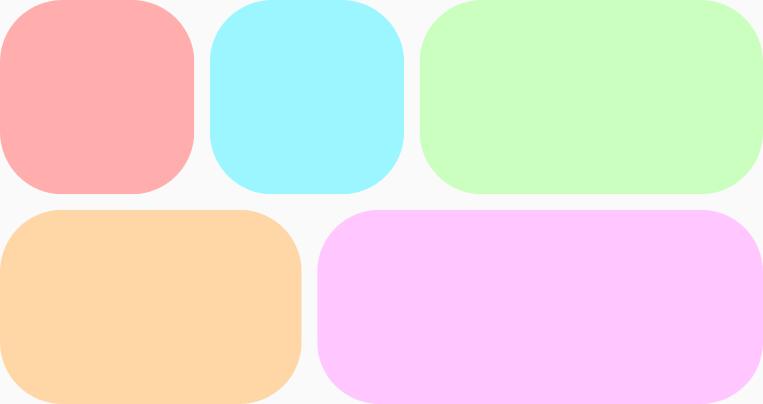
**Example 2** : `FlexBox` wraps five items onto two rows and grows them unequally
to fill the available space on each row. There is an `8.dp`
gap, both vertically and horizontally, between the items.
```kotlin
FlexBox(
config = {
wrap(FlexWrap.Wrap)
gap(8.dp)
}
) {
// All boxes have an intrinsic width of 100.dp
// Some grow to fill any remaining space on the row.
RedRoundedBox()
BlueRoundedBox()
GreenRoundedBox(modifier = Modifier.flex { grow(1.0f) })
OrangeRoundedBox(modifier = Modifier.flex { grow(1.0f) })
PinkRoundedBox(modifier = Modifier.flex { grow(1.0f) })
}
```
<br />
To learn more about `FlexBox` behavior, see [Set container behavior](https://developer.android.com/develop/ui/compose/layouts/adaptive/flexbox/container-behavior) and [Set
item behavior](https://developer.android.com/develop/ui/compose/layouts/adaptive/flexbox/item-behavior).Related skills
| Skill | Stars | Updated | Works with | Status | Install |
|---|---|---|---|---|---|
| brainstormingobra/superpowersYou MUST use this before any creative work - creating features, building components, adding functionality, modifying behavior, or planning anything new, in software or out of it (a talk, a business, a renovation). | Stars: 322k | Updated | Claude CodeCodex | Verified | Install |
| brand-guidelinesanthropics/skillsApplies Anthropic's official brand colors and typography to any sort of artifact that may benefit from having Anthropic's look-and-feel. Use it when brand colors or style guidelines, visual formatting, or company design standards apply. | Stars: 198k | Updated | Claude CodeCodex | Verified | Install |
| frontend-designanthropics/skillsGuidance for distinctive, intentional visual design when building new UI or reshaping an existing one. Helps with aesthetic direction, typography, and making choices that don't read as templated defaults. | Stars: 198k | Updated | Claude CodeCodex | Verified | Install |
| mcp-builderanthropics/skillsGuide for creating high-quality MCP (Model Context Protocol) servers that enable LLMs to interact with external services through well-designed tools. Use when building MCP servers to integrate external APIs or services, whether in Python (FastMCP) or Node/TypeScript (MCP SDK). | Stars: 198k | Updated | Claude CodeCodex | Verified | Install |