---
title: "Playground | Convex Developer Hub"
source: "https://docs.convex.dev/agents/playground"
author:
published:
created: 2025-12-29
description: "A simple way to test, debug, and develop with the agent"
tags:
- "clippings"
---
The Playground UI is a simple way to test, debug, and develop with the agent.
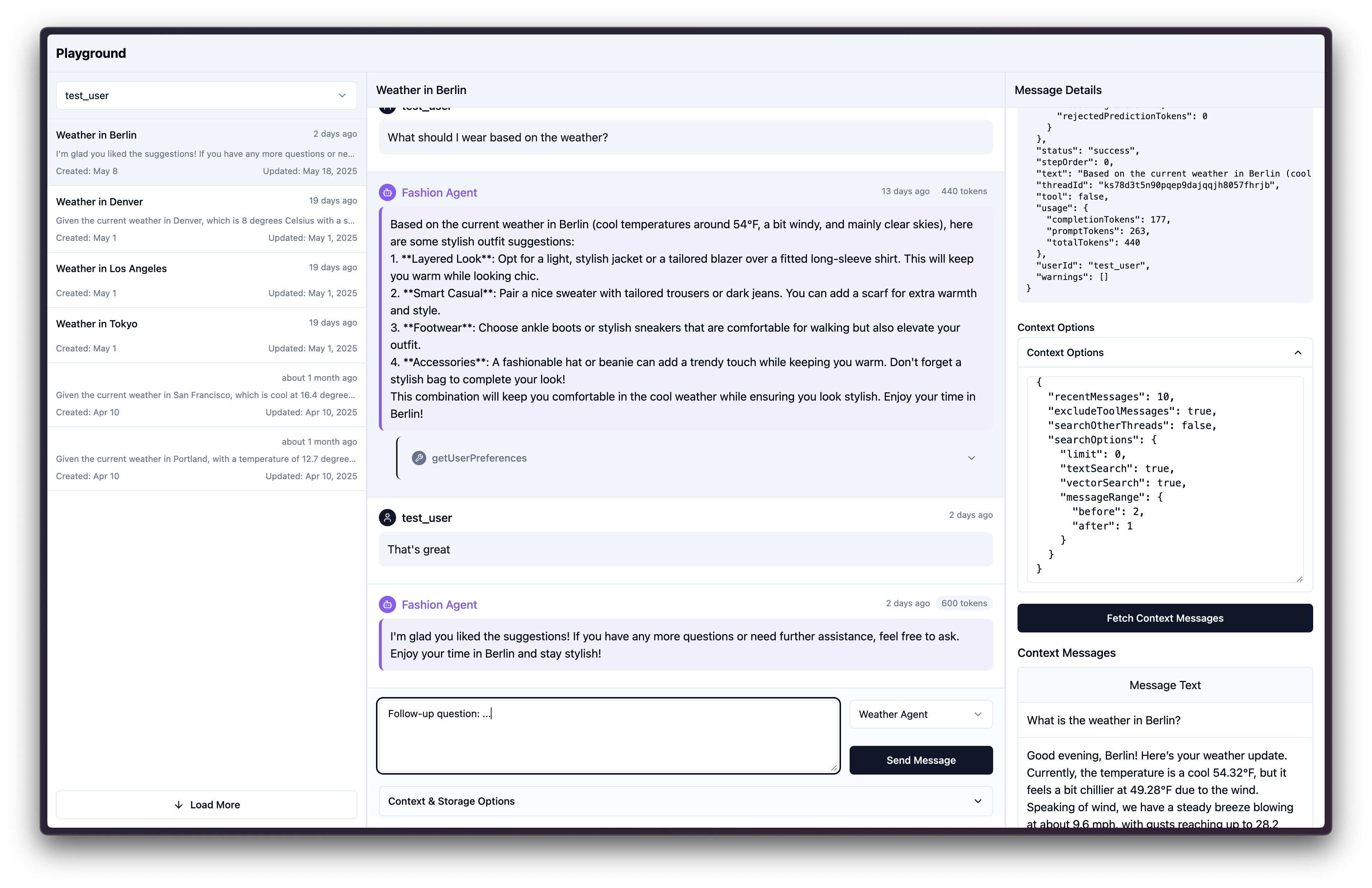
- Pick a user to list their threads.
- Browse the user's threads.
- List the selected thread's messages, along with tool call details.
- Show message metadata details.
- Experiment with contextual message lookup, adjusting context options.
- Send a message to the thread, with configurable saving options.
- It uses api keys to communicate securely with the backend.
There is also a [hosted version here](https://get-convex.github.io/agent/).
## Setup
**Note**: You must already have a Convex project set up with the Agent. See the [docs](https://docs.convex.dev/agents/getting-started) for setup instructions.
In your agent Convex project, make a file `convex/playground.ts` with:
```ts
import { definePlaygroundAPI } from "@convex-dev/agent";
import { components } from "./_generated/api";
import { weatherAgent, fashionAgent } from "./example";
/**
* Here we expose the API so the frontend can access it.
* Authorization is handled by passing up an apiKey that can be generated
* on the dashboard or via CLI via:
* npx convex run --component agent apiKeys:issue
*/
export const {
isApiKeyValid,
listAgents,
listUsers,
listThreads,
listMessages,
createThread,
generateText,
fetchPromptContext,
} = definePlaygroundAPI(components.agent, {
agents: [weatherAgent, fashionAgent],
});
```
From in your project's repo, issue yourself an API key:
```sh
npx convex run --component agent apiKeys:issue '{name:"..."}'
```
Note: to generate multiple keys, give a different name to each key. To revoke and reissue a key, pass the same name.
Then visit the [hosted version](https://get-convex.github.io/agent/).
It will ask for your Convex deployment URL, which can be found in `.env.local`. It will also ask for your API key that you generated above. If you used a different path for `convex/playground.ts` you can enter it. E.g. if you had `convex/foo/bar.ts` where you exported the playground API, you'd put in `foo/bar`.
## Running it locally
You can run the playground locally with:
```sh
npx @convex-dev/agent-playground
```
It uses the `VITE_CONVEX_URL` env variable, usually pulling it from.env.local.